mcp-kubernetes
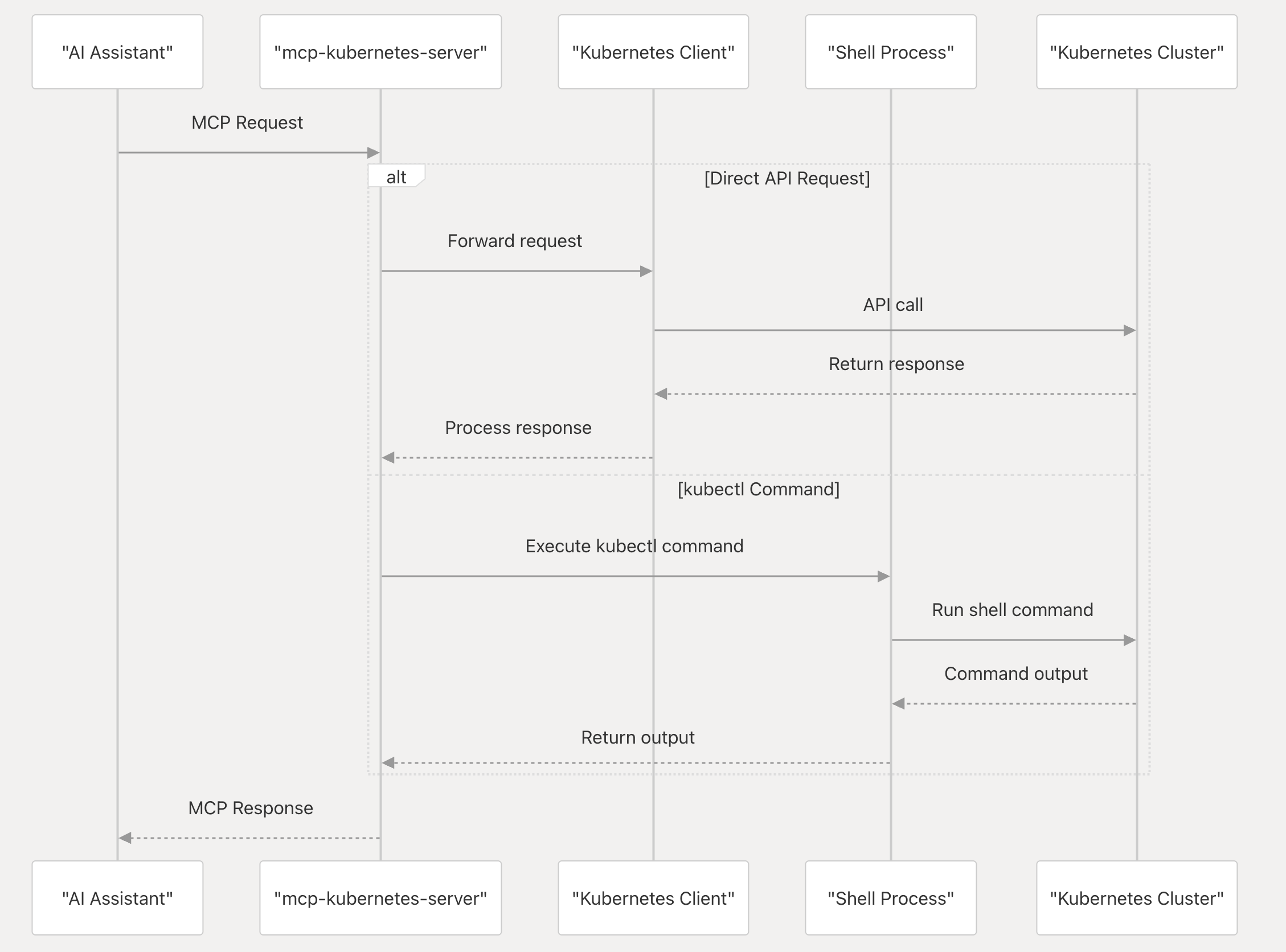
The mcp-kubernetes is a Model Context Protocol (MCP) server that enables AI assistants to interact with Kubernetes clusters. It serves as a bridge between AI tools (like Claude, Cursor, and GitHub Copilot) and Kubernetes, translating natural language requests into Kubernetes operations and returning the results in a format the AI tools can understand.
It allows AI tools to:
- Query Kubernetes resources
- Execute kubectl commands
- Manage Kubernetes clusters through natural language interactions
- Diagnose and interpret the states of Kubernetes resources
How it works
How to install
Container images are no longer produced or supported. Install a released binary locally and configure your MCP client to run it as a stdio subprocess.
Local
Install kubectl
Install kubectl if it's not installed yet and add it to your PATH, e.g.
# For Linux
curl -LO "https://dl.k8s.io/release/$(curl -L -s https://dl.k8s.io/release/stable.txt)/bin/linux/amd64/kubectl"

# For MacOS
curl -LO "https://dl.k8s.io/release/$(curl -L -s https://dl.k8s.io/release/stable.txt)/bin/darwin/arm64/kubectl"
Install helm
Install helm if it's not installed yet and add it to your PATH, e.g.
curl -sSL https://raw.githubusercontent.com/helm/helm/main/scripts/get-helm-3 | bash
Config your MCP servers in Claude Desktop, Cursor, ChatGPT Copilot, Github Copilot and other supported AI clients, e.g.
{
  "mcpServers": {
    "kubernetes": {
      "command": "<path of binary 'mcp-kubernetes'>",
      "args": ["--transport", "stdio"],
      "env": {
        "KUBECONFIG": "<your-kubeconfig-path>"
      }
    }
  }
}
Options
Environment variables:
KUBECONFIG: Path to your kubeconfig file, e.g. /home/<username>/.kube/config.USE_LEGACY_TOOLS: Set to true to use multiple specialized kubectl tools instead of the unified call_kubectl tool (default: false).
Command line arguments:
Usage of ./mcp-kubernetes:
      --access-level string       Access level (readonly, readwrite, or admin) (default "readonly")
      --additional-tools string   Comma-separated list of additional tools to support (kubectl is always enabled). Available: helm,cilium,hubble
      --allow-namespaces string   Comma-separated list of namespaces to allow (empty means all allowed)
      --otlp-endpoint string      OTLP endpoint for OpenTelemetry traces (e.g. localhost:4317, default "")
      --timeout int               Timeout for command execution in seconds, default is 60s (default 60)
      --transport string          Transport mechanism to use (stdio only) (default "stdio")
By default, mcp-kubernetes uses a single unified call_kubectl tool that consolidates all kubectl operations into one tool interface. This significantly reduces context consumption while maintaining full functionality.
To use the legacy mode with multiple specialized tools (6-7 separate tools), set the environment variable:
{
  "mcpServers": {
    "kubernetes": {
      "command": "mcp-kubernetes",
      "env": {
        "USE_LEGACY_TOOLS": "true"
      }
    }
  }
}
Access Levels
The --access-level flag controls what operations are allowed:
readonly (default): Only read operations are allowed (get, describe, logs, etc.)readwrite: Read and write operations are allowed (create, delete, apply, etc.)admin: All operations are allowed, including admin operations (cordon, drain, taint, etc.)
Tools and operations are filtered at registration time based on the access level, so AI assistants only see operations they can actually use.
Example configurations:
// Read-only access (default)
{
  "mcpServers": {
    "kubernetes": {
      "command": "mcp-kubernetes"
    }
  }
}

// Read-write access
{
  "mcpServers": {
    "kubernetes": {
      "command": "mcp-kubernetes",
      "args": ["--access-level", "readwrite"]
    }
  }
}

// Admin access
{
  "mcpServers": {
    "kubernetes": {
      "command": "mcp-kubernetes",
      "args": ["--access-level", "admin"]
    }
  }
}
Usage
Ask any questions about Kubernetes cluster in your AI client. The MCP tools make it easier for AI assistants to understand and use kubectl operations.
Example Queries
What is the status of my Kubernetes cluster?

What is wrong with my nginx pod?

Show me all deployments in the production namespace

Scale my web deployment to 5 replicas

Check if I have permission to create pods

What is my current kubectl context?

List all available kubectl contexts

Switch to the production context
By default, mcp-kubernetes uses a single unified call_kubectl tool that handles all kubectl operations. This approach significantly reduces context consumption compared to the legacy multi-tool approach.
call_kubectl - Execute kubectl commands
When USE_LEGACY_TOOLS=true, the mcp-kubernetes server provides multiple specialized kubectl tools that group related operations together. Tools are automatically filtered based on your access level.
kubectl_resources - Manage Kubernetes resources
Available in: readonly, readwrite, admin
Handles CRUD operations on Kubernetes resources and node management. In readonly mode, only supports get and describe operations. Node operations (cordon, uncordon, drain, taint) are available in admin mode only.
Parameters:
operation: The operation to perform (get, describe, create, delete, apply, patch, replace, cordon, uncordon, drain, taint)resource: The resource type (e.g., pods, deployments, services, nodes) or empty for file-based operationsargs: Additional arguments like resource names, namespaces, and flags
Examples:
# Get all pods
operation: "get"
resource: "pods"
args: "--all-namespaces"

# Apply a configuration
operation: "apply"
resource: ""
args: "-f deployment.yaml"

# Drain a node (admin only)
operation: "drain"
resource: "node"
args: "worker-1 --ignore-daemonsets"

# Add a taint (admin only)
operation: "taint"
resource: "nodes"
args: "worker-1 key=value:NoSchedule"
kubectl_workloads - Manage workload deployments
Available in: readwrite, admin
Manages deployment lifecycle operations including scaling and rollouts.
Parameters:
operation: The operation to perform (run, expose, scale, autoscale, rollout)resource: For rollout operations, the subcommand (status, history, undo, restart, pause, resume)args: Additional arguments
Examples:
# Scale a deployment
operation: "scale"
resource: "deployment"
args: "nginx --replicas=3"

# Check rollout status
operation: "rollout"
resource: "status"
args: "deployment/nginx"
kubectl_metadata - Manage resource metadata
Available in: readwrite, admin
Updates labels, annotations, and other metadata on resources.
Parameters:
operation: The operation to perform (label, annotate, set)resource: The resource typeargs: Resource name and metadata changes
Examples:
# Add a label
operation: "label"
resource: "pods"
args: "nginx-pod app=web"

# Set image
operation: "set"
resource: "image"
args: "deployment/nginx nginx=nginx:latest"
kubectl_diagnostics - Debug and monitor resources
Available in: readonly, readwrite, admin
Provides debugging and monitoring capabilities.
Parameters:
operation: The operation to perform (logs, events, top, exec, cp)resource: The resource type or specific resourceargs: Additional arguments
Examples:
# View logs
operation: "logs"
resource: ""
args: "nginx-pod -f"

# Execute command in pod
operation: "exec"
resource: ""
args: "nginx-pod -- ls /app"
kubectl_cluster - View cluster information
Available in: readonly, readwrite, admin
Provides cluster-level information and API discovery.
Parameters:
operation: The operation to perform (cluster-info, api-resources, api-versions, explain)resource: For explain operation, the resource to documentargs: Additional flags
Examples:
# Get cluster info
operation: "cluster-info"
resource: ""
args: ""

# Explain pod spec
operation: "explain"
resource: "pod.spec"
args: "--recursive"
kubectl_config - Configuration and security
Available in: readonly, readwrite, admin
Handles configuration validation, security operations, and kubectl context management. In readonly mode, supports diff, auth can-i, and read-only config operations.
Parameters:
operation: The operation to perform (diff, auth, certificate, config)resource: Subcommand for auth/certificate/config operationsargs: Operation-specific arguments
Examples:
# Check permissions
operation: "auth"
resource: "can-i"
args: "create pods"

# Approve certificate
operation: "certificate"
resource: "approve"
args: "csr-name"

# Get current context
operation: "config"
resource: "current-context"
args: ""

# List all contexts
operation: "config"
resource: "get-contexts"
args: ""

# Switch context (readwrite/admin only)
operation: "config"
resource: "use-context"
args: "my-cluster-context"
Config Operations:
current-context: Display the current context (readonly, readwrite, admin)get-contexts: List all available contexts (readonly, readwrite, admin)use-context: Switch to a different context (readwrite, admin only)
call_helm - Helm package manager
Available when: --additional-tools=helm is specified
Run Helm commands for managing Kubernetes applications.
Parameters:
command: The helm command to execute
Example:
command: "list --all-namespaces"
call_cilium - Cilium CNI commands
Available when: --additional-tools=cilium is specified
Run Cilium commands for network policies and observability.
Parameters:
command: The cilium command to execute
Example:
command: "status"
call_hubble - Hubble observability commands
Available when: --additional-tools=hubble is specified
Run Hubble commands for network monitoring and debugging in Cilium-enabled clusters.
Parameters:
command: The hubble command to execute
Example:
command: "status"
command: "observe observe --namespace backend-jobs  --from-label 'app=web'"
command: "list nodes"
Telemetry
Telemetry collection is on by default.
To opt out, set the environment variable KUBERNETES_MCP_COLLECT_TELEMETRY=false.
OpenTelemetry Support
The mcp-kubernetes server supports exporting telemetry data using OpenTelemetry Protocol (OTLP). You can configure an OTLP endpoint to send traces to any OpenTelemetry-compatible backend:
{
  "mcpServers": {
    "kubernetes": {
      "command": "mcp-kubernetes",
      "args": ["--otlp-endpoint", "localhost:4317"]
    }
  }
}
Development
How to inspect MCP server requests and responses:
npx @modelcontextprotocol/inspector <path of binary 'mcp-kubernetes'>
Contributing
This project welcomes contributions and suggestions. Most contributions require you to agree to a Contributor License Agreement (CLA) declaring that you have the right to, and actually do, grant us the rights to use your contribution. For details, visit https://cla.opensource.microsoft.com.
When you submit a pull request, a CLA bot will automatically determine whether you need to provide a CLA and decorate the PR appropriately (e.g., status check, comment). Simply follow the instructions provided by the bot. You will only need to do this once across all repos using our CLA.
This project has adopted the Microsoft Open Source Code of Conduct. For more information see the Code of Conduct FAQ or contact [email protected] with any additional questions or comments.
Trademarks
This project may contain trademarks or logos for projects, products, or services. Authorized use of Microsoft trademarks or logos is subject to and must follow Microsoft's Trademark & Brand Guidelines. Use of Microsoft trademarks or logos in modified versions of this project must not cause confusion or imply Microsoft sponsorship. Any use of third-party trademarks or logos are subject to those third-party's policies.