Basecamp MCP Server


An MCP server for Basecamp 3. It lets MCP-capable clients such as Codex, Cursor, and Claude Desktop read and manage Basecamp projects through OAuth-authenticated Basecamp API calls.
The main server is basecamp_fastmcp.py. It uses the official mcp.server.fastmcp Python SDK and exposes 79 tools covering projects, todos, message boards, campfires, card tables, inbox forwards, documents, uploads, comments, events, webhooks, and search.
What It Can Do
- Browse Basecamp projects and project details.
- Search across projects, todos, messages, campfire lines, comments, uploads, and schedules.
- Read and manage todolists, todos, todo groups, and completion state.
- Read and create message board messages, including drafts and categories.
- Read campfire lines.
- Read and create comments.
- Work with card tables, columns, cards, and card steps.
- Read inbox forwards and replies.
- Read daily check-ins and answers.
- Upload attachments and inspect uploads.
- Read and manage documents, including drafts.
- List events and manage webhooks.
- Generate local MCP configuration for Codex, Cursor, and Claude Desktop.
Requirements
If your system Python is older, use uv; it can create a virtual environment with a newer Python version.
Quick Start
Clone the repository and install dependencies:
git clone https://github.com/georgeantonopoulos/Basecamp-MCP-Server.git
cd Basecamp-MCP-Server

uv venv --python 3.12 venv
source venv/bin/activate
uv pip install -r requirements.txt
Or, if python already points to Python 3.10 or newer:
python setup.py
Create a .env file from the example and fill in your Basecamp OAuth details:
cp .env.example .env
Required values:
BASECAMP_CLIENT_ID=your-client-id
BASECAMP_CLIENT_SECRET=your-client-secret
BASECAMP_ACCOUNT_ID=your-account-id
USER_AGENT="Your App Name ([email protected])"
Authenticate with Basecamp:
python oauth_app.py
Open http://localhost:8000 and complete the OAuth flow. The token is stored locally in oauth_tokens.json by default.
Codex
python generate_codex_config.py
codex mcp get basecamp
Useful options:
python generate_codex_config.py --dry-run
python generate_codex_config.py --legacy
The script writes a basecamp server entry to ~/.codex/config.toml and points it at this checkout's virtual environment and basecamp_fastmcp.py.
Cursor
python generate_cursor_config.py
Then restart Cursor and check Settings -> MCP. The server should appear as basecamp.
Claude Desktop
python generate_claude_desktop_config.py
Then fully quit and reopen Claude Desktop. The generated config is written to:
- macOS:
~/Library/Application Support/Claude/claude_desktop_config.json
- Windows:
~/AppData/Roaming/Claude/claude_desktop_config.json
- Linux:
~/.config/claude-desktop/claude_desktop_config.json
Verify The Server
Run the FastMCP server through stdio and ask for its tool list:
printf '%s\n%s\n%s\n' \
  '{"jsonrpc":"2.0","id":1,"method":"initialize","params":{"protocolVersion":"2025-06-18","capabilities":{},"clientInfo":{"name":"test","version":"1.0"}}}' \
  '{"jsonrpc":"2.0","method":"notifications/initialized","params":{}}' \
  '{"jsonrpc":"2.0","id":2,"method":"tools/list","params":{}}' \
  | python basecamp_fastmcp.py
Run the automated tests:
python -m pytest tests/ -v
The FastMCP server exposes 82 tools.
Projects And Search
get_projectsget_projectsearch_basecampglobal_search
Reports
get_assignable_people — all people who can have to-dos assigned to them
(GET /reports/todos/assigned.json)get_person_assignments — all active, pending to-dos assigned to one
person across all projects (GET /reports/todos/assigned/{id}.json,
optional group_by: bucket|date). Prefer this over iterating projects
when you need everything assigned to a single person.get_overdue_todos — all overdue to-dos across all projects, grouped by
lateness (GET /reports/todos/overdue.json)
Todos
get_todolistsget_todolistcreate_todolistupdate_todolisttrash_todolistget_todosget_todocreate_todoupdate_tododelete_todoarchive_todocomplete_todouncomplete_todoreposition_todoget_todolist_groupscreate_todolist_groupreposition_todolist_group
Messages, Campfires, And Check-Ins
get_message_boardget_messagesget_messageget_message_categoriescreate_messagecreate_draft_message
Pass publish: false to create_message to create a draft message instead
of posting it immediately. Agents can also call create_draft_message directly
when the intended operation is specifically to create a draft.
get_campfire_linesget_daily_check_insget_question_answers
get_commentscreate_comment
Card Tables
get_card_tablesget_card_tableget_columnsget_columncreate_columnupdate_columnmove_columnupdate_column_colorput_column_on_holdremove_column_holdwatch_columnunwatch_columnget_cardsget_cardcreate_cardupdate_cardmove_cardcomplete_carduncomplete_cardget_card_stepscreate_card_stepget_card_stepupdate_card_stepdelete_card_stepcomplete_card_stepuncomplete_card_step
Inbox Forwards
get_inboxget_forwardsget_forwardget_inbox_repliesget_inbox_replytrash_forward
Documents, Uploads, Attachments, Events, And Webhooks
create_attachmentget_uploadsget_uploaddownload_upload — download a vault Upload recording (Docs & Files) and
return its bytes as MCP content (ImageContent for image MIME types,
EmbeddedResource / BlobResourceContents otherwise). The MCP host
forwards the blob to the model, so PDFs, images, and documents are read
natively without an out-of-band fetch.download_attachment — download an inline comment/message attachment by its
content_attachments[].download_url and return it as MCP content. Use this
for files embedded into a comment or message body. Inline attachments are
Attachment objects with their own IDs and cannot be resolved through
/uploads/{id} — that endpoint returns 404. For files that are their own
Upload recording in a vault, use download_upload instead.
Host compatibility for download_upload and download_attachment.
Both tools return MCP content blocks. The file is only readable by the
model if the MCP host forwards ImageContent / EmbeddedResource
(BlobResourceContents) on. Status as of June 2026:
- Claude Code (CLI) — fully supported, including
application/pdf
and other binary blob resources.
- Claude Desktop / claude.ai web — image content blocks work, but
non-image
EmbeddedResource blocks are rejected with "Resources of type 'application/pdf' are not currently supported". The bytes reach
the host but never the model. Once the client adds support, these
tools become useful in those frontends without server changes.
get_documentsget_documentcreate_documentcreate_draft_document
Pass publish: false to create_document to create a draft document instead
of publishing it immediately. Agents can also call create_draft_document
directly when the intended operation is specifically to create a draft.
update_documenttrash_documentget_eventsget_webhookscreate_webhookdelete_webhook
Example Prompts
- "Show me all my Basecamp projects."
- "Search Basecamp for deadline."
- "Get the todolists for project 123456."
- "Create a todo called Review PR in todolist 987654."
- "Show me the message board categories for project 123456."
- "Post an Announcement to the project message board."
- "Show me the card table columns for project 123456."
- "Move this card to the Done column."
- "List the latest uploads in this project's vault."
- "Download the screenshot attached to that comment so you can read it."
Architecture
Authentication And Token Storage
The recommended path is OAuth 2.0:
- Create a Basecamp OAuth app.
- Put the client ID, client secret, account ID, redirect URI, and user agent in
.env.
- Run
python oauth_app.py.
- Complete the browser flow at http://localhost:8000.
By default, OAuth tokens are stored in <project>/oauth_tokens.json. For containers, read-only checkouts, or mounted token volumes, set BASECAMP_MCP_TOKEN_FILE:
export BASECAMP_MCP_TOKEN_FILE=/var/lib/basecamp-mcp/oauth_tokens.json
Both the OAuth app and the MCP server read the same variable. token_storage.py expands ~ and environment variables in this path, creates the parent directory if needed, and attempts to set the token file permissions to 0o600 when writing. Parent directory permissions are still your responsibility.
The built-in OAuth web server omits query strings from its access log so callback authorization codes are not recorded. If you run it behind another web server or reverse proxy, configure that server's access logs to omit query strings too.
Troubleshooting
If tools do not appear in your MCP client:
Confirm the virtual environment exists and has the MCP SDK:
./venv/bin/python -c "import mcp; print('MCP available')"
Confirm .env contains BASECAMP_ACCOUNT_ID.
Re-run the relevant config generator.
Fully quit and restart your MCP client.
If authentication fails:
python oauth_app.py
Then open http://localhost:8000 and complete the Basecamp OAuth flow again.
For Claude Desktop on macOS, MCP logs are usually under:
~/Library/Logs/Claude/
Security Notes
- Do not commit
.env or oauth_tokens.json.
- Use a descriptive
USER_AGENT that includes contact information, as Basecamp expects API clients to identify themselves.
- Keep token files on local or appropriately permissioned storage.
- This server is designed for local MCP client use. Review the code and deployment model before exposing it on a network.
License
MIT. See LICENSE.
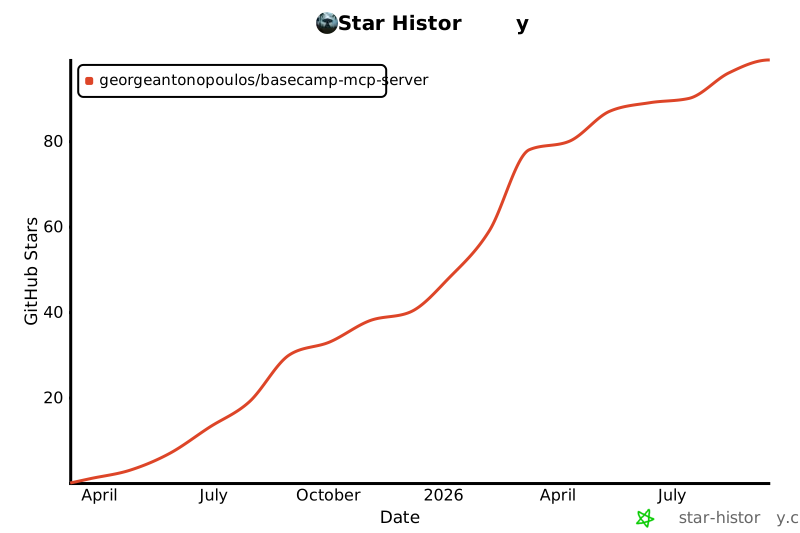
Star History