CentralMind Gateway: Create API or MCP Server in Minutes
🚀 Interactive Demo avialable here: https://centralmind.ai
What is Centralmind/Gateway
Simple way to expose your database to AI-Agent via MCP or OpenAPI 3.1 protocols.
docker run --platform linux/amd64 -p 9090:9090 \
  ghcr.io/centralmind/gateway:v0.2.18 start \
  --connection-string "postgres://db-user:db-password@db-host/db-name?sslmode=require"
This will run for you an API:
INFO Gateway server started successfully!
INFO MCP SSE server for AI agents is running at: http://localhost:9090/sse
INFO REST API with Swagger UI is available at: http://localhost:9090/
Which you can use inside your AI Agent:
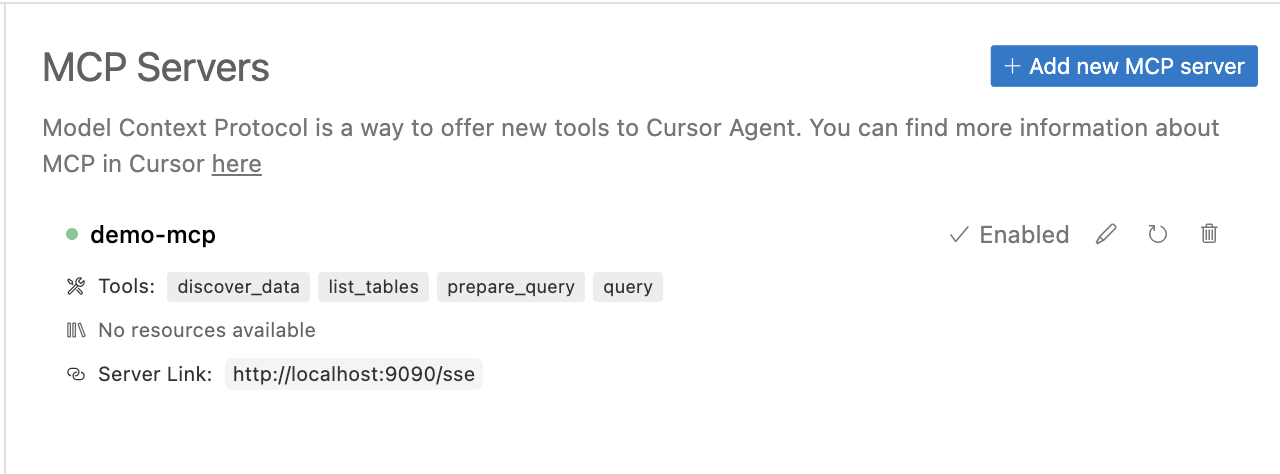
Gateway will generate AI optimized API.
Why Centralmind/Gateway
AI agents and LLM-powered applications need fast, secure access to data. We're building an API layer that automatically generates secure, LLM-optimized APIs for your structured data.
- Quickly start with MCP or OpenAPI, or use Direct/Raw SQL APIs
- Filters out PII and sensitive data to ensure compliance with GDPR, CPRA, SOC 2, and other regulations
- Adds traceability and auditing capabilities, ensuring AI applications aren't black boxes and allowing security teams to maintain control
- Optimized for AI workloads: supports the Model Context Protocol (MCP) with enhanced metadata to help AI agents understand APIs, along with built-in caching and security features
It can be useful during development, when an LLM needs to create, adjust, or query data from your database.
In analytical scenarios, it enables you to chat with your database or data warehouse.
Enrich your AI agents with data from your database using remote function/tool calling.
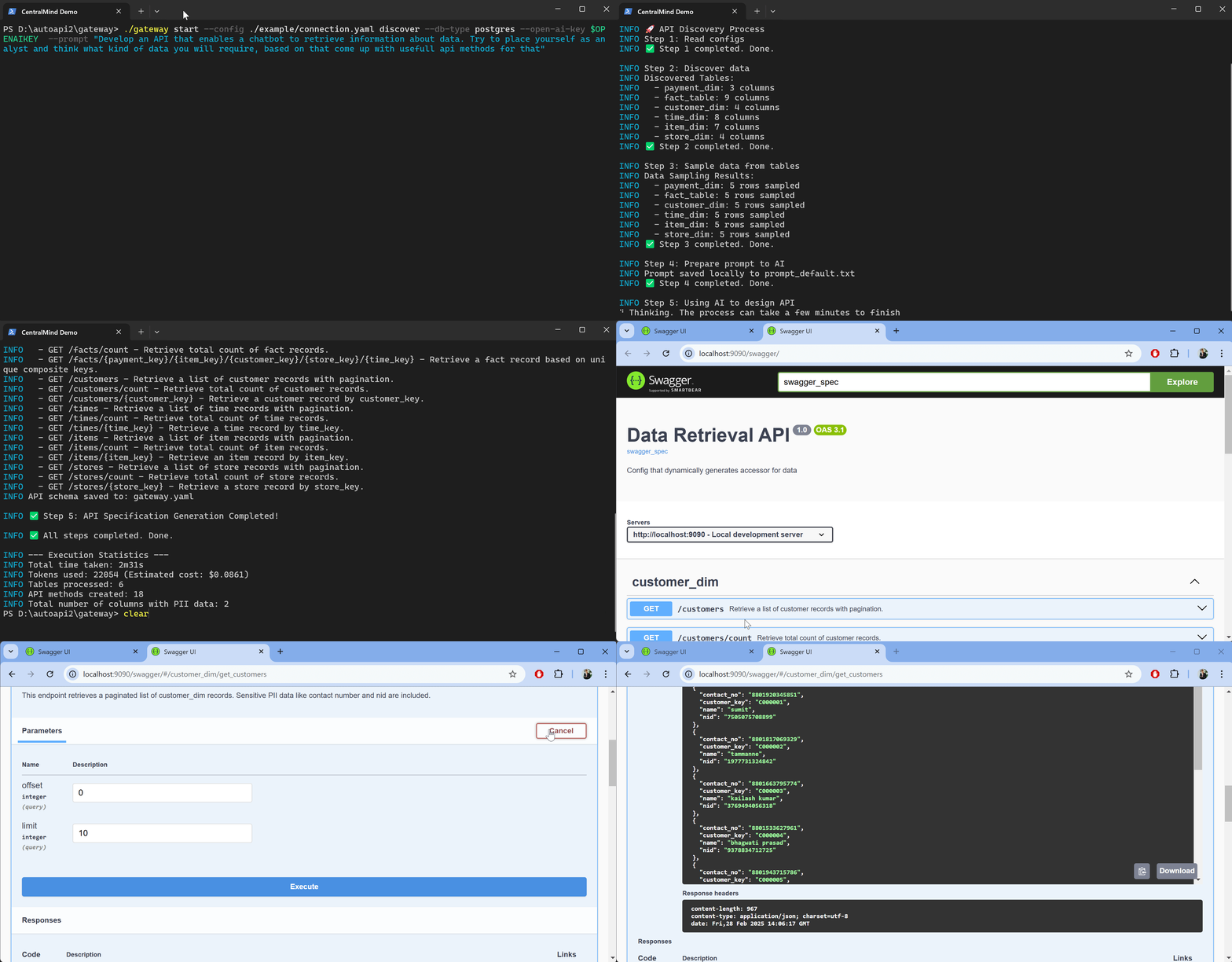
Features
- ⚡ Automatic API Generation – Creates APIs automatically using LLM based on table schema and sampled data
- 🗄️ Structured Database Support – Supports PostgreSQL, MySQL, ClickHouse, Snowflake, MSSQL, BigQuery, Oracle Database, SQLite, ElasticSearch
- 🌍 Multiple Protocol Support – Provides APIs as REST or MCP Server including SSE mode
- 🔐 Authentication Options – Built-in support for API keys and OAuth
- 🔒 PII Protection – Implements regex plugin or Microsoft Presidio plugin for PII and sensitive data redaction
- 👀 Comprehensive Monitoring – Integration with OpenTelemetry (OTel) for request tracking and audit trails
- 📦 Local & On-Premises – Support for self-hosted LLMs through configurable AI endpoints and models
- 🤖 Multiple AI Providers Support - Support for OpenAI, Anthropic, Amazon Bedrock, Google Gemini & Google VertexAI
- ⚡ Flexible Configuration – Easily extensible via YAML configuration and plugin system
- 📜 API Documentation – Auto-generated Swagger documentation and OpenAPI 3.1.0 specification
- 🔑 Row-Level Security (RLS) – Fine-grained data access control using Lua scripts
- 🏎️ Performance Optimization – Implements time-based and LRU caching strategies
How it Works
1. Connect & Discover
Gateway connects to your structured databases like PostgreSQL and automatically analyzes the schema and data samples
to generate an optimized API structure based on your prompt. LLM is used only on discovery stage to produce API configuration.
The tool uses AI Providers to generate the API configuration while ensuring security
through PII detection.
2. Deploy
Gateway supports multiple deployment options from standalone binary, docker or Kubernetes.
Check our launching guide for detailed
instructions. The system uses YAML configuration and plugins for easy customization.
3. Use & Integrate
Access your data through REST APIs or Model Context Protocol (MCP) with built-in security features.
Gateway seamlessly integrates with AI models and applications like LangChain,
OpenAI and
Claude Desktop using function calling
or Cursor through MCP. You can also setup telemetry to local or remote destination in otel format.
Documentation
Getting Started
Additional Resources
How to Build
# Clone the repository
git clone https://github.com/centralmind/gateway.git

# Navigate to project directory
cd gateway

# Install dependencies
go mod download

# Build the project
go build .
API Generation
Gateway uses LLM models to generate your API configuration. Follow these steps:
Choose one of our supported AI providers:
Google Gemini provides a generous free tier. You can obtain an API key by visiting Google AI Studio:
Once logged in, you can create an API key in the API section of AI Studio. The free tier includes a generous monthly token allocation, making it accessible for development and testing purposes.
Configure AI provider authorization. For Google Gemini, set an API key.
export GEMINI_API_KEY='yourkey'
- Run the discovery command:
./gateway discover \
  --ai-provider gemini \
  --connection-string "postgresql://neondb_owner:MY_PASSWORD@MY_HOST.neon.tech/neondb?sslmode=require" \
  --prompt "Generate for me awesome readonly API"
- Enjoy the generation process:
INFO 🚀 API Discovery Process
INFO Step 1: Read configs
INFO ✅ Step 1 completed. Done.

INFO Step 2: Discover data
INFO Discovered Tables:
INFO   - payment_dim: 3 columns, 39 rows
INFO   - fact_table: 9 columns, 1000000 rows
INFO ✅ Step 2 completed. Done.

# Additional steps and output...

INFO ✅ All steps completed. Done.

INFO --- Execution Statistics ---
INFO Total time taken: 1m10s
INFO Tokens used: 16543 (Estimated cost: $0.0616)
INFO Tables processed: 6
INFO API methods created: 18
INFO Total number of columns with PII data: 2
- Review the generated configuration in
gateway.yaml:
api:
  name: Awesome Readonly API
  description: ''
  version: '1.0'
database:
  type: postgres
  connection: YOUR_CONNECTION_INFO
  tables:
    - name: payment_dim
      columns: # Table columns
      endpoints:
        - http_method: GET
          http_path: /some_path
          mcp_method: some_method
          summary: Some readable summary
          description: 'Some description'
          query: SQL Query with params
          params: # Query parameters
Running the API
Run locally
./gateway start --config gateway.yaml
Docker Compose
docker compose -f ./example/simple/docker-compose.yml up
MCP Protocol Integration
Gateway implements the MCP protocol for seamless integration with Claude and other tools. For detailed setup instructions, see our Claude integration guide.
To add MCP Tool to Claude Desktop just adjust Claude's config :
{
  "mcpServers": {
    "gateway": {
      "command": "PATH_TO_GATEWAY_BINARY",
      "args": ["start", "--config", "PATH_TO_GATEWAY_YAML_CONFIG", "mcp-stdio"]
    }
  }
}
Roadmap
It is always subject to change, and the roadmap will highly depend on user feedback. At this moment,
we are planning the following features:
Database and Connectivity
- 🗄️ Extended Database Integrations - Databricks, Redshift, S3 (Iceberg and Parquet), Oracle DB, Microsoft SQL Server, Elasticsearch
- 🔑 SSH tunneling - ability to use jumphost or ssh bastion to tunnel connections
Enhanced Functionality
- 🔍 Advanced Query Capabilities - Complex filtering syntax and Aggregation functions as parameters
- 🔐 Enhanced MCP Security - API key and OAuth authentication
- 📦 Schema Management - Automated schema evolution and API versioning
- 🚦 Advanced Traffic Management - Intelligent rate limiting, Request throttling
- ✍️ Write Operations Support - Insert, Update operations
Database Gateway in MCP Registries









