MCP for Unity

by CoplayDev

A Python server that acts as a bridge between Unity Editor and MCP Clients, enabling AI assistants to control Unity via natural language. Requires Python 3.10+ installed. The server is installed automatically by the Unity package on first run or can be set up manually.

Developer toolsstdioCommunity

Repository-wide counts · Cached 2025-11-09

Overview

The MCP for Unity MCP server is a publicly available project. Review the upstream repository for installation instructions, supported tools, compatibility, permissions, and current maintenance status.

Configuration

Configuration, transport, authentication, and runtime requirements vary by project. Open the repository before connecting and use the smallest set of credentials and permissions required.

Open the MCP for Unity repository to read the latest documentation.

KEEP EXPLORING

Compare source, connection, and authentication details before choosing an implementation.

View the complete category

模型上下文协议服务器

modelcontextprotocol

Community

一组用于模型上下文协议(MCP)的参考实现,展示了对大型语言模型(LLM)工具和数据源的安全且受控的访问方式。

Context7 Platform - Up-to-date Code Docs For Any Prompt

upstash

Community

Context7 MCP server providing up-to-date, version-specific documentation and code examples for libraries, enabling coding agents to fetch accurate docs and code snippets. Requires an API key for higher rate limits, passed via CONTEXT7_API_KEY header.

Playwright MCP

Microsoft Corporation

Community

A Model Context Protocol (MCP) server that provides browser automation capabilities using Playwright. Enables LLMs to interact with web pages through structured accessibility snapshots, bypassing the need for screenshots or visually-tuned models.

AIHawk

feder-cr

Community

AIHawk is an anti detect browser and web browsing agent, open source, with an MCP server for coding agents: undetected, no captchas, no blocks. It requires an OpenRouter API key for the standalone web UI mode, which can be provided via the --openrouter-key flag or the OPENROUTER_API_KEY environment variable or a .env file in the running directory.

FROM THE SOURCE

Repository README

Build-time snapshot · Retrieved 2026-10-05

View original

MCP for Unity

English ↔ 简体中文    |    Discord ↔ Wiki

Proudly sponsored and maintained by Aura — the AI assistant for Unreal & Unity.
And don't miss Godot AI, the new open source project from the makers of MCP for Unity.

Create your Unity apps with LLMs. MCP for Unity bridges AI assistants — Claude, Codex, VS Code, local LLMs, and more — with your Unity Editor via Model Context Protocol. Give your LLM the tools to manage assets, control scenes, edit scripts, run tests, and automate your game dev workflows.
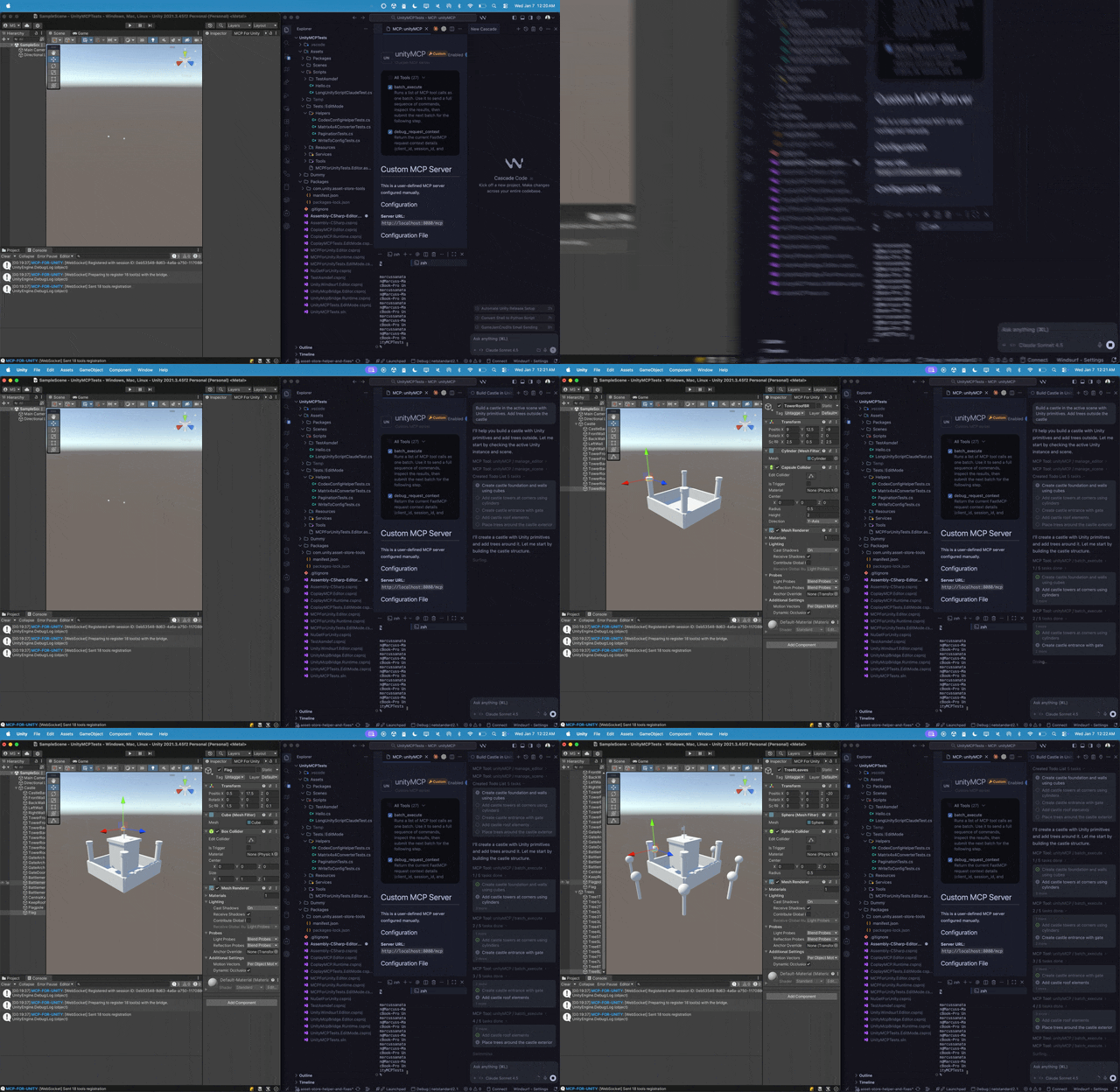
MCP for Unity building a scene


Recent Updates

Full history: Release Notes.


What it does

Control the Unity Editor in natural language from any MCP client — create scenes & GameObjects, edit C# scripts, manage assets, run tests, profile, and build. 48 focused MCP tool entrypoints, any client, free & MIT.

Browse the full tool catalog →


Quickstart

Requirements: Unity 2021.3 LTS → 6.x · Python 3.10+ (via uv). Works with any MCP client — Claude Desktop & Code, Cursor, VS Code, Windsurf, Cline, Gemini CLI, and more.

  1. Install — Unity → Package Manager → Add from git URL: https://github.com/CoplayDev/unity-mcp.git?path=/MCPForUnity#main  (pin #v10.0.0 for this release, or openupm add com.coplaydev.unity-mcp)
  2. Configure — Window → MCP for Unity → Configure All Detected Clients.
  3. Prompt — "Create a cube at the origin and add a Rigidbody." The cube appears in seconds.

Community

  • Discord — chat with maintainers and other contributors
  • Issues — bugs and feature requests
  • Discussions — design ideas and broader questions
  • Security: see SECURITY.md for private reporting

Contributing

See CONTRIBUTING.md. Branch off beta, not main. The full dev setup, testing, and release process live in the Contributing docs.

Advanced

Star History
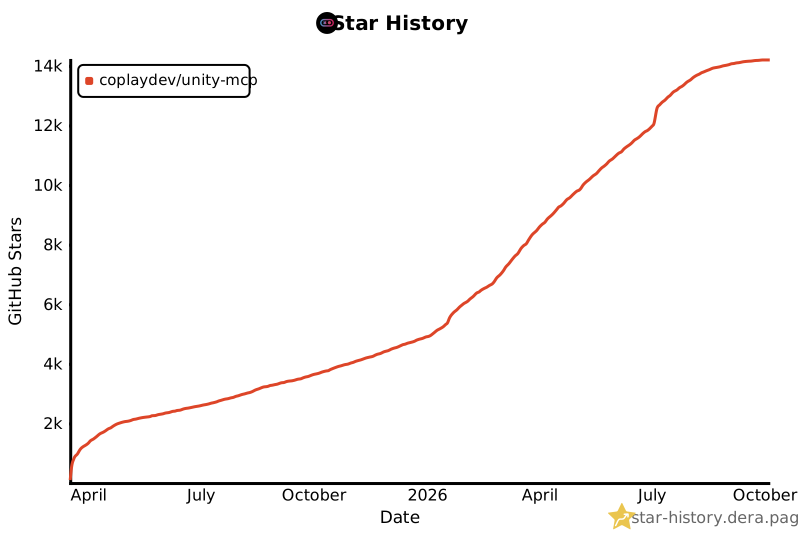
Star History Chart

Citation

If MCP for Unity helped your research, please cite it.

@inproceedings{wu2025mcpunity,
  author    = {Wu, Shutong and Barnett, Justin P.},
  title     = {{MCP-Unity}: {Protocol-Driven} Framework for Interactive {3D} Authoring},
  year      = {2025},
  isbn      = {9798400721366},
  publisher = {Association for Computing Machinery},
  address   = {New York, NY, USA},
  url       = {https://doi.org/10.1145/3757376.3771417},
  doi       = {10.1145/3757376.3771417},
  series    = {SA Technical Communications '25}
}

Unity AI Tools by Aura

Aura offers 2 AI tools for Unity:

  • MCP for Unity is available freely under the MIT license.
  • Aura for Unity is a premium Unity/Unreal AI assistant built for game devs.

Disclaimer

This project is a free and open-source tool for the Unity Editor, and is not affiliated with Unity Technologies.


License: MIT — see LICENSE.