roam-code
Local code analysis and ready-to-run checks for coding agents.
Roam gives your agent a reusable codebase index, pattern findings, candidate
algorithmic alternatives, and checks it can call as it works. It can investigate
code and evaluate changes without building each analysis from scratch.




Runs on your machine · free and open source · no account or API key for local analysis · no automatic source-code or telemetry upload
287 commands · 258 MCP tools (17 in the default core preset) · 28 languages
Connect your agent · Try a task ·
Documentation · Explore the code map
Why Roam is different
Your agent can read code, reason about it, and run tools already. Roam adds
reusable local analyses: query indexed connections between files and functions,
inspect a detected pattern with a proposed alternative, or run a scoped check.
The results give your agent something concrete to inspect, test, and build on.
Static checks use local compute, not model calls or a paid Roam API. Your
agent's model usage, including reading those results, is separate. Refresh the
index with roam index as the code changes.
Roam is useful before there is a defect or a patch: trace a dependency, compare
an approach, or establish which checks a change will need. Agents use the tools;
people set direction and decide what ships. It complements your editor, search,
tests, security tools, and code review.
Connect your agent
You need Python 3.10+ and a Git repository. On Linux, macOS, or Windows:
pip install "roam-code[mcp]"
cd path/to/your/repo
roam init
Replace the path with your project. init builds the local index and creates
project configuration; use roam index if you want only the index. The first
run can download a parser and takes longer than a refresh.
Then choose your agent's setup guide.
Connect through MCP (a standard way for agents to use tools), or let your agent
call the CLI. Add the usage instructions to its project configuration; connecting
tools alone does not make the agent use them.
Prefer an isolated installation? Use pipx install "roam-code[mcp]" or
uv tool install "roam-code[mcp]". If your agent only needs shell commands,
pip install roam-code is enough. Container setup and limits.
Inspect a first result yourself
roam health
roam preflight <symbol>
Replace <symbol> with a function or class in your project; find it with
roam search <name>. Read the returned locations, findings and missing checks,
not just the score. The historical fresh-install transcript
shows a recorded example, not current measurements of your checkout.
Try a task
Start with code you know. Ask your agent to use Roam to find a function's
definition and references, then inspect the returned locations together.
Follow the first-result checklist
to confirm the intended repository, connected tools, and any incomplete results.
For example, roam algo can pair repeated list searches with a set or lookup-table
alternative. That is a candidate, not a proven improvement: value types, updates,
ordering, duplicates and returned positions can change the answer. Check behavior
and measure performance before adopting it. For its MCP tool, choose the review
preset and restart the server; it is not in default core.
Findings are leads. Static connections can be incomplete; a suggested test list
is not test coverage, and a good health score is not permission to merge.
Read the evidence limits.
Core commands
Start with these five commands. Use understand, context, retrieve, preflight, and critique for everyday exploration and change review. You can discover the rest as you need them: 287 commands (280 canonical + 7 aliases) organised into 7 categories. An alias is another name for the same command; you do not need to memorize them. The remaining ~282 commands beyond those five are detail surface for specialised workflows — they are called by agents on demand, not memorised.
Discover the wider command surface
The full surface spans 7 categories — Getting Started, Daily Workflow, Codebase Health, Architecture, Exploration, Reports & CI, and Refactoring. Run roam --help for the 5-verb core, roam --help-all for every command name, and roam surface --json for the machine-readable inventory. Every command accepts roam --json <cmd> for structured output and roam --sarif <cmd> for CI integration (SARIF 2.1.0, honoured by 39 commands).
Full command reference — canonical command list (all 280)
Use the complete command index or the
command reference with examples.
MCP Server
MCP lets an agent call Roam tools directly. Install with the [mcp] extra
above and follow the client-specific setup.
The server command is roam mcp; the client starts it for the intended project.
Default preset: core (17 tools: 16 core + roam_expand_toolset meta-tool).
Select a wider preset for a named task by setting ROAM_MCP_PRESET in the
server's environment and restarting it. roam_expand_toolset reports what is
available; it does not switch the running server. See presets and tool schemas.
When consuming results, check errors, partial_success, scan scope, freshness,
and any response handle before calling a check complete. Preserve useful partial
findings, but do not treat missing evidence as a clean result.
CLI evidence handling · MCP usage.
Default tools and package configuration
There are 8 selectable presets (core, review, refactor, debug, architecture, compliance, compile-curated, full).
Choose by the task; the preset guide explains their contents.
Core preset tools: roam_alerts, roam_ask, roam_batch_search, roam_coupling, roam_dead_code, roam_deps, roam_diagnose_issue, roam_fetch_handle, roam_file_info, roam_grep, roam_metrics, roam_prepare_change, roam_search_symbol, roam_taint, roam_understand, roam_uses.
roam_ask (CLI: roam ask) routes a supported question to a recipe from the
31-recipe registry. It is a deterministic dispatcher, not a model conversation.
The full 258-tool table with descriptions lives in docs/mcp-tools.md.
Which preset ships where. The Claude Code plugin selects core for a
smaller tool list. This repository's own .mcp.json selects full so agents
working on Roam can test the wider surface. The difference is intentional.
Use the integration guides
for supported clients and project instructions. Review generated instructions
before adding them to an existing agent configuration.
roam describe --agent-prompt
This prints guidance to inspect and incorporate; it does not establish that
your agent has followed the workflow. The agent CLI guide
covers bounded calls and incomplete output.
Context for your agent
Roam's task compiler can attach locally prepared context to a prompt: callers,
recent changes, or source around a reported bug. It makes no model calls.
Optional Claude Code hooks combine that preparation with post-edit checks:
roam hooks claude --write
Run from the initialized project. Undo with
roam hooks claude --uninstall --write. Compile-time context injection is
fail-open; the edited-turn Stop gate blocks failing, unavailable, malformed or
incomplete verification. Read the hook compatibility and check workflow
before enabling it. Installation does not prove the hooks executed.
compile-code provides a dedicated
driver for the same preparation-and-verification loop.
Historical comparisons and losses
are dated experiments, not a promise for your model or repository.
Check the work after an edit
roam verify --auto chooses checks for changed files. The
verification workflow explains
what can run, how missing evidence is handled, and how reviewed exceptions work.
It does not replace your project's required test suite.
CI/CD integration
Use the CI integration guide for GitHub, GitLab,
Jenkins, Azure or Bitbucket. Generate configuration explicitly with
roam ci-setup --platform github --write or roam init --with-ci=github;
plain roam init does not change CI configuration.
GitHub Actions example
# .github/workflows/roam.yml
name: Roam Analysis
on: [pull_request]

jobs:
  roam:
    runs-on: ubuntu-24.04
    steps:
      - uses: actions/checkout@34e114876b0b11c390a56381ad16ebd13914f8d5 # v4.3.1
        with:
          fetch-depth: 0
          persist-credentials: false
      # For production, replace the tag with the reviewed 40-character SHA it
      # points at — a release tag is readable but remains movable.
      - uses: Cranot/[email protected]
        with:
          version: '14.1.0'
          commands: health
          gate: "score>=70"
          sarif: 'true'
          comment: 'true'
Review permissions and pin actions to reviewed commit SHAs before adoption.
A quality-score gate is one configured check, not permission to merge.
SARIF output. 39 commands honour the global --sarif flag (health, complexity, dead, smells, clones, vulns, taint, secrets, n1, …). Minimal upload:
- run: roam --sarif health > roam-health.sarif
- uses: github/codeql-action/upload-sarif@03e4368ac7daa2bd82b3e85262f3bf87ee112f57 # v3.36.0
  with:
    sarif_file: roam-health.sarif
Roam Guard for PRs
roam guard-pr gathers a change's review record: what changed, which checks
were required, what ran, and what remains missing. Use --ci or --strict
when it must gate CI; reporting-only mode can exit 0 with a blocking verdict.
roam guard-pr --ci --output guard.md
The adoption guide covers verdicts,
exit codes, rules, and CI setup. Verification evidence
explains what a saved record establishes. Signed records can reveal later
changes to evidence; they do not authenticate every supplied claim or establish
that all relevant checks ran.
Best for
Repeated repository investigations, implementation choices, refactor planning,
and change checks in an agent's workflow. Try a real task on your own code and
inspect the evidence, false positives and time involved before adding a gate.
When NOT to use Roam
Use an LSP for compiler-backed type resolution, ripgrep for raw text search,
and your test runner for runtime behavior. A small script may be quicker to
read directly. Roam complements these tools; it does not replace them.
What's measured vs advisory
The measurement record separates historical agent
comparisons, held-out repair-sibling retrieval results, and unmeasured detector
accuracy. It preserves losses and limitations alongside wins. No general
accuracy or savings claim follows from a passing regression suite.
Language Support
Python, JavaScript, TypeScript, Go, Rust, Java, C#, PHP, Ruby, Salesforce and more.
The language support table lists extractors and
supported constructs. Extraction depth varies by language and framework;
a recognized file extension is not complete semantic or runtime coverage.
Indexing cost depends on your source, Git history, machine and parser cache.
Refresh with roam index after changes; unchanged source can be reused.
Historical timings and benchmark results
are context, not a latency promise. Measure the commands your workflow uses.
How It Works
Roam discovers files, parses source, extracts symbols, resolves references,
and stores the local model in SQLite. Graph analysis, Git history, detector
rules and supported experiments supply different kinds of observations.
See the architecture and
explore the illustrative code atlas.
Exclude paths with .roamignore or roam config --exclude "*.proto".
How Roam Compares
Choose Roam for callable local code analysis and checks alongside your agent,
not as another coding agent or a replacement for specialist review.
Its MCP inventory is 246 (17 in default core preset); select tools for the task.
Compare the roles, then evaluate the outputs on
your own repository: resolution, false positives, latency, and usefulness.
Paid layers (free CLI stays Apache 2.0)
The CLI and MCP server are free under Apache 2.0 for individuals and teams.
Static checks use local compute, not model calls; your agent's model charges
are separate. You do not need a paid service to use Roam with your agents.
- PR Replay — paid report by request. A written assessment of an agreed
change history, reviewed findings, and a founder walk-through. The existing
Team and Deep scopes define the PR window;
agree how commits map to those PRs before kickoff. Try the free local sample
with
roam pr-replay --tier sample.
Its default range is HEAD~5..HEAD, not necessarily five PRs; your checkout
needs that history. A replay does not prove that an incident would have been prevented.
- Roam Review — planned, not available to subscribe to. A proposed hosted
pull-request check using Roam's local analysis. The hosted app, installation
flow, and billing are not built yet.
- Roam Cloud — planned, not available to subscribe to. A proposed shared
history of codebase measurements. The local
roam metrics-push command exists;
that does not establish a hosted dashboard. Inspect its payload with --dry-run.
See pricing and paid help and the
PR Replay sample and scope. Questions go to
[email protected]; describe the task first, without
source code, credentials, or private reports. Availability and written terms
are agreed before work starts.
FAQ
Does Roam send any data externally?
Not during ordinary local analysis. Roam does not automatically upload source code, indexes, findings, telemetry, or analytics, and it performs no automatic update check. On first use, tree-sitter-language-pack downloads a checksum-verified parser bundle and keeps it in a local cache. Explicit features can contact PyPI, GitHub, user-selected URLs, Roam Cloud, or Sigstore services; docs/network-boundary.md lists every built-in trigger, destination, and payload class. Inspect roam metrics-push with --dry-run before sending its allow-listed payload.
Can Roam run in air-gapped environments?
Yes, after installation and parser prewarming. Run roam index --force once while connected on each target platform; the retained bundle lets later grammar loads complete without network access. Avoid the explicit network triggers in the network-boundary inventory, use fixture/file inputs and offline-key signing, and enforce egress policy around project commands launched by roam verify or hooks.
Does Roam modify my source code?
Read-only by default. Creates .roam/ with an index database. roam mutate (move/rename/extract) defaults to --dry-run; pass --apply explicitly to write changes.
Can I control where and when the index is built?
Set ROAM_DB_DIR to redirect the SQLite database and its index.lock / index.state sidecars together, or save a per-project location with roam config --set-db-dir. Set ROAM_NO_AUTO_INDEX=1 to refuse implicit builds: an analysis command needing a missing or incomplete index exits 3 and emits a structured refusal in JSON mode. roam index and roam init still build when explicitly invoked. Use roam index if you only want to build the index; init intentionally also creates project configuration. The storage override does not redirect agent ledgers, response evidence, or other requested artifacts. Stop older indexers before upgrading or changing store locations; do not run mixed-version writers against one store.
How does Roam handle monorepos and multi-repo projects?
Monorepos: indexes from the root; batched SQL handles 100k+ symbols. Multi-repo: roam ws init <repo1> <repo2> builds a workspace overlay DB for cross-repo API edges, then roam ws resolve / ws context / ws trace work across repos.
Is Roam compatible with SonarQube / CodeScene?
Yes — they coexist in the same CI pipeline. SARIF output uploads to GitHub Code Scanning.
Does Roam satisfy SOC 2 / ISO 42001 / EU AI Act on its own?
No. Configured Roam workflows can produce supporting records: ChangeEvidence
packets, a run ledger, and audit-trail records. Read which checks and supplied
decisions were captured, and which evidence is missing. These records do not
authenticate who acted or prove complete coverage. Roam does not certify;
framework applicability and assessment need appropriate specialist review.
What's the difference between the free CLI and Roam Review / Cloud / PR Replay?
The CLI and MCP tools are free under Apache 2.0; their static checks run locally
without model calls. Your agent's model usage is separate. PR Replay offers a
free local sample and paid reports with founder review, by agreed scope.
Roam Review and Roam Cloud are planned hosted products, not available to
subscribe to. See pricing and availability.
Limitations
- Static analysis primarily — can't trace dynamic dispatch, reflection, or eval'd code. Runtime trace ingestion (
roam ingest-trace) adds production data but requires external trace export.
- Import resolution is heuristic — complex re-exports or conditional imports may not resolve.
- Limited cross-language edges — Salesforce, Protobuf, REST API, and multi-repo edges are supported, but not arbitrary FFI.
- Tier 2 languages get basic symbol extraction only via the generic tree-sitter walker.
- Large monorepos (100k+ files) may have slow initial indexing.
Troubleshooting
See the troubleshooting guide and
repository maintenance guide for environment
repair, index recovery, and the meaning of doctor advisories.
Go deeper
Walkthrough
Follow the worked example from a
first scan to a configured review record, or browse
illustrative changes.
Watch a recorded terminal demo
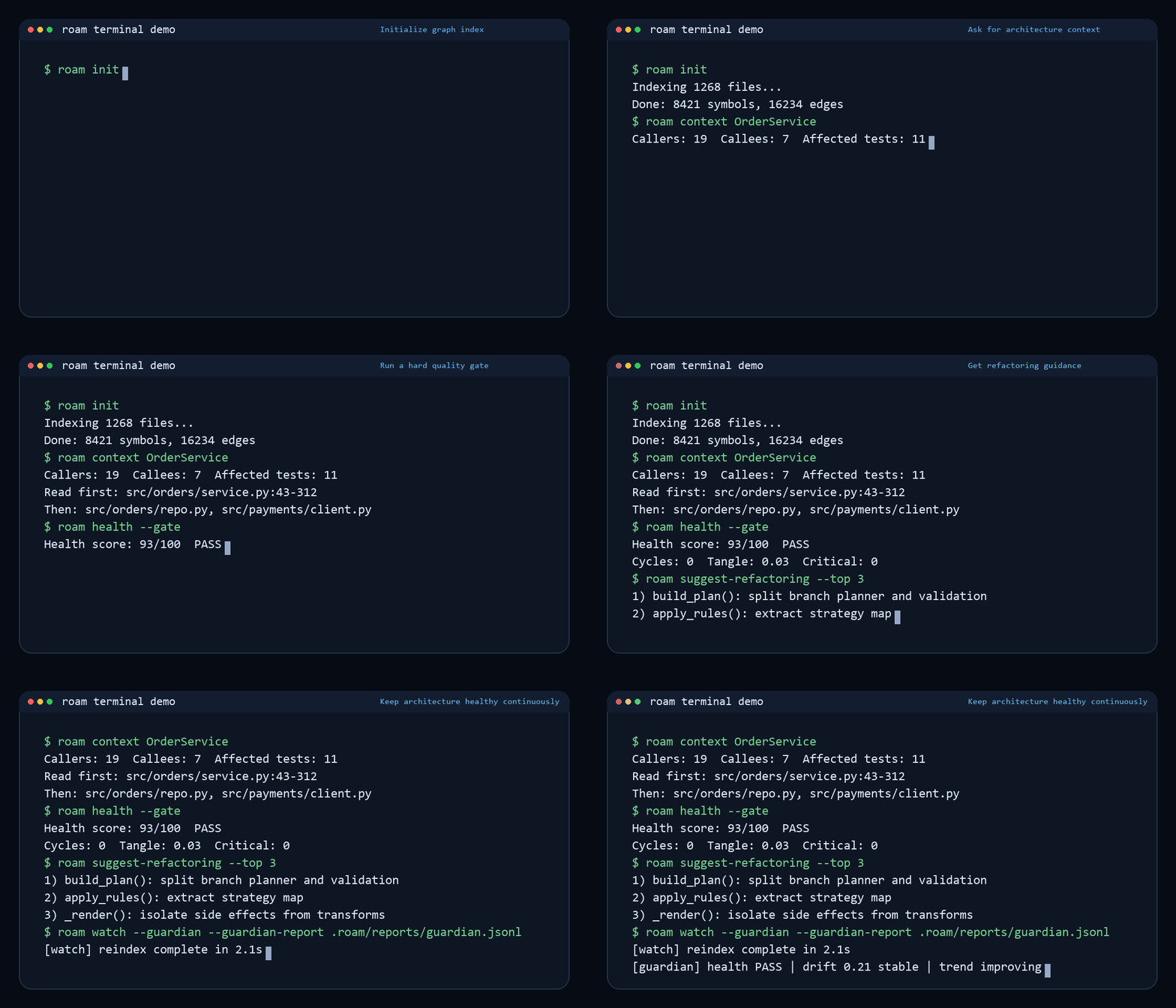
This is a historical CLI recording, not a live run or a current-output contract.
Use the linked guides above for the maintained workflow.
What's New
Read the changelog for released changes and the Unreleased
section for work awaiting a release. A source checkout may be ahead of the
package installed from PyPI.
Update / Uninstall
# Update
pipx upgrade roam-code        # or: uv tool upgrade roam-code / pip install --upgrade roam-code

# Uninstall
pipx uninstall roam-code      # or: uv tool uninstall roam-code / pip uninstall roam-code
Before removing .roam/, back up any rules, annotations, memory, signed run
ledgers, keys, or proof bundles you need to retain. That directory contains
project state as well as the rebuildable index; uninstalling the package does
not require deleting it.
Contributing
git clone https://github.com/Cranot/roam-code.git
cd roam-code
uv sync --locked --no-default-groups --extra dev --group ci --python 3.12
uv run --no-sync pytest tests/test_basic.py -n 0
Follow CONTRIBUTING.md for the full test/release gates and
the documentation map for maintained guides and references.
Good first contributions: add a Tier 1 language (see go_lang.py or php_lang.py as templates), improve reference resolution, add benchmark repos, extend SARIF converters, add MCP tools. Please open an issue first to discuss larger changes.
License
Apache 2.0




