IDA Pro MCP Server
A Model Context Protocol (MCP) server that enables AI assistants to interact with IDA Pro for reverse engineering and binary analysis tasks.
Overview
This project provides a bridge between AI assistants and IDA Pro, a popular disassembler and debugger used for reverse engineering software. It consists of three main components:
- IDA Pro Remote Control Plugin (
ida_remote_server.py): An IDA Pro plugin that creates an HTTP server to remotely control IDA Pro functions.
- IDA Remote Client (
idaremoteclient.ts): A TypeScript client for interacting with the IDA Pro Remote Control Server.
- MCP Server (
index.ts): A Model Context Protocol server that exposes IDA Pro functionality to AI assistants.
Features
- Execute Python scripts in IDA Pro from AI assistants
- Retrieve information about binaries:
- Strings
- Imports
- Exports
- Functions
- Advanced binary analysis capabilities:
- Search for immediate values in instructions
- Search for text strings in the binary
- Search for specific byte sequences
- Get disassembly for address ranges
- Automate IDA Pro operations through a standardized interface
- Secure communication between components
Prerequisites
- IDA Pro 8.3 or later
- Node.js 18 or later
- TypeScript
Example usage ida_remote_server.py
curl -X POST -H "Content-Type: application/json" -d '{"script":"print(\"Script initialization...\")"}' http://127.0.0.1:9045/api/execute
{"success": true, "output": "Script initialization...\n"}
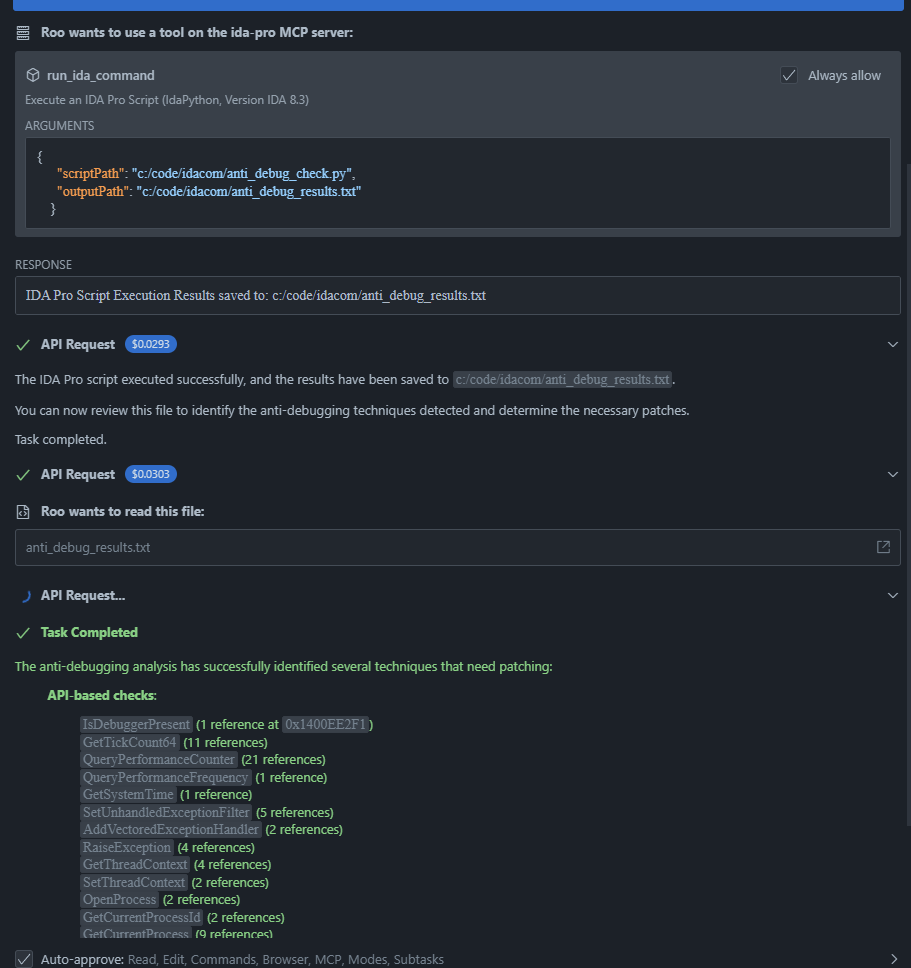
Example usage MCP Server
Installation
1. Install the IDA Pro Remote Control Plugin
Copy ida_remote_server.py to your IDA Pro plugins directory:
- Windows:
%PROGRAMFILES%\IDA Pro\plugins
- macOS:
/Applications/IDA Pro.app/Contents/MacOS/plugins
- Linux:
/opt/idapro/plugins
Start IDA Pro and open a binary file.
The plugin will automatically start an HTTP server on 127.0.0.1:9045.
2. Install the MCP Server
Clone this repository:
git clone <repository-url>
cd ida-server
Install dependencies:
npm install
Build the project:
npm run build
Configure the MCP server in your AI assistant's MCP settings file:
{
  "mcpServers": {
    "ida-pro": {
      "command": "node",
      "args": ["path/to/ida-server/dist/index.js"],
      "env": {}
    }
  }
}
Usage
Once installed and configured, the MCP server provides the following tool to AI assistants:
run_ida_command
Executes an IDA Pro Python script.
Parameters:
scriptPath (required): Absolute path to the script file to executeoutputPath (optional): Absolute path to save the script's output to
Example:
# Example IDA Pro script (save as /path/to/script.py)
import idautils

# Count functions
function_count = len(list(idautils.Functions()))
print(f"Binary has {function_count} functions")

# Get the first 5 function names
functions = list(idautils.Functions())[:5]
for func_ea in functions:
    print(f"Function: {ida_name.get_ea_name(func_ea)} at {hex(func_ea)}")

# Return data
return_value = function_count
The AI assistant can then use this script with:
<use_mcp_tool>
<server_name>ida-pro</server_name>
<tool_name>run_ida_command</tool_name>
<arguments>
{
  "scriptPath": "/path/to/script.py"
}
</arguments>
</use_mcp_tool>
Searches for immediate values in the binary's instructions.
Parameters:
value (required): Value to search for (number or string)radix (optional): Radix for number conversion (default: 16)startAddress (optional): Start address for searchendAddress (optional): End address for search
Example:
<use_mcp_tool>
<server_name>ida-pro</server_name>
<tool_name>search_immediate_value</tool_name>
<arguments>
{
  "value": "42",
  "radix": 10
}
</arguments>
</use_mcp_tool>
search_text
Searches for text strings in the binary.
Parameters:
text (required): Text to search forcaseSensitive (optional): Whether the search is case sensitive (default: false)startAddress (optional): Start address for searchendAddress (optional): End address for search
Example:
<use_mcp_tool>
<server_name>ida-pro</server_name>
<tool_name>search_text</tool_name>
<arguments>
{
  "text": "password",
  "caseSensitive": false
}
</arguments>
</use_mcp_tool>
search_byte_sequence
Searches for a specific byte sequence in the binary.
Parameters:
bytes (required): Byte sequence to search for (e.g., "90 90 90" for three NOPs)startAddress (optional): Start address for searchendAddress (optional): End address for search
Example:
<use_mcp_tool>
<server_name>ida-pro</server_name>
<tool_name>search_byte_sequence</tool_name>
<arguments>
{
  "bytes": "90 90 90"
}
</arguments>
</use_mcp_tool>
get_disassembly
Gets disassembly for an address range.
Parameters:
startAddress (required): Start address for disassemblyendAddress (optional): End address for disassemblycount (optional): Number of instructions to disassemble
Example:
<use_mcp_tool>
<server_name>ida-pro</server_name>
<tool_name>get_disassembly</tool_name>
<arguments>
{
  "startAddress": "0x401000",
  "count": 10
}
</arguments>
</use_mcp_tool>
get_functions
Gets the list of functions from the binary.
Parameters:
Example:
<use_mcp_tool>
<server_name>ida-pro</server_name>
<tool_name>get_functions</tool_name>
<arguments>
{}
</arguments>
</use_mcp_tool>
get_exports
Gets the list of exports from the binary.
Parameters:
Example:
<use_mcp_tool>
<server_name>ida-pro</server_name>
<tool_name>get_exports</tool_name>
<arguments>
{}
</arguments>
</use_mcp_tool>
get_strings
Gets the list of strings from the binary.
Parameters:
Example:
<use_mcp_tool>
<server_name>ida-pro</server_name>
<tool_name>get_strings</tool_name>
<arguments>
{}
</arguments>
</use_mcp_tool>
IDA Pro Remote Control API
The IDA Pro Remote Control Plugin exposes the following HTTP endpoints:
GET /api/info: Get plugin informationGET /api/strings: Get strings from the binaryGET /api/exports: Get exports from the binaryGET /api/imports: Get imports from the binaryGET /api/functions: Get function listGET /api/search/immediate: Search for immediate values in instructionsGET /api/search/text: Search for text in the binaryGET /api/search/bytes: Search for byte sequences in the binaryGET /api/disassembly: Get disassembly for an address rangePOST /api/execute: Execute Python script (JSON/Form)POST /api/executebypath: Execute Python script from file pathPOST /api/executebody: Execute Python script from raw body
Security Considerations
By default, the IDA Pro Remote Control Plugin only listens on 127.0.0.1 (localhost) for security reasons. This prevents remote access to your IDA Pro instance.
If you need to allow remote access, you can modify the DEFAULT_HOST variable in ida_remote_server.py, but be aware of the security implications.
Development
Building from Source
npm run build
Running Tests
npm test
License
This project is licensed under the MIT License. See the LICENSE file for details.
Author
Florian Drechsler (@fdrechsler) [email protected]




