WolframAlpha LLM MCP 服务器

by Garoth

一个 Model Context Protocol (MCP) 服务器,提供访问 WolframAlpha 的大语言模型(LLM)API 以回答数学和其他查询。需要通过环境变量 WOLFRAM_LLM_APP_ID 设置 WolframAlpha API 密钥。

Education & sciencestdioCommunity

Repository-wide counts · Cached 2026-03-07

Overview

The WolframAlpha LLM MCP 服务器 MCP server is a publicly available project. Review the upstream repository for installation instructions, supported tools, compatibility, permissions, and current maintenance status.

Configuration

Configuration, transport, authentication, and runtime requirements vary by project. Open the repository before connecting and use the smallest set of credentials and permissions required.

Open the WolframAlpha LLM MCP 服务器 repository to read the latest documentation.

KEEP EXPLORING

Compare source, connection, and authentication details before choosing an implementation.

View the complete category

Deep Research

u14app

Community

Deep Research 使用强大的 AI 模型快速生成深入的研究报告。支持 SSE API 和 MCP 服务器。需要在 .env 文件中配置环境变量以设置服务器端的 API 密钥和相关参数。

TorchLeet

Exorust

Community

TorchLeet provides 68 PyTorch problems from real ML/AI interviews at companies like Google, Meta, and Anthropic. It includes an AI Tutor MCP server that gives AI assistants access to problems, hints, prep plans, and learning paths with a no-spoilers teaching style.

Zotero MCP

54yyyu

Community

用于 Zotero 的模型上下文协议(MCP)服务器,将您的 Zotero 研究库与 Claude 及其他 AI 助手连接。支持本地和 Web API 访问、PDF 注释提取以及高级搜索功能。完整本地 API 功能需要 Python 3.10 及 Zotero 7 以上版本。配置可以通过环境变量或 JSON 配置文件进行设置。

mcp-brasil

mcp-brasil

Community

MCP Server for 70 Brazilian public data sources covering economy, legislation, transparency, judiciary, elections, environment, health, education, public security, and more. Some APIs require optional API keys configured via environment variables (e.g., TRANSPARENCIA_API_KEY, DATAJUD_API_KEY, META_ACCESS_TOKEN).

FROM THE SOURCE

Repository README

Build-time snapshot · Retrieved 2026-10-05

View original

WolframAlpha LLM MCP Server

WolframAlpha LLM MCP Logo

A Model Context Protocol (MCP) server that provides access to WolframAlpha's LLM API. https://products.wolframalpha.com/llm-api/documentation

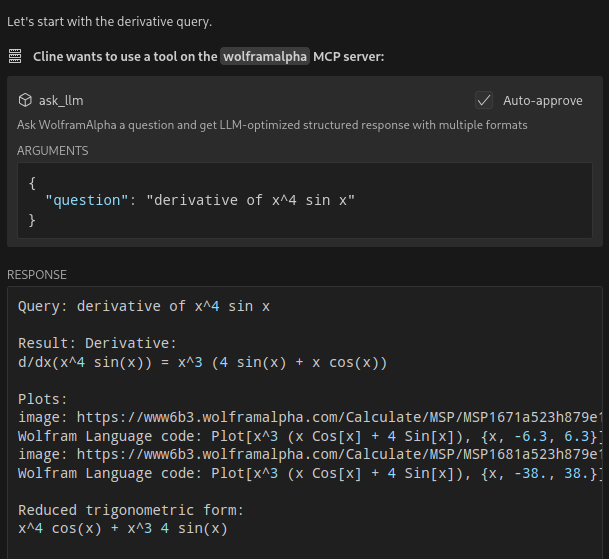
WolframAlpha MCP Server Example 1

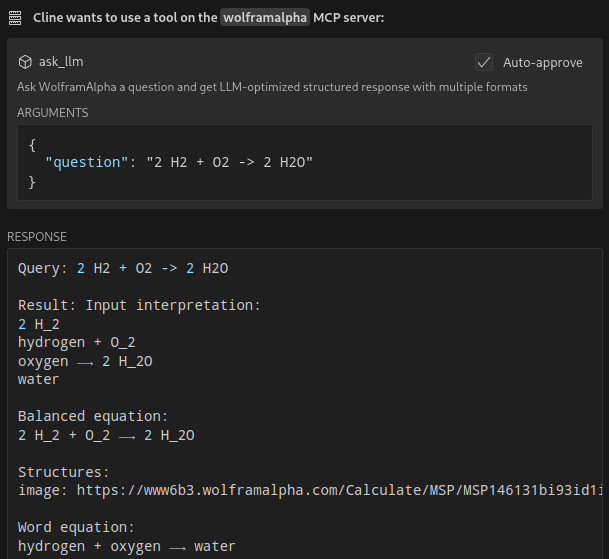
WolframAlpha MCP Server Example 2

Features

  • Query WolframAlpha's LLM API with natural language questions
  • Answer complicated mathematical questions
  • Query facts about science, physics, history, geography, and more
  • Get structured responses optimized for LLM consumption
  • Support for simplified answers and detailed responses with sections

Available Tools

  • ask_llm: Ask WolframAlpha a question and get a structured llm-friendly response
  • get_simple_answer: Get a simplified answer
  • validate_key: Validate the WolframAlpha API key

Installation

git clone https://github.com/Garoth/wolframalpha-llm-mcp.git
npm install

Configuration

  1. Get your WolframAlpha API key from developer.wolframalpha.com

  2. Add it to your Cline MCP settings file inside VSCode's settings (ex. ~/.config/Code/User/globalStorage/saoudrizwan.claude-dev/settings/cline_mcp_settings.json):

{
  "mcpServers": {
    "wolframalpha": {
      "command": "node",
      "args": ["/path/to/wolframalpha-mcp-server/build/index.js"],
      "env": {
        "WOLFRAM_LLM_APP_ID": "your-api-key-here"
      },
      "disabled": false,
      "autoApprove": [
        "ask_llm",
        "get_simple_answer",
        "validate_key"
      ]
    }
  }
}

Development

Setting Up Tests

The tests use real API calls to ensure accurate responses. To run the tests:

  1. Copy the example environment file:

    cp .env.example .env
    
  2. Edit .env and add your WolframAlpha API key:

    WOLFRAM_LLM_APP_ID=your-api-key-here
    

    Note: The .env file is gitignored to prevent committing sensitive information.

  3. Run the tests:

    npm test
    

Building

npm run build

License

MIT