Meme MCP Server

by haltakov

A simple Model Context Protocol (MCP) server for generating memes using the ImgFlip API. Requires ImgFlip account credentials via environment variables IMGFLIP_USERNAME and IMGFLIP_PASSWORD.

Gaming & entertainmentstdio or Streamable HTTPCommunity

Repository-wide counts · Cached 2025-10-28

Overview

The Meme MCP Server MCP server is a publicly available project. Review the upstream repository for installation instructions, supported tools, compatibility, permissions, and current maintenance status.

Configuration

Configuration, transport, authentication, and runtime requirements vary by project. Open the repository before connecting and use the smallest set of credentials and permissions required.

Open the Meme MCP Server repository to read the latest documentation.

KEEP EXPLORING

Compare source, connection, and authentication details before choosing an implementation.

View the complete category

BlenderMCP

mcpblender

Community

Blender integration through the Model Context Protocol enabling prompt-driven 3D modeling, scene creation, and real-time manipulation directly from your AI assistant. Requires Blender 3.0+, Python 3.10+, and the 'uv' runtime (installed separately).

Godot MCP

Coding-Solo

Community

用于与 Godot 游戏引擎接口的 MCP 服务器。提供启动编辑器、运行项目和捕获调试输出的工具。需要在系统上安装 Godot 引擎,路径可通过环境变量 GODOT_PATH 进行配置。

MCP Unity 编辑器(游戏引擎)

CoderGamester

Community

MCP Unity 是一种适用于 Unity 编辑器的模型上下文协议(Model Context Protocol)实现,允许 AI 助手通过 Node.js 服务器桥接与您的 Unity 项目进行交互。运行该服务器需要 Unity 2022.3 及以上版本和 Node.js 18 及以上版本。

AI Game Developer — Unity MCP

IvanMurzak

Community

Unity MCP is an AI-powered game development assistant for Editor & Runtime. Connect Claude, Cursor, & Windsurf to Unity via MCP. Automate workflows, generate code, and enable AI within your games. It works inside your compiled game, allowing for real-time AI debugging and player-AI interaction.

FROM THE SOURCE

Repository README

Build-time snapshot · Retrieved 2026-10-05

View original

Meme MCP Server

A simple Model Context Protocol (MCP) server for generating memes using the ImgFlip API. This server enables AI models and tools to generate meme images from user prompts.
Meme Server MCP server

Tools

The server implements the following a single tool called generateMeme.

The tool accepts the following parameters:

  • templateNumericId: The numeric ID of the meme template to use.
  • text0: The text for the first placeholder.
  • text1: The text for the second placeholder.

Usage

You can configure the meme generator server in your client using the meme-mcp NPM package. Here is an example configuration for Claude Desktop (Settings -> Developer -> Edit Config):

{
  "mcpServers": {
    "meme": {
      "command": "npx",
      "args": ["-y", "meme-mcp"],
      "env": {
        "IMGFLIP_USERNAME": "<IMGFLIP USERNAME>",
        "IMGFLIP_PASSWORD": "<IMGFLIP PASSWORD>"
      }
    }
  }
}

Note: you need to create a free account on ImgFlip to get your username and password.

Troubleshooting

Sometimes Claude Desktop fails to find the right version of npx (especially if you are using NVM, see this Issue for details). In this case, you can manually install meme-mcp globally and then use it directly.

npm install -g meme-mcp

You can find the path of your node executable by running which node in your terminal. After that your configuration should look like this:

{
  "mcpServers": {
    "meme": {
      "command": "/Users/<USERNAME>/.nvm/versions/node/v20.18.2/bin/node",
      "args": ["/Users/<USERNAME>/.nvm/versions/node/v20.18.2/lib/node_modules/meme-mcp/dist/index.js"],
      "env": {
        "IMGFLIP_USERNAME": "<IMGFLIP USERNAME>",
        "IMGFLIP_PASSWORD": "<IMGFLIP PASSWORD>"
      }
    }
  }
}

Example

After configuring Claude Desktop, you need to restart it and then you will see the small hammer icon on the bottom right in the chat input. You can then ask Claude to generate a meme for you.
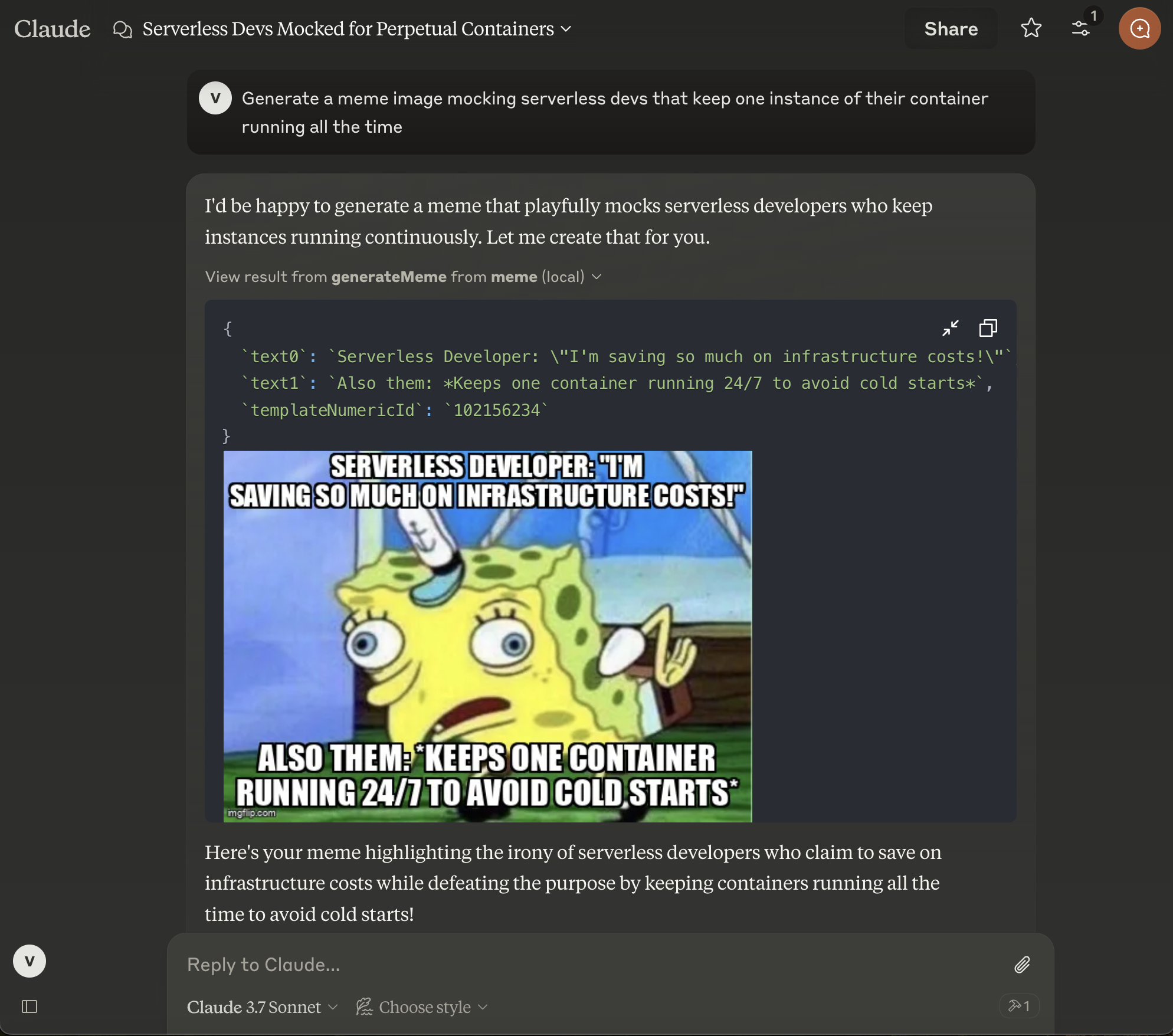
Claude Desktop with meme server configured

Author

This project is created for fun by Vladimir Haltakov. If you find it interesting you can message me on X @haltakov.