TYPO3 MCP Server Extension
This extension provides a Model Context Protocol (MCP) server implementation for TYPO3 that allows
AI assistants to safely view and manipulate TYPO3 pages and records through TYPO3's workspace system.
🔒 Safe AI Content Management with Workspaces
All content changes are automatically queued in TYPO3 workspaces, making it completely safe for AI assistants to create, update, and modify content without immediately affecting your live website. Changes require explicit publishing to become visible to site visitors.
🧪 Continuously Tested With Real LLMs
Every push to main runs a benchmark that has the latest models from Anthropic, OpenAI, Mistral, and Google actually use this MCP to perform real TYPO3 tasks. That's how we stay vendor-independent and prove the tool descriptions convey what they claim across very different prompting styles — your AI assistant of choice should just work, not only ours. Click any badge for the full run-by-run history.


What Can You Do?
With the TYPO3 MCP Server, your AI assistant can help you:
📝 Content Management
- Translate Pages: "Translate the /about-us page to German" - The AI reads your content, translates it, and creates proper language versions
- Import Documents: "Create a news article from this Word document" - Transform external documents into TYPO3 content with proper structure
- Bulk Updates: "Update all product descriptions to include our new sustainability message" - Make consistent changes across multiple pages
🔍 Content Analysis & SEO
- SEO Optimization: "Add meta descriptions to all pages that don't have them" - Automatically generate missing SEO content based on page content
- Tone Analysis: "Review the tone of our product pages and make them more friendly" - Get suggestions for improving content voice and style
- Content Audit: "Find all pages mentioning our old company name" - Quickly locate content that needs updating
🚀 Productivity Boosters
- Template Application: "Apply our standard legal disclaimer to all service pages" - Consistently apply content patterns
- Content Migration: "Copy all news articles from 2023 to the archive folder" - Reorganize content efficiently
- Multi-language Management: "Ensure all German pages have English translations" - Identify and fill translation gaps
🖼️ Images, Videos & Files
- Add Images From the Web: "Put this image on our homepage: https://example.org/press/team.jpg" - The AI downloads the file into your file storage and creates the content element that shows it
- Embed Videos: "Put this video on the home page: https://www.youtube.com/watch?v=..." - YouTube and Vimeo links become proper TYPO3 online media assets
- Add Text-Based Documents: "Add this price list as a CSV download on the service page" - Text formats like SVG, CSV or subtitles can be uploaded directly as content
- Upload From Your Machine: "Upload the team photo from my Desktop and add it to the about page" - You get a single-use upload link, so the file goes directly to TYPO3 instead of through the AI's context
All these operations happen safely in workspaces, giving you full control to review before publishing!
💡 Want to know how it works? Check out our Technical Overview for detailed information about the implementation, available tools, and real-world examples with actual tool calls.
Project Status
While there are a lot of automated tests, TYPO3 instances are widely different and Language Models are also widely different. Feel free to create issues here on GitHub or share experiences in the typo3-core-ai channel.
🖼️ Files and Images
Your assistant can bring new files into TYPO3, and it picks the right of these four ways on its own:
- From a URL: the TYPO3 server downloads the file itself, so the file never has to pass through the AI.
- From YouTube or Vimeo: those links become proper TYPO3 online media assets — the video itself stays where it is.
- Directly as content: text-based documents like SVG, CSV or subtitle files can be uploaded as content, without a URL or a separate upload.
- From your own computer: the assistant hands out a single-use upload link, and your MCP client sends the file directly to TYPO3. Binary data never travels through the AI's context, which keeps large photos both cheap and private.
Uploading is deliberately create-only — nothing you already have can be overwritten or deleted. A name that is already taken is resolved by renaming (image.jpg becomes image_01.jpg), and uploading content that already exists returns the existing file instead of creating a duplicate. Files that could be executed, by the server or by a visitor's browser, are refused, as are files that reconfigure the web server. Downloads only work from public http(s) addresses, and your backend user's file mounts and file permissions apply throughout.
Unlike records, files are not workspace-versioned in TYPO3, so an uploaded file lands in your file storage right away. It only becomes visible on the website once a record references it — and that reference is workspace-staged, so the usual review before publishing still applies.
💡 See Put this image on the homepage in the Technical Overview for the actual tool calls, and Image/File Handling for the upload-token flow and the current limits.
Installation
composer require hn/typo3-mcp-server
Requirements:
- TYPO3 v13.4+
- TYPO3 Workspaces extension (automatically installed as dependency)
Configuration
The defaults work out of the box. All settings live in the extension configuration
(Admin Tools → Settings → Extension Configuration → mcp_server):
Usage
Quick Start
There are two ways to connect AI assistants like Claude Desktop to your TYPO3 installation:
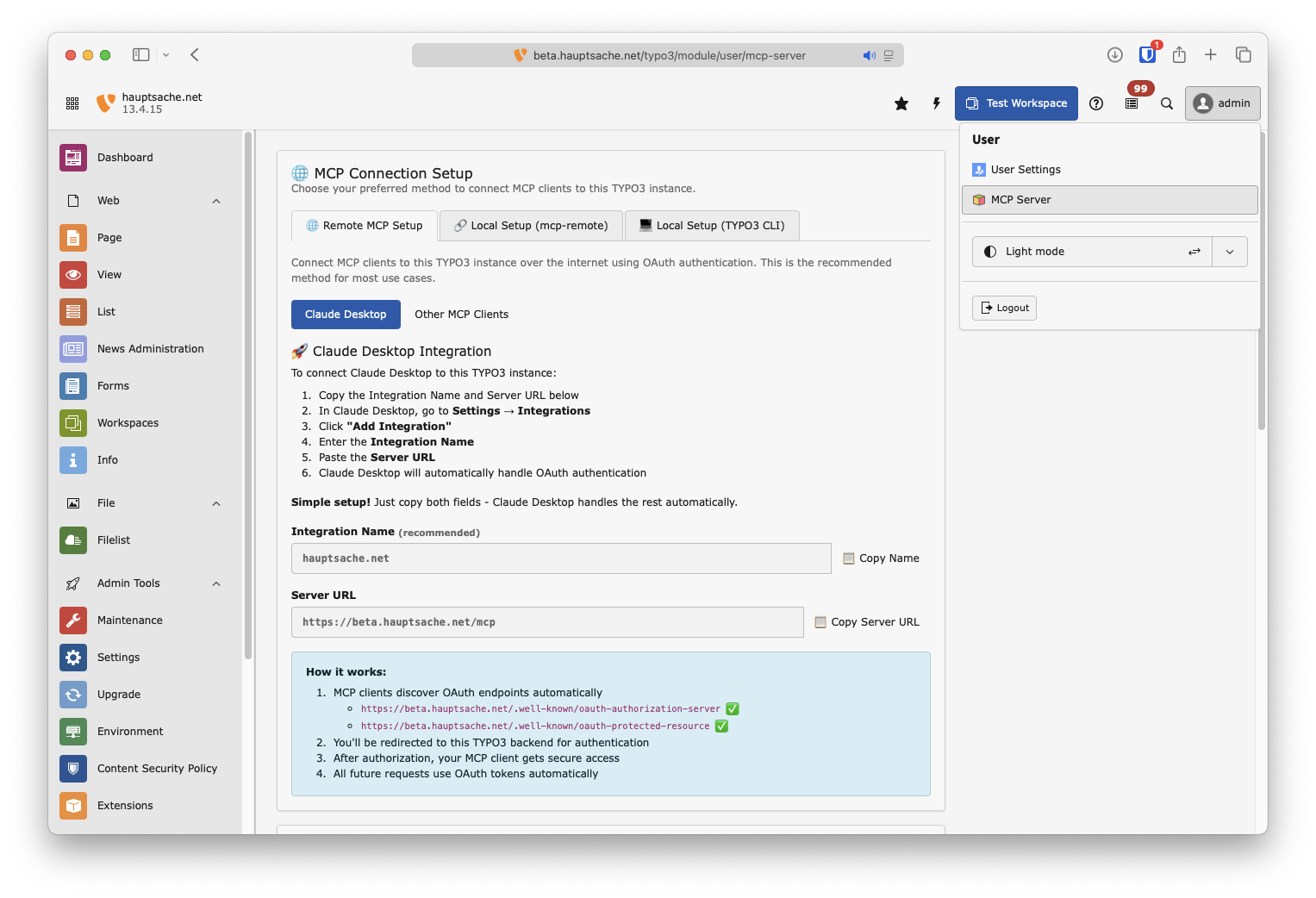
Option 1: OAuth Authentication (Recommended)
For secure remote access with proper authentication:
- Go to [Username] → MCP Server in your TYPO3 backend
- Copy the Server URL (and optionally the Integration Name)
- Add the Integration to whatever MCP Client you are using.
Option 2: Local Command Line Connection
This method gives you admin privileges by default. Add this to your mcp config file of Claude Desktop or whatever client you are using.
{
   "mcpServers": {
      "[your-typo3-name]": {
         "command": "php",
         "args": [
            "vendor/bin/typo3",
            "mcp:server"
         ]
      }
   }
}
Development
Running Tests
# Functional tests (PHPUnit)
composer test

# E2E tests — spins up MySQL, TYPO3, and Playwright in Docker
Build/runTests.sh -s e2e

# E2E without Docker (host PHP + SQLite + local Playwright).
# Auto-selected when Docker is unavailable.
Build/runTests.sh -s e2e --no-docker

# E2E against an existing TYPO3 instance
TYPO3_BASE_URL=https://my.ddev.site Build/runTests.sh -s e2e

# See all options
Build/runTests.sh -h
Tools are defined in the Classes/MCP/Tool directory. Each tool follows the MCP tool specification and maps to specific TYPO3 functionality.
Learn More
License
GPL-2.0-or-later





