scandrop
Minimal but real MCP server that ingests a GLB/GLTF floorplan scan (for example captured with Polycam https://poly.cam/) and exposes deterministic spatial tools over a compact derived scene graph.
Live demo: scandrop.janjs.dev
Install
uv sync --python 3.12
Claude Desktop setup
Use scandrop in combination with the filesystem MCP so Claude can both run spatial tools and read your local .glb/.gltf files.
After uv sync, configure Claude Desktop (claude_desktop_config.json) with both servers:
{
  "mcpServers": {
    "filesystem": {
      "command": "npx",
      "args": ["-y", "@modelcontextprotocol/server-filesystem", "/Users/<username>/Downloads", "/Users/<username>/Desktop"]
    },
    "scandrop": {
      "command": "uv",
      "args": ["run", "--project", "/absolute/path/to/scandrop-mcp", "python", "-m", "scandrop.main"]
    }
  }
}
Restart Claude Desktop after saving the config.
What scandrop MCP does
- Loads
.glb / .gltf mesh exports (including Polycam free-plan outputs).
- Derives a compact spatial database:
- dominant floor plane
- floor polygon in XZ
- obstacle footprints + OBBs + heuristic semantic labels
- scene AABB bounds
- Persists versioned scene artifacts on local disk:
./data/scenes/{scene_id}/v{version}/scene_graph.json./data/scenes/{scene_id}/v{version}/params.json
- Exposes deterministic MCP tools (
check_fit, find_free_spaces) so the model never does geometry math.
- Provides optional FastAPI debug endpoints.
Quickstart
1) Ingest a scan
python scripts/ingest.py path/to/scan.glb
Example output:
{
  "scene_id": "ab12cd34ef56",
  "version": 1
}
2) Run MCP server (stdio)
python -m scandrop.main
After uv sync, most MCP clients can launch this server via uv run from the project directory. In Claude Desktop, keep this server enabled together with filesystem.
Claude Desktop config (claude_desktop_config.json):
{
  "mcpServers": {
    "scandrop": {
      "command": "uv",
      "args": ["run", "--project", "/absolute/path/to/scandrop-mcp", "python", "-m", "scandrop.main"]
    }
  }
}
Generic MCP client config shape:
{
  "servers": {
    "scandrop": {
      "command": "uv",
      "args": ["run", "--project", "/absolute/path/to/scandrop", "python", "-m", "scandrop.main"]
    }
  }
}
2c) Load a scene (recommended user flow)
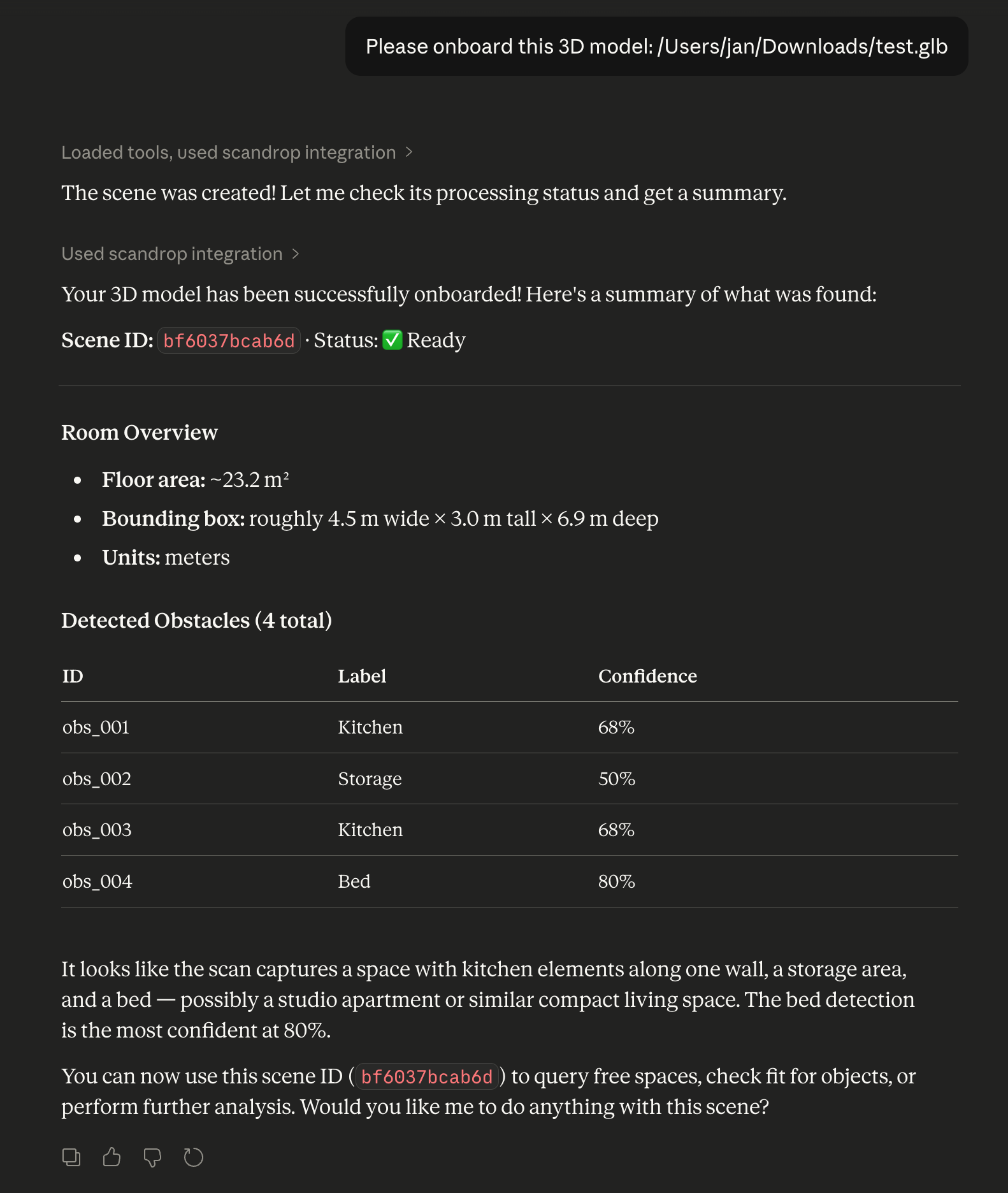
In Claude Desktop, users only need to provide a path to the 3D model:
Please onboard this 3D model: /Users/<username>/Downloads/test.glb
Scandrop handles scene creation, status, and summary internally via onboard_scene.
3) Run FastAPI debug server (optional)
python scripts/run_api.py --reload
Claude Desktop tutorial (attach + ingest a GLB)
Use this flow when you have both connectors enabled:
filesystem connector (to read files from your machine)scandrop MCP server (this repo)- A GLB/GLTF scan export (for example from Polycam)
- Place your
.glb file in a folder exposed by filesystem, for example /Users/<username>/Downloads/test.glb.
- Send this prompt:
Please onboard this 3D model: /Users/<username>/Downloads/test.glb
- The assistant runs onboarding in one step and returns:
scene_id and version- processing status (usually
ready)
- scene summary (bounds, floor area, obstacle count)
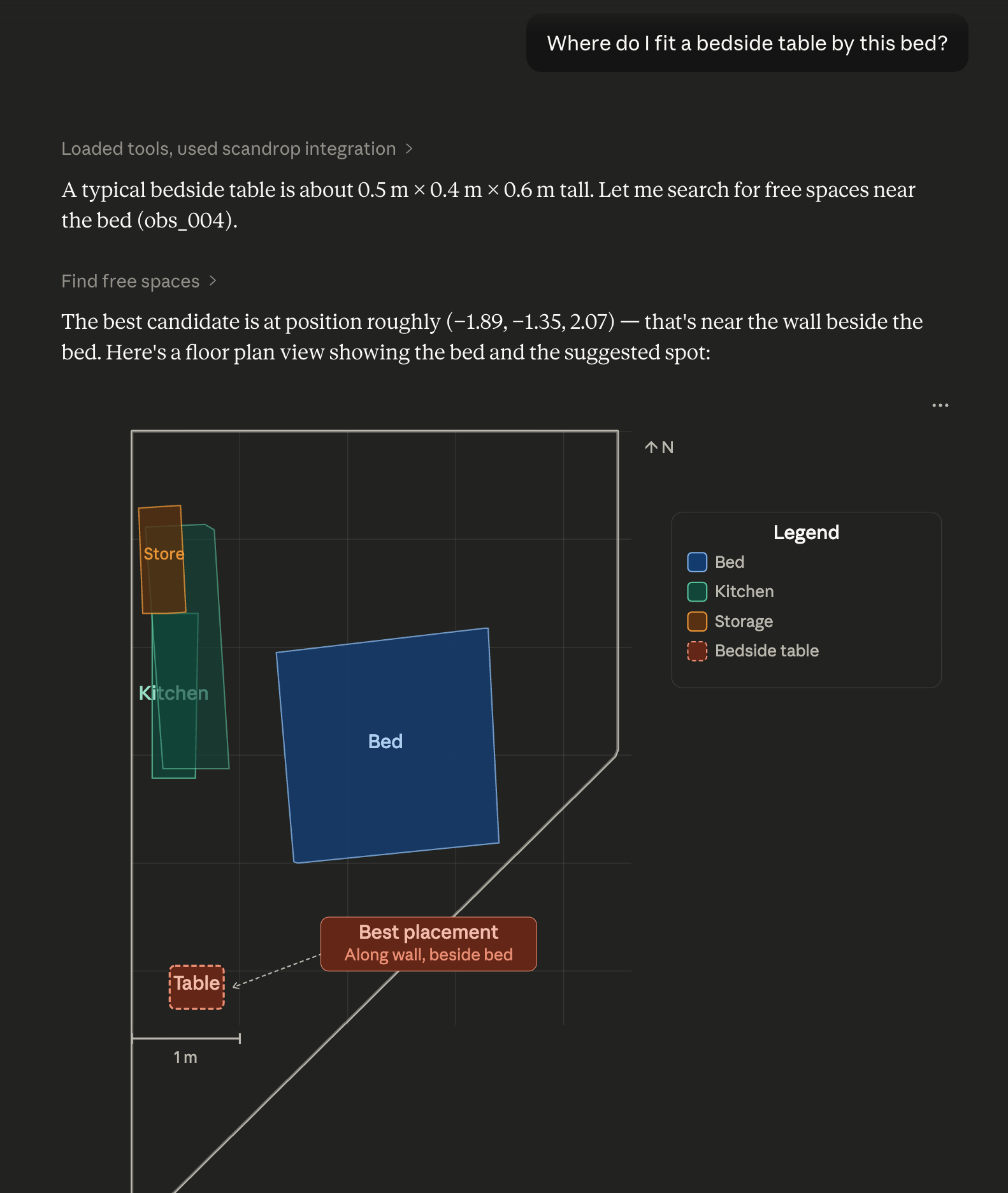
- Ask a placement question, for example:
Where do I fit a bedside table by the bed?
For the full web app tutorial and UI screenshot, see web/README.md.
create_scene_from_gltf
Input:
{ "path": "/absolute/path/to/scan.glb" }
Output:
{ "scene_id": "ab12cd34ef56", "version": 1 }
onboard_scene
Input:
{ "path": "/absolute/path/to/scan.glb" }
Output:
{
  "scene_id": "ab12cd34ef56",
  "version": 1,
  "status": { "status": "ready", "message": null },
  "summary": {
    "bounds_aabb": { "min": [0.0, -0.1, -2.0], "max": [5.2, 2.8, 4.4] },
    "floor_area_m2": 17.42,
    "obstacle_count": 6
  }
}
get_processing_status
Input:
{ "scene_id": "ab12cd34ef56" }
Output:
{ "status": "ready", "message": null }
get_scene_summary
Input:
{ "scene_id": "ab12cd34ef56", "version": 1 }
Output:
{
  "bounds_aabb": { "min": [0.0, -0.1, -2.0], "max": [5.2, 2.8, 4.4] },
  "floor_area_m2": 17.42,
  "obstacle_count": 6
}
get_scene_graph
Input:
{ "scene_id": "ab12cd34ef56", "version": 1 }
Output:
{
  "units": "meters",
  "room": { "floor_plane": { "normal": [0, 1, 0], "d": -0.02 }, "floor_polygon_xz": [[0, 0], [5, 0], [5, 4], [0, 4]], "bounds_aabb": { "min": [0, -0.1, 0], "max": [5, 2.7, 4] } },
  "obstacles": [{ "id": "obs_001", "footprint_xz": [[1, 1], [1.8, 1], [1.8, 1.7], [1, 1.7]], "obb": { "center": [1.4, 0.5, 1.35], "extent": [0.8, 1.0, 0.7], "rotation": [[1, 0, 0], [0, 1, 0], [0, 0, 1]] } }]
}
check_fit
Input:
{
  "scene_id": "ab12cd34ef56",
  "size_m": [2.0, 0.9, 0.8],
  "pose": { "pos": [1.2, 0.4, -0.8], "yaw_rad": 1.57 },
  "clearance_m": 0.3
}
Output:
{
  "ok": false,
  "reasons": ["collides_obstacle:obs_002"]
}
find_free_spaces
Input:
{
  "scene_id": "ab12cd34ef56",
  "size_m": [2.0, 0.9, 0.8],
  "clearance_m": 0.5,
  "yaw_steps": 4,
  "grid_step_m": 0.2,
  "max_results": 3
}
Output:
{
  "candidates": [
    {
      "pos": [4.0, 0.4, 1.2],
      "yaw_rad": 1.57,
      "score": 1.246,
      "notes": ["wall_distance_m=0.184", "center_distance_m=1.430"]
    }
  ]
}
list_scenes
Input:
{}
Output:
[
  {
    "scene_id": "ab12cd34ef56",
    "created_at": "2026-02-18T20:00:00Z",
    "latest_version": 1
  }
]
FastAPI debug endpoints
POST /scenes/import
- multipart upload with
file field, or JSON body { "path": "/abs/path.glb" }
GET /scenes/{scene_id}/summaryGET /scenes/{scene_id}/scene_graphGET /health
Data model snapshot
scene_graph.json:
{
  "units": "meters",
  "room": {
    "floor_plane": { "normal": [0.0, 1.0, 0.0], "d": -0.02 },
    "floor_polygon_xz": [[0.0, 0.0], [5.0, 0.0], [5.0, 4.0], [0.0, 4.0]],
    "bounds_aabb": { "min": [0.0, -0.1, 0.0], "max": [5.0, 2.7, 4.0] }
  },
  "obstacles": [
    {
      "id": "obs_001",
      "footprint_xz": [[1.0, 1.0], [1.8, 1.0], [1.8, 1.7], [1.0, 1.7]],
      "obb": {
        "center": [1.4, 0.5, 1.35],
        "extent": [0.8, 1.0, 0.7],
        "rotation": [[1.0, 0.0, 0.0], [0.0, 1.0, 0.0], [0.0, 0.0, 1.0]]
      }
    }
  ]
}
Notes
- Determinism: fixed random seed for mesh surface sampling, deterministic sorting for obstacle IDs and candidate ranking.
- Semantic labels are heuristic and currently include broad classes such as
bed, kitchen, table, storage, and unknown.
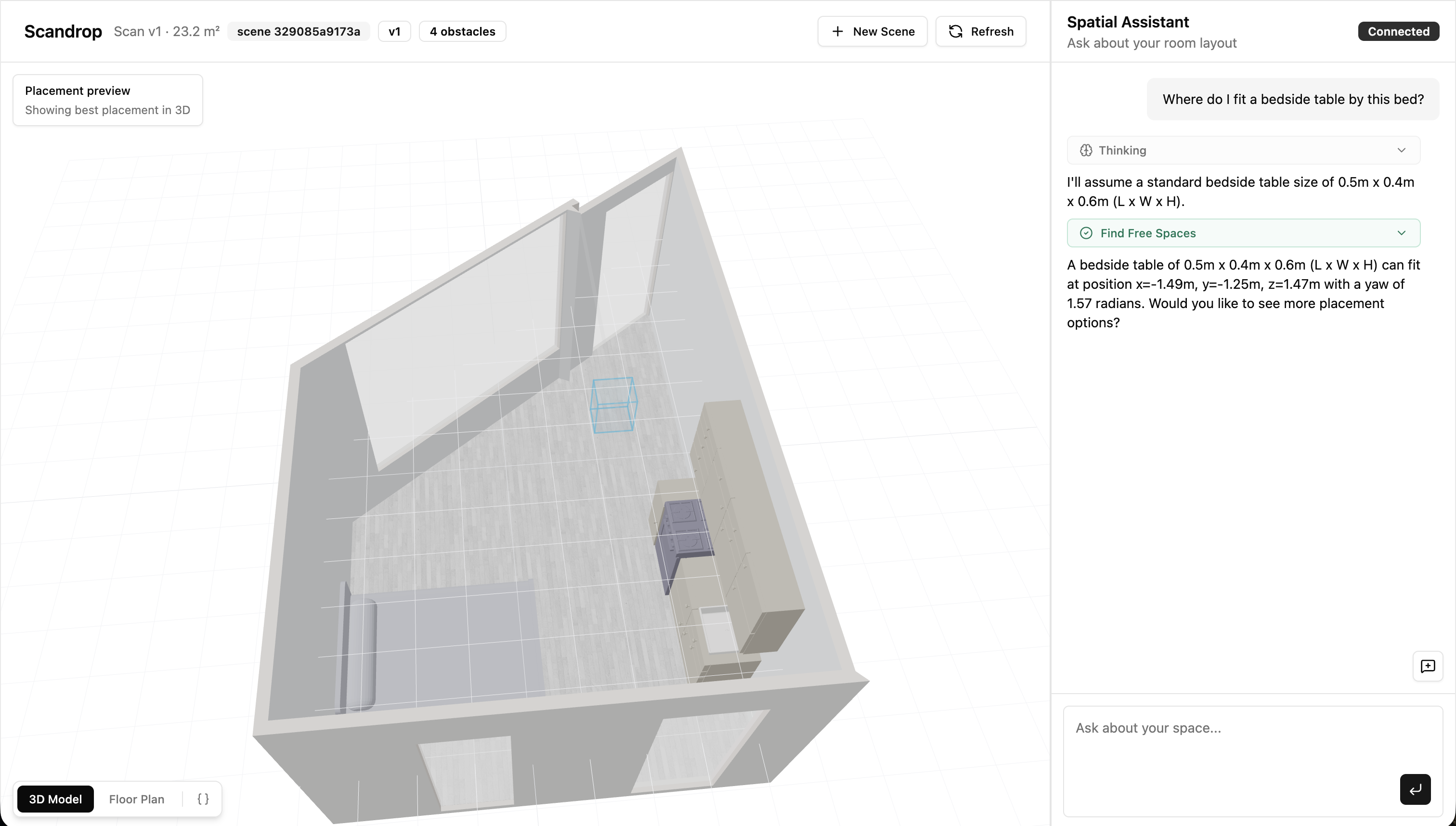
Web App Workbench
A UI app is included at ./web with:
- source model viewer (GLB/GLTF)
- derived spatial representation viewer (floor + obstacles)
- MCP-backed chat panel with prompt chips
Try the hosted demo at scandrop.janjs.dev, or run it locally:
cd web
pnpm install
pnpm dev
Then open http://localhost:3000.


