codex-as-mcp
中文版
codex-as-mcp is a small Model Context Protocol (MCP) server that lets MCP clients (Claude Code, Cursor, etc.) delegate work to the Codex CLI.
It exposes two tools that run Codex in the server's current working directory:
spawn_agent(prompt: str)spawn_agents_parallel(agents: list[dict])
Under the hood, each agent runs something like:
codex exec --cd <server cwd> --skip-git-repo-check --dangerously-bypass-approvals-and-sandbox -.
The prompt is sent through stdin and then closed. This avoids command-line quoting/length issues and prevents Codex from accidentally reading from the MCP server's JSON-RPC stdin pipe.
Note: --dangerously-bypass-approvals-and-sandbox disables sandboxing and confirmation prompts. Use this server only in repos you trust.
Use it in Claude Code
There are two tools in codex-as-mcp
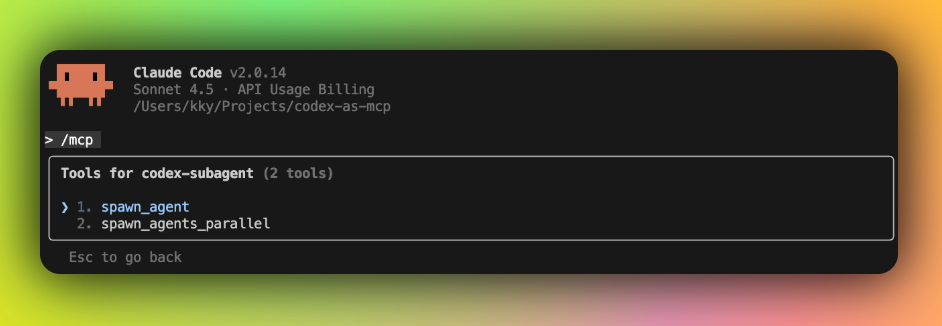
You can spawn parallel codex subagents using prompt.
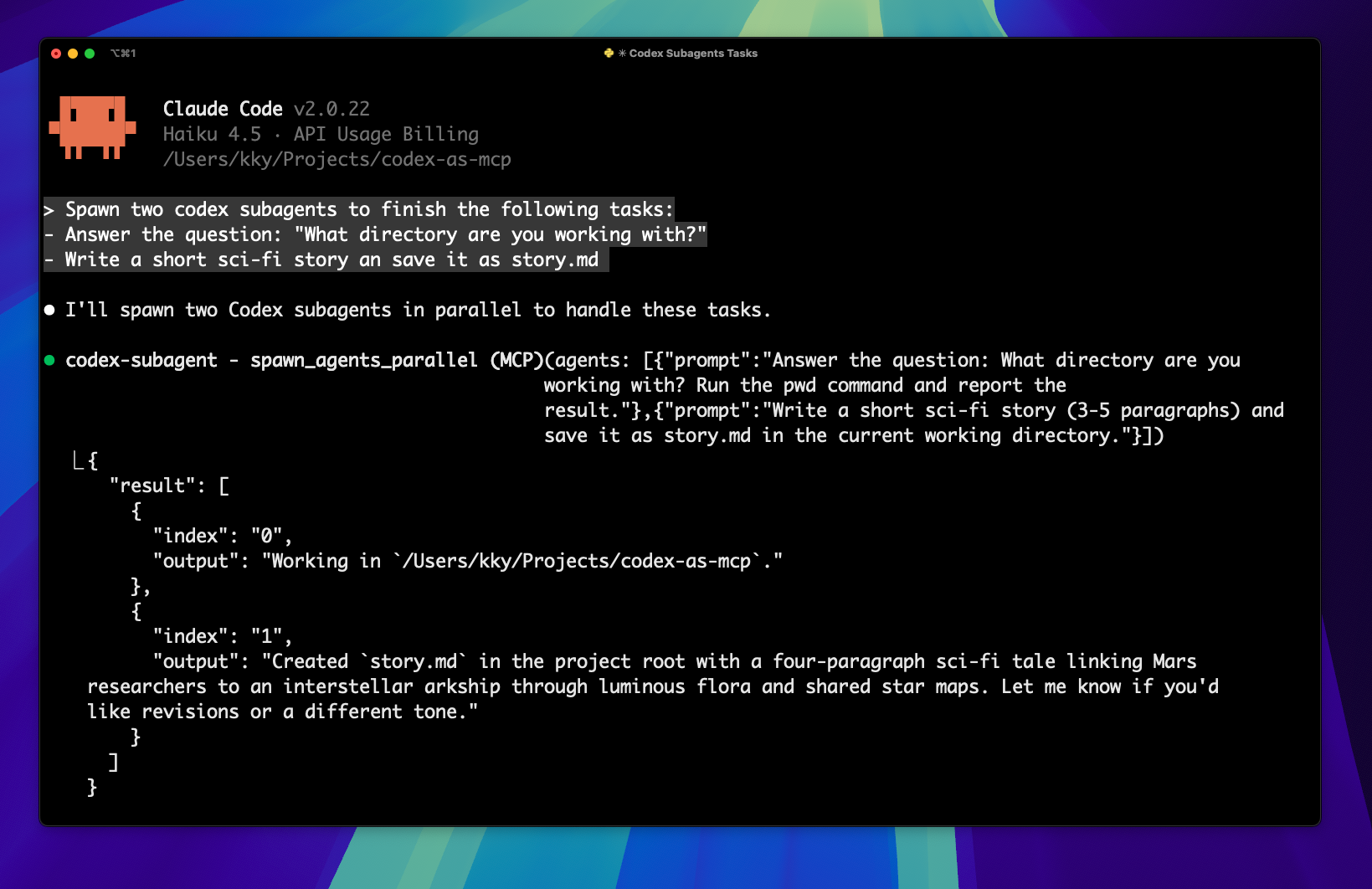
Here's a sample Codex session delegating two tasks in parallel.
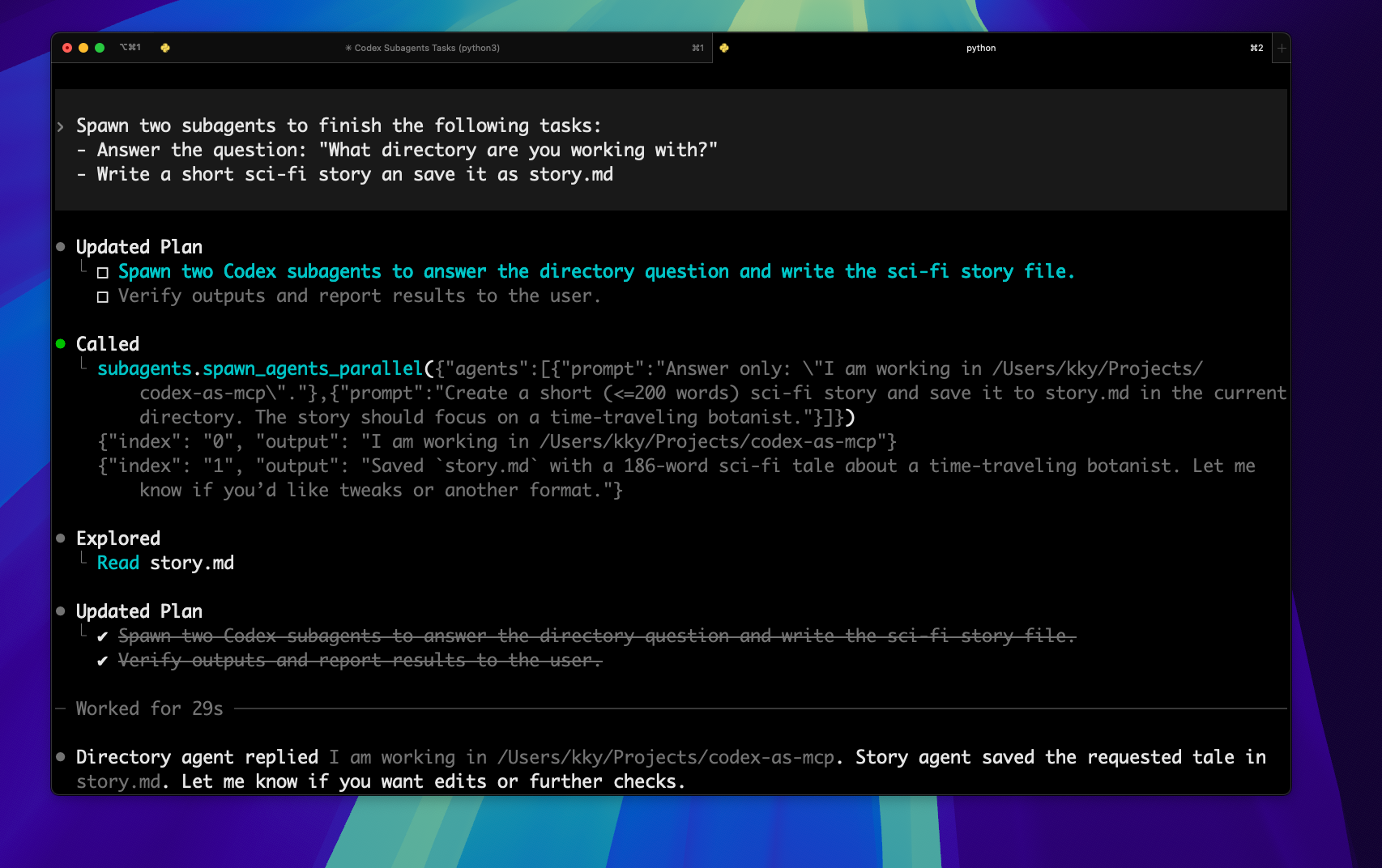
Quick start
1. Install Codex CLI
Requires Codex CLI >= 0.46.0
npm install -g @openai/codex@latest
codex login

# Verify installation
codex --version
Make sure Codex CLI can run non-interactively on your machine (provider + credentials in ~/.codex/config.toml, or via the provider-specific env var it references).
Example: third-party provider + env_key
If you're using a third-party provider, configure it in Codex config.toml and point model_provider at it. When a provider uses env_key, Codex CLI expects that env var to be present when it runs.
Example:
model_provider = "custom_provider"

[model_providers.custom_provider]
name = "custom_provider"
base_url = "https://..."
wire_api = "responses"
env_key = "PROVIDER_API_KEY"
show_raw_agent_reasoning = true
When using codex-as-mcp, make sure the MCP server process has that env var set, so it can pass it through to the spawned codex process. The env var name must match the env_key value above (here: PROVIDER_API_KEY).
Option A (recommended): set env in your MCP client config (if supported)
{
  "mcpServers": {
    "codex-subagent": {
      "type": "stdio",
      "command": "uvx",
      "args": ["codex-as-mcp@latest"],
      "env": {
        "PROVIDER_API_KEY": "KEY_VALUE"
      }
    }
  }
}
Option B: pass env via server args
uvx codex-as-mcp@latest --env PROVIDER_API_KEY=KEY_VALUE
Option C: add via Codex CLI (codex mcp add)
codex mcp add codex-subagent --env PROVIDER_API_KEY=KEY_VALUE -- uvx codex-as-mcp@latest
Security note: passing secrets via command-line args may be visible via process lists on your machine; prefer option A when possible.
Add to your .mcp.json:
{
  "mcpServers": {
    "codex-subagent": {
      "type": "stdio",
      "command": "uvx",
      "args": ["codex-as-mcp@latest"]
    }
  }
}
Or use Claude Desktop commands:
claude mcp add codex-subagent -- uvx codex-as-mcp@latest
If you're configuring Codex CLI directly (for example ~/.config/codex/config.toml), add:
[mcp_servers.subagents]
transport = "stdio"
command = "uvx"
args = ["codex-as-mcp@latest"]
# Increase if you see ~60s tool-call timeouts when running longer Codex tasks.
# tool_timeout_sec = 600
spawn_agent(prompt: str) – Spawns an autonomous Codex subagent using the server's working directory and returns the agent's final message.spawn_agents_parallel(agents: list[dict]) – Spawns multiple Codex subagents in parallel; each item must include a prompt key and results include either an output or an error per agent.
Maintainer live smoke test
The default CI uses unit tests and a fake subprocess path so it can run safely without credentials. Maintainers can additionally run the manually triggered Live Codex smoke GitHub Actions workflow with a real provider by setting repository secret CODEX_LIVE_API_KEY and providing a Responses-compatible base_url/model in the workflow inputs.
Note: current Codex CLI rejects wire_api = "chat"; chat-completions-only providers such as direct DeepSeek API need either native Codex support for that wire API or a Responses-compatible proxy.
Troubleshooting
spawn_agent times out after ~60s
If you see an error like:
tool call failed for `subagents/spawn_agent`
timed out awaiting tools/call after 60s
deadline has elapsed
This is typically a client-side MCP tool-call timeout. spawn_agent does not return until the spawned codex exec process finishes, which can take longer than 60 seconds.
Fix: increase the tool-call timeout in your MCP client.
Codex CLI
In your Codex config (~/.codex/config.toml or ~/.config/codex/config.toml), set a higher tool_timeout_sec for the MCP server:
[mcp_servers.subagents]
transport = "stdio"
command = "uvx"
args = ["codex-as-mcp@latest"]
tool_timeout_sec = 600
MCP Inspector / mcp dev
If you're testing locally with the MCP Inspector, increase request timeouts (or run ./test.sh, which exports these):
export MCP_SERVER_REQUEST_TIMEOUT=300000
export MCP_REQUEST_TIMEOUT_RESET_ON_PROGRESS=true
export MCP_REQUEST_MAX_TOTAL_TIMEOUT=28800000




