LuxAlgo MCP is a LuxAlgo open-source project. Overview and setup: luxalgo.com/mcp.
It puts the LuxAlgo ecosystem behind a single MCP server: an encyclopedia of trading and technical analysis, your LuxAlgo trade journal, read-only access to your own brokerage accounts, hosted session statistics with a sample size on every number, the public record of US markets (congressional trades, insider filings, lobbying, contracts, patents and more, with a primary-source link on every row), a Monte Carlo challenge simulator, and a live prop-firm directory. No API key for anything hosted: the public tools are free and read-only, the Trade Journal and account tools use your LuxAlgo sign-in, and the local broker tools use your own keys and never send them anywhere.
claude mcp add --transport http luxalgo https://mcp.luxalgo.com/mcp
What's inside
Install
The hosted server is one URL:
https://mcp.luxalgo.com/mcp
Claude (web, desktop, mobile)
Customize → Connectors → Add custom connector, URL https://claude.mcp.luxalgo.com/mcp, and under Authentication choose Required when the server asks. Claude connects anonymously, every keyless tool works right away, and the sign-in card only appears the first time you call an account tool. This Claude-only address exists because Claude.ai otherwise opens the OAuth window at connect time for any server whose OAuth metadata it can discover (claude-ai-mcp#1013); it serves the same tools with that metadata hidden until a sign-in is actually needed. Every other client uses https://mcp.luxalgo.com/mcp.
Claude Code
claude mcp add --transport http luxalgo https://mcp.luxalgo.com/mcp
Cursor
Use the Install in Cursor button above, or add this to .cursor/mcp.json:
{
  "mcpServers": {
    "luxalgo": {
      "url": "https://mcp.luxalgo.com/mcp"
    }
  }
}
Any other MCP client
Point your client's MCP config at the hosted URL:
{
  "mcpServers": {
    "luxalgo": {
      "url": "https://mcp.luxalgo.com/mcp"
    }
  }
}
Where each client keeps its config
Local (stdio)
Runs every hosted tool locally, and unlocks the broker tools. Set read-only credential env vars for the brokers you use. Any subset works: a broker connects when all of its vars are set, and with no vars at all the broker tools simply stay unconfigured.
{
  "mcpServers": {
    "luxalgo": {
      "command": "npx",
      "args": ["-y", "@luxalgo/mcp"],
      "env": {
        "BROKERS_ALPACA_API_KEY": "…",
        "BROKERS_ALPACA_API_SECRET": "…",
        "BROKERS_KRAKEN_API_KEY": "…",
        "BROKERS_KRAKEN_API_SECRET": "…",
        "BROKERS_HYPERLIQUID_WALLET_ADDRESS": "0x…"
      }
    }
  }
}
Env var names derive from each broker's credential fields: BROKERS_<BROKER>_<FIELD> (for example BROKERS_OKX_PASSPHRASE, BROKERS_IBKR_FLEX_FLEX_TOKEN). The broker_setup tool lists every supported broker, its exact variables, and a one-line guide to creating each key with read-only scope, which is all this server ever needs.
Signing in with LuxAlgo (optional)
Almost everything here is keyless and works without an account. The tools in the Account and Trade Journal sections below need to know who you are; they use your LuxAlgo account through standard OAuth 2.1, with app.luxalgo.com as the authorization server. Nothing is required up front: every client can connect, list tools and use the public ones anonymously, and sign-in is only requested when you first call an account tool.
Hosted (ChatGPT, Claude, Cursor, any remote connector). The server advertises its protected-resource metadata and answers an unauthenticated account-tool call with a 401 + WWW-Authenticate challenge; MCP clients handle the rest (discovery, PKCE, consent screen in your browser) and keep the token for you. Each tool also declares its policy in tools/list (securitySchemes: noauth for public tools, oauth2 for account tools), so ChatGPT's per-tool linking works as well. Clients may identify themselves via Client ID Metadata Documents or Dynamic Client Registration — the app accepts both. One client-side exception: Claude.ai/Desktop connectors sign in at connect time whenever OAuth metadata is discoverable, regardless of their Authentication setting, so they get their own address, https://claude.mcp.luxalgo.com/mcp, whose metadata is only reachable from the 401 (see Install).
Local (stdio). The server running on your machine is itself the OAuth client. Sign in once:
npx -y @luxalgo/mcp login     # opens your browser; tokens are stored under your user config dir (0600)
npx -y @luxalgo/mcp status    # who is signed in, token expiry
npx -y @luxalgo/mcp logout
Tokens live in ~/.config/luxalgo/mcp-auth.json (%APPDATA%\luxalgo\mcp-auth.json on Windows, or LUXALGO_MCP_AUTH_FILE), are refreshed automatically, and are only ever sent to the LuxAlgo app. If your MCP client supports URL-mode elicitation (MCP 2026-07-28), you can skip the command: the first account-tool call asks the client to open the sign-in page and continues once you approve. Otherwise the tool answers with the challenge and the login hint.
What the token is for. This server never decides what you are entitled to — its code is public, so any such check would be decorative. Instead, once you are signed in, every request a tool makes to the LuxAlgo app carries your token, and the app resolves your account and plan from it exactly as it does when you use the web app. Public tools work without it; with it, the app can tailor what they return. When the app declines — no valid sign-in (401) or a feature outside your plan (403) — the tool reports that, naming the permission involved.
Library
Library outputs are compact JSON with canonical urls for citation. Concept and family pages are also directly fetchable as markdown: append .md to any concept URL.
Account (sign-in required)
Trade Journal (sign-in required)
Your own trade journal in the LuxAlgo app — the same accounts, trades, annotations and notes the app shows — read and written as you. Dates are YYYY-MM-DD day keys in your journal timezone (journal_list_accounts reports it); account filters take ids from the same call.
The journal tools and luxalgo_account are the only tools that need a LuxAlgo account; see Signing in with LuxAlgo. Without a sign-in they return an OAuth challenge instead of data — never a silent fallback. The write tools act only as the signed-in user and only on that user's journal; the app validates and owns every change.
Brokers (local stdio only)
Read-only by construction: the SDK's root export has no trading endpoints, the server never writes secrets anywhere, and per-broker failures are reported alongside results, never silently dropped.
Edge Stats
Hosted session statistics from the open-source edge-stats engine, precomputed nightly:
Every number arrives with its sample size — the engine has no code path that returns a percentage without one. Results are historical conditional frequencies, never predictions. For arbitrary composed queries or your own market data, run edge-stats locally; its own MCP server exposes the full engine over your local store.
Market Trackers
The data is the CC0 output of LuxAlgo/market-trackers, published daily to LuxAlgo/market-trackers-data: year-sharded gzipped JSON in the repository's live tree, plus deep-history shards attached to the data repo's GitHub Releases and indexed in its archives.json. The server streams shards row by row (never loading a whole file) under a per-call budget of compressed bytes, so a deep-history year (often 30–60 MB compressed) is read one at a time. Amounts disclosed as ranges stay ranges; ticker mappings for contracts, lobbying, trials, FDA events and patents are best-effort against a curated map of public companies; every row keeps its primary-source deep link.
Challenge Simulator
Runs locally inside the server:
Every simulation result carries its assumptions, unsimulated-rule flags, seed, and engine version. Results are distributions under stated assumptions, never promises. The engine runs locally; firm rules adapt live from the directory, and inline specs simulate fully offline.
Prop Firm Directory
The live directory the simulator draws from, queryable directly:
Charts, in your browser, with Vela
Every tool above returns text and JSON. When the answer wants a chart, draw it with Vela for Developers (@luxalgo/vela, Apache-2.0, GitHub), LuxAlgo's open-source charting library: a headless chart with its own WebGL2 renderer that takes bars you already have, or fetches them from keyless public providers, and runs indicator scripts through pluggable engines. Pine Script® lives in the @luxalgo/vela-pinets addon, which is what closes the loop with the Library: library_get_source_code hands an agent an indicator's exact Pine source, and Vela executes that source on a chart.
To open an indicator on Vela, LuxAlgo's state-of-the-art charts at vela.luxalgo.com/chart, give the user the chart_url that library_get_source_code returns when the indicator's code runs only on LuxAlgo.
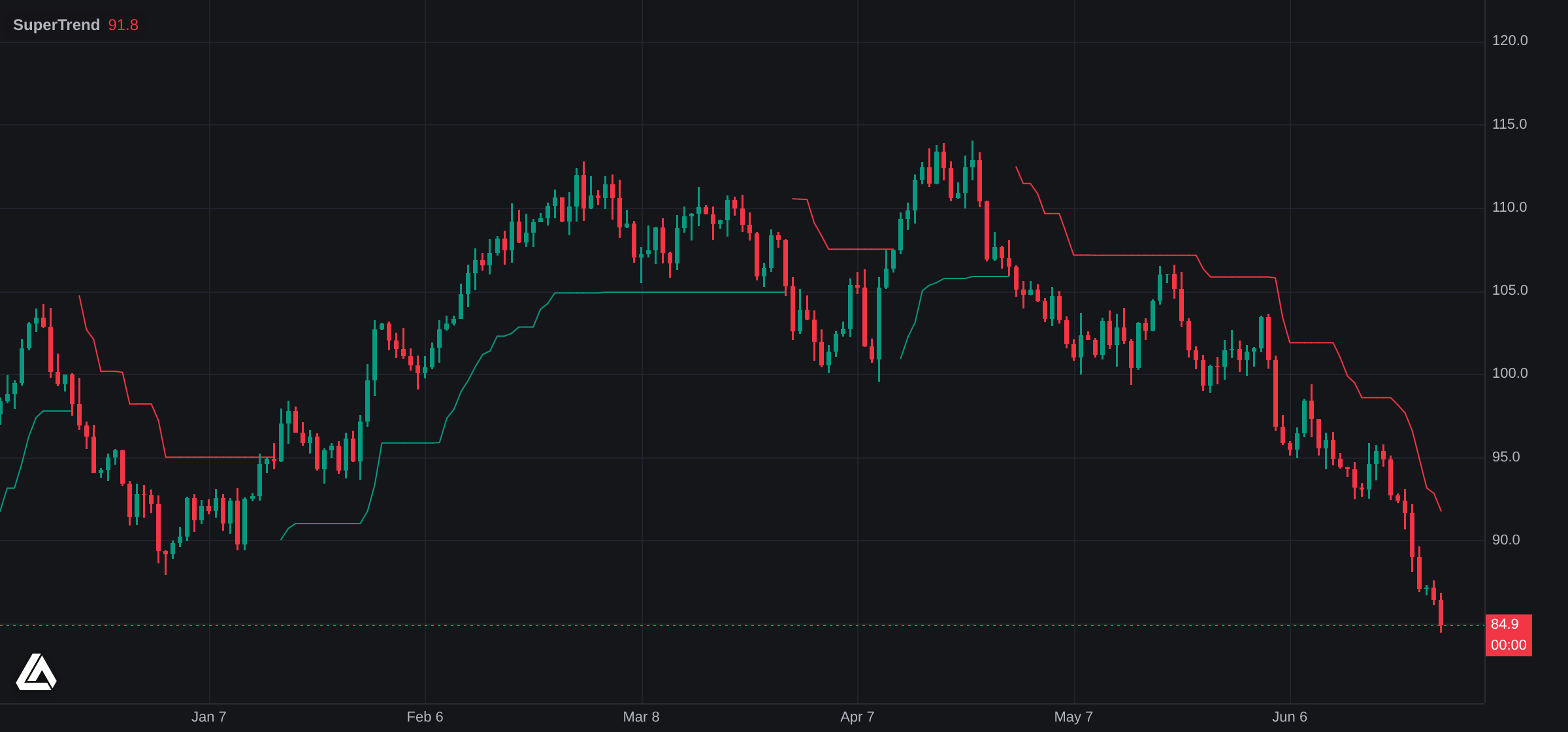
Not a mockup: the Library's SuperTrend source as returned by library_get_source_code, executed by @luxalgo/vela-pinets on a @luxalgo/vela 0.6 chart and screenshotted in headless Chromium. The bars are a labelled synthetic sample; point data at your own or register a provider for live ones.
The whole demo is two script tags and five lines. source is the source field of a library_get_source_code result:
<div id="chart" style="height: 480px"></div>
<script src="https://cdn.jsdelivr.net/npm/@luxalgo/[email protected]/dist/vela.global.min.js"></script>
<script src="https://cdn.jsdelivr.net/npm/@luxalgo/[email protected]/dist/vela-pinets.global.min.js"></script>
<script>
  const chart = new Vela.Vela('#chart', { data: bars, timeframe: '1D', theme: 'dark' }); // bars: [{ time, open, high, low, close, volume? }]
  chart.registerEngine('pine', new VelaPinets.PineEngine());
  chart.addIndicator(source);
</script>
With a bundler it is the same three calls over import { Vela } from '@luxalgo/vela' and import { PineEngine } from '@luxalgo/vela-pinets'; see Vela's quickstart. The same chart paints your own trades: Trade Journal takes the shape broker_trades returns and draws entries, exits and P&L labels through Vela's native-indicator API, engine-free, in one component you can lift as is.
Where each piece runs. This matters because it is the opposite of how the rest of this server works:
Vela already draws the charts in Trade Journal and on the hosted Market Trackers, and velacharts.dev runs a live one.
Development
npm install
npm run build
npm start            # stdio
npm run start:http   # streamable HTTP on :3333/mcp
npm test               # smoke suite over stdio (hits live endpoints); --only library,edge for a subset
npm run test:http      # the same suite against a running HTTP entry on :3333
npm run test:parity    # simulator tools vs upstream package + raw engine
npm run test:trackers  # offline checks of the Market Trackers streaming engine
Layout — one directory per concern, one directory per tool domain:
src/
  index.ts            the `luxalgo-mcp` binary → entries/stdio.ts
  entries/            stdio.ts (local), node-http.ts (plain Node), hosted.ts (shared by node-http and api/server.ts)
  server/             manifest.ts (the list of tool modules; protected / local-only derived from it),
                      create-server.ts (registration shared by every entry), version.ts (serverInfo)
  tools/<domain>/     index.ts exports a ToolModule (name, tool names, protected, localOnly, register);
                      api.ts wraps the domain's endpoints; the rest is the domain's own
  tools/_shared/      result/format helpers and the ToolModule contract
  auth/               OAuth: config, gate, verify, metadata, challenge, runtime, protected-tool, local/ (stdio client)
  platform/           app-client.ts (the one HTTP client for the LuxAlgo app), analytics.ts
api/server.ts         the Vercel function
test/                 smoke.mjs runner + smoke/<domain>.mjs suites, parity.mjs, trackers-check.mjs
Adding a tool domain: create src/tools/<domain>/index.ts exporting a ToolModule and list it in src/server/manifest.ts; registration asserts the module registers exactly the tools it declares. Mark tools that need a signed-in user in protectedTools (and register them with registerProtectedTool), and modules that read local credentials with localOnly.
Optional env: LUXALGO_APP_ORIGIN and LUXALGO_SITE_ORIGIN point the server at non-production environments; LUXALGO_CHART_ORIGIN (default https://vela.luxalgo.com) is where chart_url opens the chart; MARKET_TRACKERS_DUMPS_ORIGIN (default https://raw.githubusercontent.com/LuxAlgo/market-trackers-data/main) and MARKET_TRACKERS_DATA_REPO point the Market Trackers tools at another dumps tree.
OAuth env (see src/auth/config.ts): the authorization server is always LUXALGO_APP_ORIGIN + /api/auth; MCP_RESOURCE (default https://mcp.luxalgo.com/mcp) is this server's resource identifier and token audience — it must equal the app's LUXALGO_MCP_SERVER_RESOURCE. For local end-to-end work: LUXALGO_APP_ORIGIN=http://localhost:3001 MCP_RESOURCE=http://localhost:3333/mcp npm run start:http, with the app running on 3001 and the same MCP_RESOURCE exported for npx -y @luxalgo/mcp login / the stdio server. LUXALGO_AUTH_CHALLENGE=result makes the hosted entries let an anonymous protected call reach the tool (which answers the in-band _meta["mcp/www_authenticate"] challenge) instead of short-circuiting with HTTP 401 — the default; invalid tokens are always a 401. The Claude-only host is MCP_RESOURCE's host with claude. in front (http://claude.localhost:3333/mcp locally, where the smoke suite reaches it through X-Forwarded-Host); it must match the app's getLuxalgoClaudeMcpServerResource(). npm test covers the anonymous paths and the advertised securitySchemes on both transports; npm run test:http adds OAuth discovery on both hosts.
Disclaimer
Nothing this server returns is investment advice. Simulation outputs are modeled estimates under stated assumptions, not predictions or guarantees. Verify balances and performance numbers against your broker's own statements, and a prop firm's own page is authoritative for its current rules.
License
Code is MIT © LuxAlgo Global, LLC. Library content and Pine Script® sources served by this server keep their own licenses; see NOTICE.
The LuxAlgo name and logo are trademarks of LuxAlgo Global, LLC; see TRADEMARKS.md. To report a vulnerability, see SECURITY.md.