tokio-prompt-orchestrator
A Rust LLM request orchestrator: it sits between your app and an AI model (Anthropic, OpenAI, llama.cpp, vLLM), so the same prompt asked twice costs one model call, and when the provider goes down your requests fail fast with a clear reason instead of piling up.
For developers who call an LLM API from an app, an agent or a script and want it to stay fast and predictable under load and during outages. Use it as a ready-made server (orchestrator) or as a Rust library.



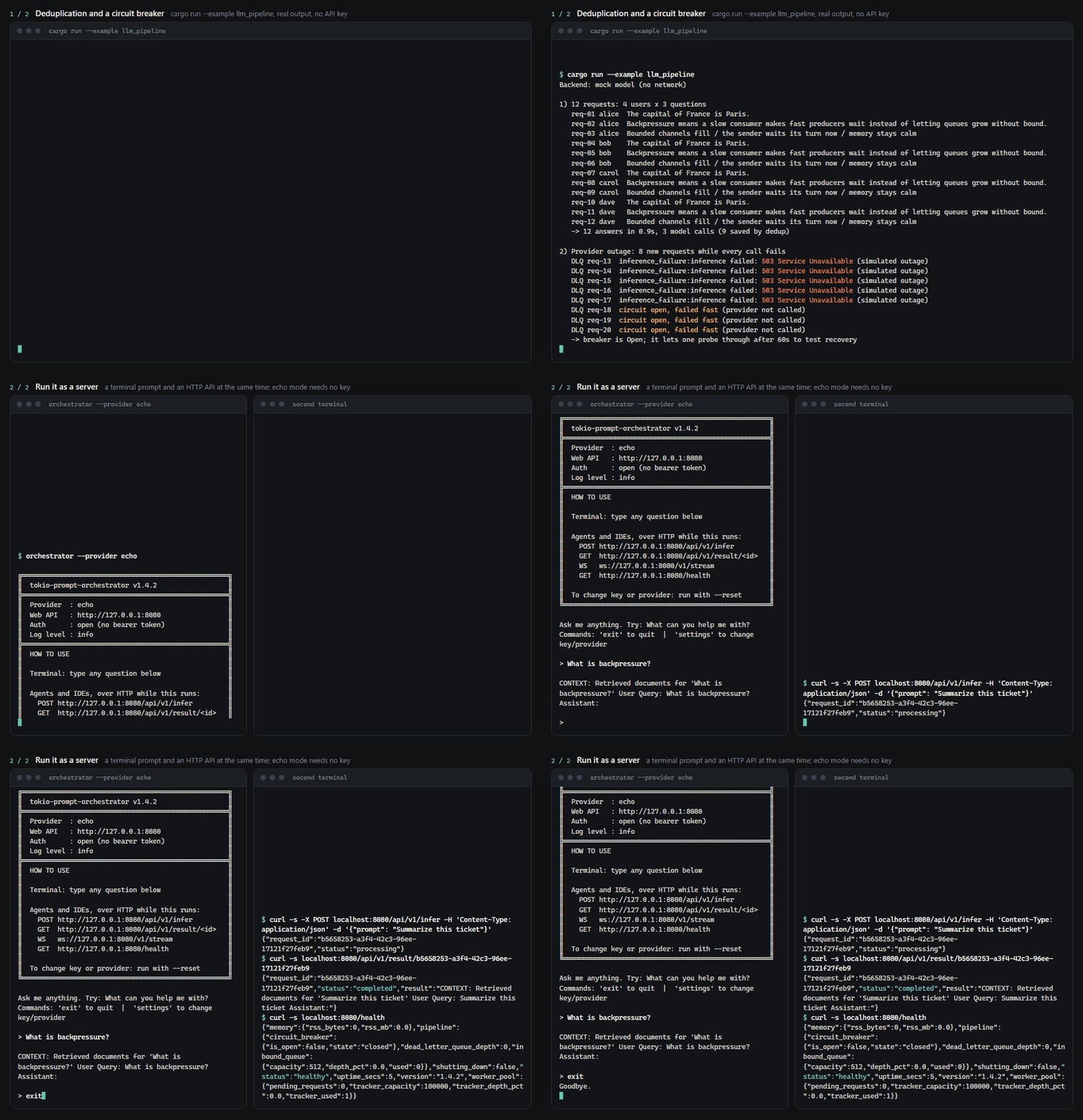
A real recording, sped up only where it was waiting. The site replays the same run step by step.
Install
Linux (x86_64, Ubuntu 20.04+ / Debian 11+). One line, no dependencies, installs to ~/.local/bin:
mkdir -p ~/.local/bin && curl -fsSL https://gitlab.com/mattbusel/tokio-prompt-orchestrator/-/releases/permalink/latest/downloads/orchestrator-linux-x86_64.tar.gz | tar xz --strip-components=1 -C ~/.local/bin --wildcards '*/orchestrator'
Every method installs the same orchestrator command. Every release, with SHA-256 checksums: Releases.
Drop-in OpenAI proxy
Any app that already uses an OpenAI client gets deduplication, the circuit breaker, timeouts, a spend cap and the dead-letter queue with no code change: start orchestrator and point the client's base URL at it.
export OPENAI_BASE_URL=http://127.0.0.1:8080/v1
With orchestrator --provider echo running (echo mode answers with your prompt, no key needed), the official Python client (pip install openai), unchanged:
from openai import OpenAI

client = OpenAI()  # reads OPENAI_BASE_URL and OPENAI_API_KEY

reply = client.chat.completions.create(
    model="gpt-4o-mini",
    messages=[{"role": "user", "content": "Summarize this ticket"}],
)
print(reply.choices[0].message.content, reply.usage.total_tokens)

for chunk in client.chat.completions.create(
    model="gpt-4o-mini",
    messages=[{"role": "user", "content": "Now stream it"}],
    stream=True,
):
    if chunk.choices:
        print(chunk.choices[0].delta.content or "", end="")
print()
Summarize this ticket 10
Now stream it
The same question again from curl is answered from the dedup window, without a model call:
curl -s -i localhost:8080/v1/chat/completions -H 'Content-Type: application/json' \
  -d '{"model": "gpt-4o-mini", "messages": [{"role": "user", "content": "Summarize this ticket"}]}'
x-orchestrator-dedup: cached
{"choices":[{"finish_reason":"stop","index":0,"logprobs":null,"message":{"content":"Summarize this ticket","refusal":null,"role":"assistant"}}],"created":1790804186,"id":"chatcmpl-4d5284a811bd4c0f90bee01018103e1a","model":"echo","object":"chat.completion","system_fingerprint":null,"usage":{"completion_tokens":5,"prompt_tokens":5,"total_tokens":10}}
The orchestrator answers with the provider and model it was started with (--provider openai --model gpt-4o-mini, say), whatever model the request names. Errors come back in OpenAI's format: 503 while the breaker is open, 429 at the spend cap. Details, auth and limits: docs/REFERENCE.md.
For OpenAI models the token counts in usage (and so the spend cap) come from the model's own tokenizer, so they match your OpenAI bill. Other models get an estimate of about 4 characters per token, which is what you see from echo above.
Drop-in Anthropic proxy
The same for Anthropic clients: point the base URL at the orchestrator and POST /v1/messages gets the same deduplication, circuit breaker and spend cap. The official Python SDK, unchanged, against orchestrator --provider echo:
import anthropic

client = anthropic.Anthropic(base_url="http://127.0.0.1:8080", api_key="local")
msg = client.messages.create(
    model="claude-sonnet-4-6",
    max_tokens=200,
    messages=[{"role": "user", "content": "Summarize this ticket"}],
)
print(msg.content[0].text, msg.stop_reason)

with client.messages.stream(model="claude-sonnet-4-6", max_tokens=200,
                            messages=[{"role": "user", "content": "Now stream it"}]) as s:
    print("".join(s.text_stream))
Summarize this ticket end_turn
Now stream it
Text conversations, system prompts and streaming are supported; image and tool blocks are rejected with a clear invalid_request_error. The key goes in x-api-key (as the Anthropic SDKs send it) or Authorization: Bearer.
Answer from your own documents
orchestrator --docs ./my-docs indexes the Markdown and text files in a folder (tantivy BM25 search with English stemming, in memory) and sends the best passages, with their file names, in front of each question. Real run with --provider echo, which shows exactly what the model receives:
  Answering from 2 passages in ./demo-docs
> How long do refunds take?
Use the following excerpts to answer. If they do not contain the answer, say so. [1] (policies/refunds.md) # Refunds Refunds are issued to the original card within 14 days of us receiving the return. Gift cards cannot be refunded. Question: How long do refunds take?
If search fails or takes longer than 2 seconds, the prompt is sent without context; a request is never dropped because of retrieval. In Rust: spawn_pipeline_with(worker, PipelineOptions::with_retriever(Arc::new(TantivyRetriever::index_dir("./docs")?))), or implement the Retriever trait over your own search (a vector database, Elasticsearch, Postgres).
Semantic dedup: same question, different words
Exact dedup only catches identical prompts. With an embedder, the OpenAI and Anthropic endpoints also answer a reworded question from the cache (x-orchestrator-dedup: semantic, with the similarity in x-orchestrator-similarity). orchestrator --semantic-dedup uses a local model (fastembed, BGE-small, no API key, 128 MB downloaded once to your cache directory); in Rust, Deduplicator::with_embedder takes it or an OpenAI/genai embedder.
Embeddings alone are not safe for this. Measured with BGE-small, "Convert 10 miles to kilometers" and "Convert 10 kilometers to miles" score 0.99, higher than any real paraphrase we tried. So a match must also have the same numbers and its shared words in the same order. On our test pairs (tests/semantic_dedup_tests.rs), at the default threshold of 0.93:
It errs toward a second model call, never toward someone else's answer. Check the hits on your own traffic before lowering the threshold.
How it works
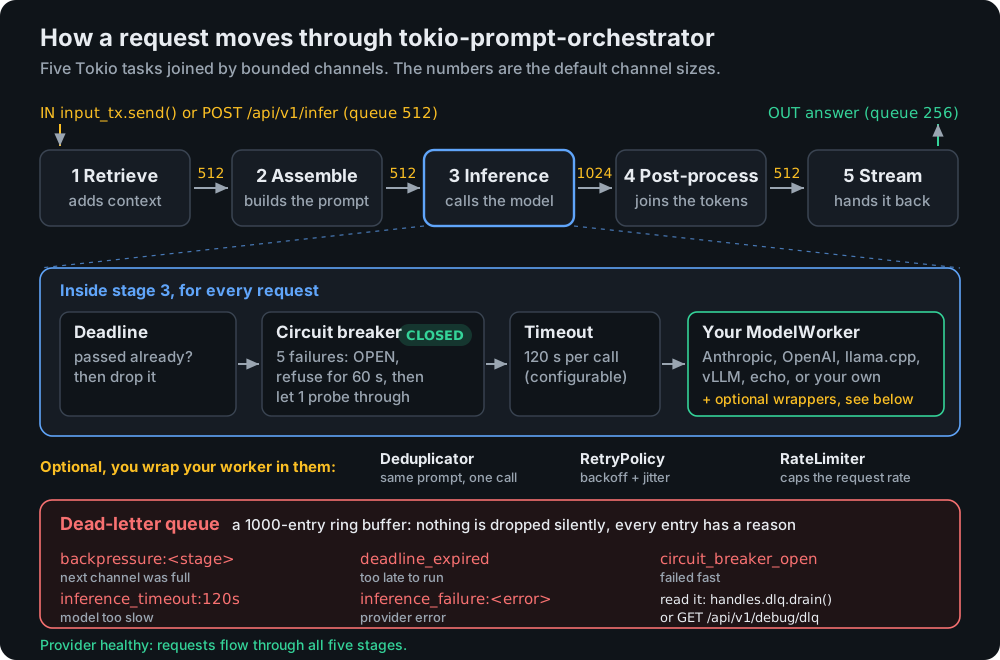
Each stage is its own Tokio task. A full channel never grows memory: the request is shed to the dead-letter queue with the reason, and the HTTP API answers 429 with Retry-After. Everything in the drawing is read from src/stages.rs; more in docs/ARCHITECTURE.md.
Retries for brief hiccups. Providers sometimes fail for a second: a 429, a 503, a dropped connection. Start with orchestrator --retries 2 (or set retry_attempts in a pipeline config) and such a call is tried again after a short, randomised wait that doubles each time, before it counts as a failure. A provider's Retry-After is respected, a bad API key is never retried, and all the tries of one request count once for the circuit breaker. It is off by default, so the breaker demo above behaves exactly as shown.
Built on proven crates. The parts that are easy to get subtly wrong come from widely used open-source libraries rather than code written here: backon for retry timing, moka for the dedup cache (it has a size limit, so a flood of different prompts cannot grow memory without bound), tiktoken-rs for OpenAI token counts, and prometheus for /metrics.
Examples
1. Twelve requests, three model calls, then an outage. cargo run --example llm_pipeline (no key needed), real output from today, trimmed:
1) 12 requests: 4 users x 3 questions
   req-01 alice  The capital of France is Paris.
   req-02 alice  Backpressure means a slow consumer makes fast producers wait instead of letting queues grow without bound.
   ...
   req-12 dave   Bounded channels fill / the sender waits its turn now / memory stays calm
   -> 12 answers in 0.9s, 3 model calls (9 saved by dedup)

2) Provider outage: 8 new requests while every call fails
   DLQ req-13  inference_failure:inference failed: 503 Service Unavailable (simulated outage)
   ...
   DLQ req-17  inference_failure:inference failed: 503 Service Unavailable (simulated outage)
   DLQ req-18  circuit open, failed fast (provider not called)
   DLQ req-19  circuit open, failed fast (provider not called)
   DLQ req-20  circuit open, failed fast (provider not called)
   -> breaker is Open; it lets one probe through after 60s to test recovery
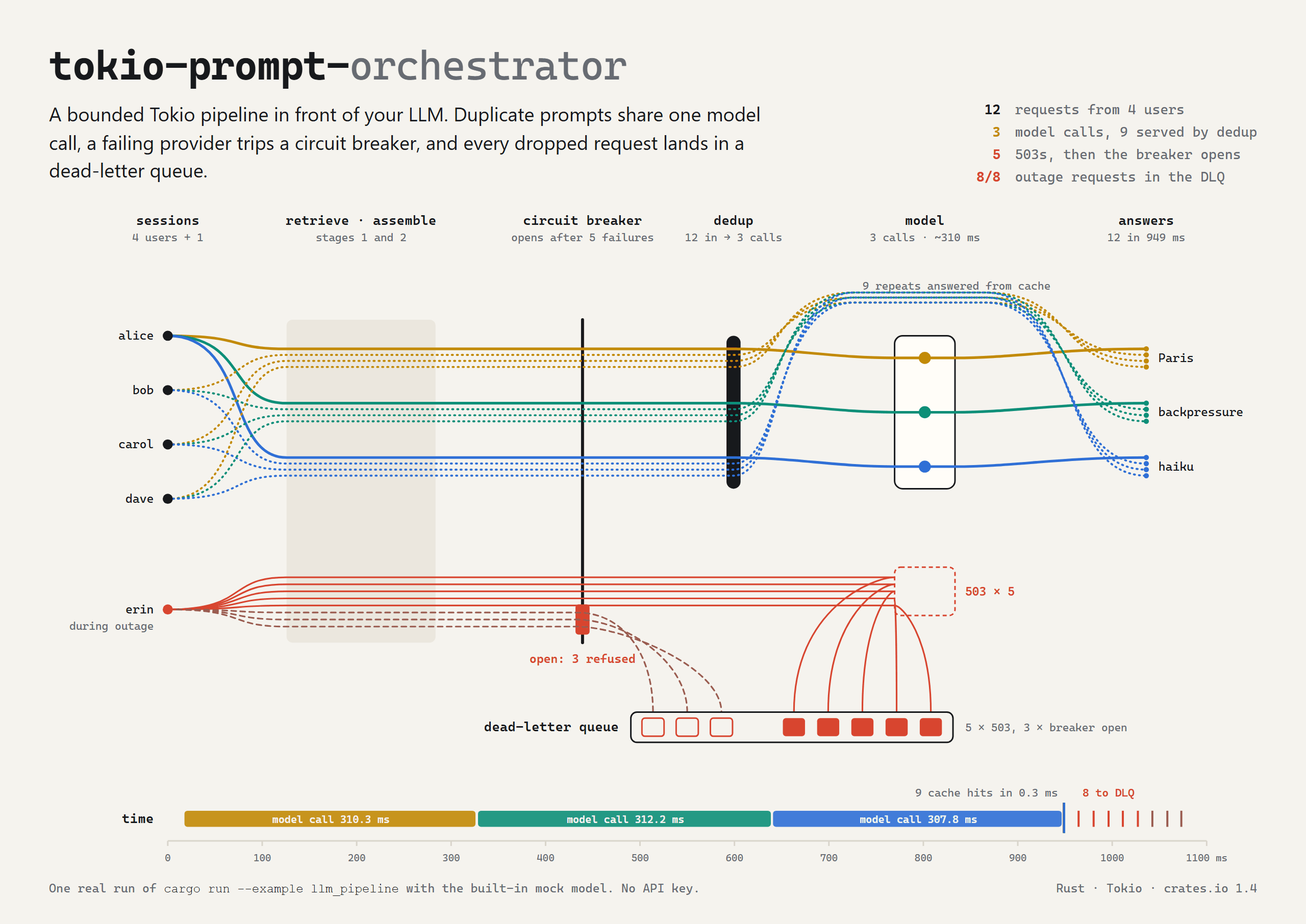
Set PROVIDER=anthropic ANTHROPIC_API_KEY=... or PROVIDER=openai OPENAI_API_KEY=... to make the same 3 calls against a real model. The source, examples/llm_pipeline.rs, is a good template for your own backend.
2. Any tool can use it over HTTP. With orchestrator --provider echo running (echo mode answers with the prompt exactly as the model would receive it):
curl -s -X POST localhost:8080/api/v1/infer -H 'Content-Type: application/json' -d '{"prompt": "Summarize this ticket"}'
{"request_id":"d6a70800-99ef-4f2b-9b27-63b02af7d972","status":"processing"}
curl -s localhost:8080/api/v1/result/d6a70800-99ef-4f2b-9b27-63b02af7d972
{"request_id":"d6a70800-99ef-4f2b-9b27-63b02af7d972","status":"completed","result":"Summarize this ticket"}
curl -s localhost:8080/health
{"memory":{"rss_bytes":0,"rss_mb":0.0},"pipeline":{"circuit_breaker":{"is_open":false,"state":"closed"},"dead_letter_queue_depth":0,"inbound_queue":{"capacity":512,"depth_pct":0.0,"used":0}},"shutting_down":false,"status":"healthy","uptime_secs":2,"version":"2.0.0","worker_pool":{"pending_requests":0,"tracker_capacity":100000,"tracker_depth_pct":0.0,"tracker_used":1}}
3. In your own Rust code. examples/quickstart.rs, cargo run --example quickstart:
use std::{collections::HashMap, sync::Arc};
use tokio_prompt_orchestrator::{spawn_pipeline, EchoWorker, ModelWorker, PromptRequest, SessionId};

#[tokio::main]
async fn main() -> Result<(), Box<dyn std::error::Error>> {
    // Swap EchoWorker for AnthropicWorker, OpenAiWorker, LlamaCppWorker, VllmWorker,
    // or a worker over the client you already use (next section).
    let worker: Arc<dyn ModelWorker> = Arc::new(EchoWorker::new());
    let handles = spawn_pipeline(worker);
    let mut output = handles.take_output_rx().await.ok_or("output already taken")?;

    handles.input_tx.send(PromptRequest {
        session: SessionId::new("demo"),
        request_id: "req-1".into(),
        input: "Hello, pipeline!".into(),
        meta: HashMap::new(),
        deadline: None,
    }).await?;

    let answer = output.recv().await.ok_or("pipeline closed")?;
    println!("{}", answer.text);
    for dropped in handles.dlq.drain() { println!("dropped {}: {}", dropped.request_id, dropped.reason); }
    Ok(())
}
Hello, pipeline!
Needs tokio-prompt-orchestrator = "2" and tokio = { version = "1", features = ["rt-multi-thread", "macros"] } in Cargo.toml.
Already using async-openai, genai, rig or tower?
Keep your client. Each of these is a cargo feature that turns it into a worker, so deduplication, the circuit breaker, retries, timeouts and the dead-letter queue sit in front of the code you already have.
use std::sync::Arc;
use async_openai::{config::OpenAIConfig, Client};
use tokio_prompt_orchestrator::{integrations::AsyncOpenAiWorker, spawn_pipeline};

// The client you already have, here pointed at a local Ollama.
let client = Client::with_config(
    OpenAIConfig::new().with_api_base("http://localhost:11434/v1").with_api_key("ollama"),
);
let handles = spawn_pipeline(Arc::new(AsyncOpenAiWorker::new(client, "llama3.2")));
All four are tested end to end against a mock OpenAI server (tests/integrations_tests.rs): replies, streaming, and that a rejected key is never retried while a 429 backs off.
Feature flags
With no features the library is the pipeline, the workers and the resilience parts: 167 crates in the dependency tree. Everything else is opt-in.
Use it in 3 steps
- Start it.
orchestrator --provider echo needs no key. You get a > prompt in the terminal and a web address, http://127.0.0.1:8080.
- Send it prompts from the terminal, or from any app with
POST /api/v1/infer and GET /api/v1/result/<id> (example 2 above).
- Point it at a real model.
orchestrator --reset asks for a provider and key once and saves them, or pass them directly: ANTHROPIC_API_KEY=sk-ant-... orchestrator --provider anthropic --model claude-sonnet-4-6.
orchestrator --help lists every flag. If something goes wrong, see Troubleshooting.
Documentation
Contributions welcome: see CONTRIBUTING.md. MIT licensed, see LICENSE.
Hire the author
Need this kind of engineering on your product? I take on a small number of client builds: LLM features, iOS apps and performance work, fixed price. Services and pricing · Email · LinkedIn




