The FreeCAD MCP MCP server is a publicly available project. Review the upstream repository for installation instructions, supported tools, compatibility, permissions, and current maintenance status.
Configuration
Configuration, transport, authentication, and runtime requirements vary by project. Open the repository before connecting and use the smallest set of credentials and permissions required.
Context7 Platform - Up-to-date Code Docs For Any Prompt
upstash
Community
Context7 MCP server providing up-to-date, version-specific documentation and code examples for libraries, enabling coding agents to fetch accurate docs and code snippets. Requires an API key for higher rate limits, passed via CONTEXT7_API_KEY header.
57.7Kstars0forks
Playwright MCP
Microsoft Corporation
Community
A Model Context Protocol (MCP) server that provides browser automation capabilities using Playwright. Enables LLMs to interact with web pages through structured accessibility snapshots, bypassing the need for screenshots or visually-tuned models.
35.5Kstars0forks
AIHawk
feder-cr
Community
AIHawk is an anti detect browser and web browsing agent, open source, with an MCP server for coding agents: undetected, no captchas, no blocks. It requires an OpenRouter API key for the standalone web UI mode, which can be provided via the --openrouter-key flag or the OPENROUTER_API_KEY environment variable or a .env file in the running directory.
Control FreeCAD from Claude Desktop and other MCP clients. Create and edit models,
run Python scripts, inspect documents, and run FEM analyses.
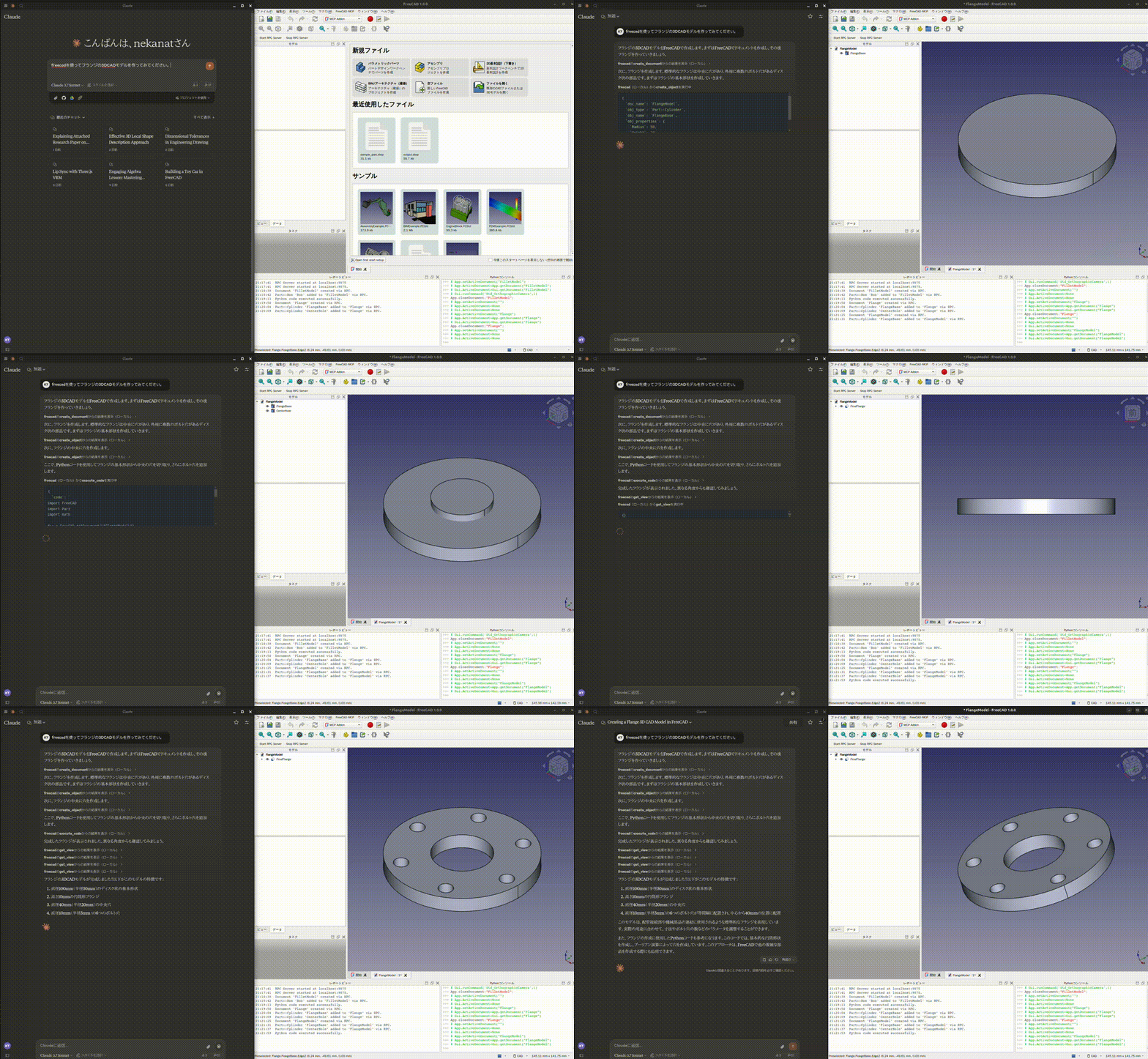
Demo
Design a flange:
See more demos and examples for a toy car, modelling from a
2D drawing, and agent integrations.
Quick start
You need FreeCAD and uv / uvx.
FreeCAD MCP has two components: an addon running inside FreeCAD and an MCP server
launched by your client.
1. Install and start the FreeCAD addon
git clone https://github.com/neka-nat/freecad-mcp.git
cd freecad-mcp
Copy addon/FreeCADMCP into your FreeCAD addon directory,
then restart FreeCAD. Select the MCP Addon workbench and click
Start RPC Server in the FreeCAD MCP toolbar.
See the installation guide for platform-specific commands
and screenshots.
2. Connect Claude Desktop
Add the following entry to claude_desktop_config.json:
Restart Claude Desktop to load the configuration, keep FreeCAD open with its RPC
server running, and ask Claude to create a model. Connections use localhost by
default.