🤔 Why MinerU Document Explorer?
MinerU Document Explorer equips your agent with three tool suites — Retrieve, Deep Read, and Ingest — closing the full knowledge loop:
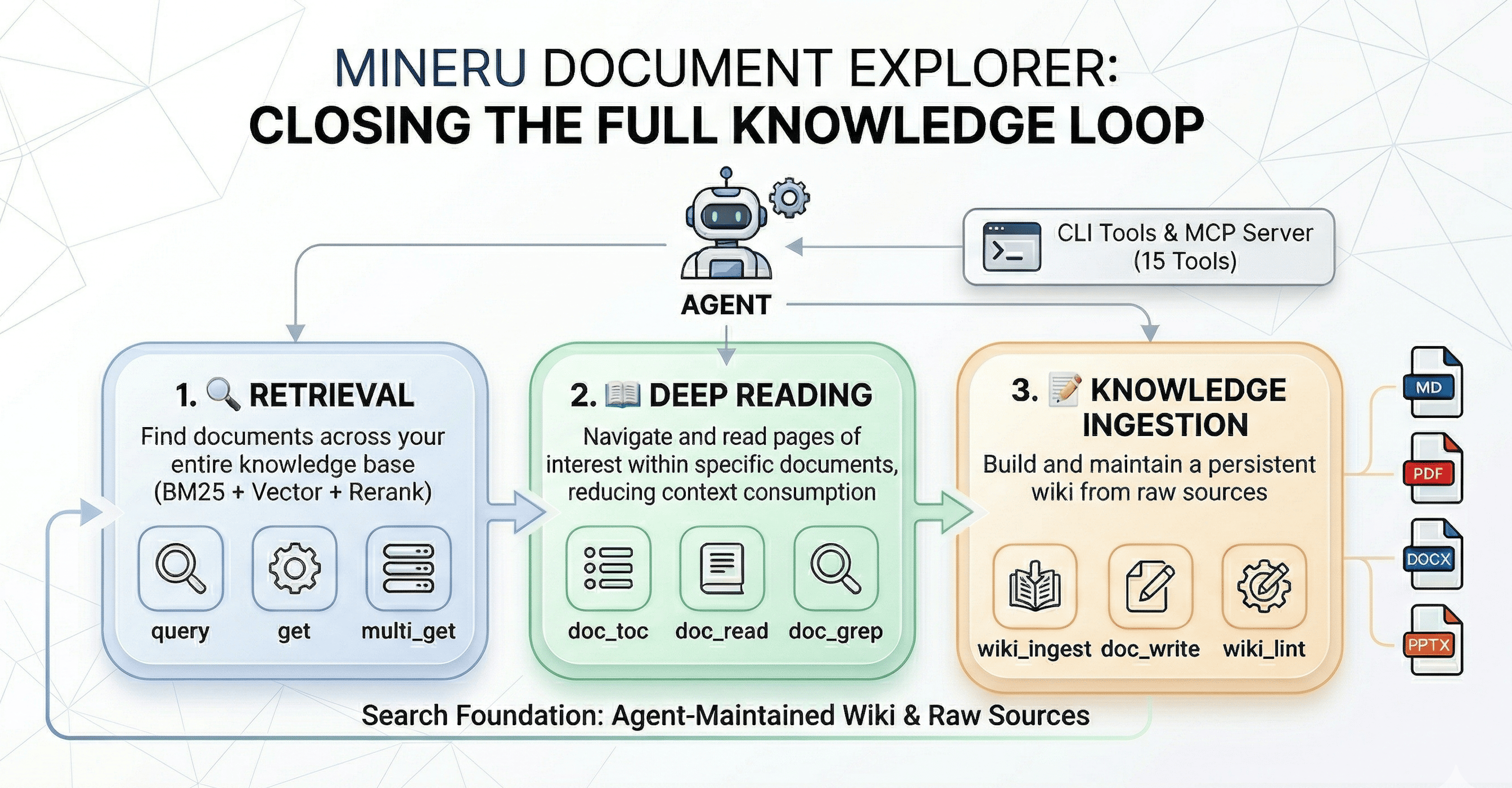
- 🔍 Retrieve — Cross-collection search: BM25, vector, and hybrid with LLM reranking and query expansion
- 📖 Deep Read — Navigate inside a single document without loading the whole file: table of contents, section reading, inline search, and element extraction
- 📝 Ingest — Build and maintain a LLM wiki from raw documents, following the Karpathy LLM Wiki pattern
Developed by the MinerU team, building on QMD and Karpathy's LLM Wiki.
💡 What can you do with it?
- Research assistant — Point it at a folder of PDFs and ask your AI agent to survey the literature, compare methods, or find specific results across papers
- Project knowledge base — Index your codebase, docs, and design specs; let the agent answer questions about architecture, find relevant code, or trace requirements
- Study companion — Upload textbooks or lecture notes; use
doc_toc + doc_read to navigate, doc_grep to search, and build a wiki of key concepts
- Enterprise document search — Index contracts, reports, or manuals and search them with natural language queries enhanced by LLM reranking
See it in action: The demo/ folder contains a complete end-to-end example — an AI agent automatically reads ~10 arXiv papers on RAG, builds an interlinked wiki knowledge base, and writes a research survey. See the Demo Guide for step-by-step instructions.
🚀 Quick Start
Agent-Assisted Setup: If you're using an AI agent (Claude Code, Cursor, etc.), simply ask it to help you deploy MinerU Document Explorer and install skills — the agent can handle the entire setup process for you, including MCP configuration.
Follow the https://github.com/opendatalab/MinerU-Document-Explorer/blob/main/docs/quickstart.md to install MinerU Document Explorer and walk the user through configuration.
📖 Document Deep Reading
Navigate and search within a single document without reading the whole file:
# View document structure
qmd doc-toc papers/attention-is-all-you-need.pdf

# Read specific sections by address
qmd doc-read papers/attention-is-all-you-need.pdf "line:45-120"

# Search within one document
qmd doc-grep papers/attention-is-all-you-need.pdf "self-attention"
Integrate with AI agents via Model Context Protocol.
MCP Server vs CLI: The MCP server runs as a persistent process — LLM models (embeddings, reranker, query expansion) are loaded once and stay in memory across requests. CLI commands like qmd query must reload all models on every invocation, adding ~5–15 s of startup overhead each time. For agent workflows, always prefer the MCP server.
Two transport modes:
# Start the HTTP daemon (recommended — models stay loaded across all requests)
qmd mcp --http --daemon             # default port 8181
qmd mcp --http --daemon --port 8080 # custom port

# Verify server is running
curl http://localhost:8181/health

# Stop the daemon
qmd mcp stop
Client Configuration
Cursor — add to .cursor/mcp.json (project) or ~/.cursor/mcp.json (global)
Option A — stdio (Cursor manages the process lifecycle):
{
  "mcpServers": {
    "qmd": {
      "command": "qmd",
      "args": ["mcp"]
    }
  }
}
Option B — HTTP (run qmd mcp --http --daemon first; models stay loaded, faster responses):
{
  "mcpServers": {
    "qmd": {
      "url": "http://localhost:8181/mcp"
    }
  }
}
Claude Desktop — add to ~/Library/Application Support/Claude/claude_desktop_config.json
{
  "mcpServers": {
    "qmd": {
      "command": "qmd",
      "args": ["mcp"]
    }
  }
}
Claude Code — add to ~/.claude/settings.json or run claude mcp add qmd -- qmd mcp
{
  "mcpServers": {
    "qmd": {
      "command": "qmd",
      "args": ["mcp"]
    }
  }
}
Windsurf / VS Code / Other MCP Clients
For stdio transport, use "command": "qmd", "args": ["mcp"] in your client's MCP configuration.
For HTTP transport, start qmd mcp --http --daemon and point your client to http://localhost:8181/mcp.
See MCP setup guide for all 15 tools and HTTP transport details.
Agent Skills
MinerU Document Explorer ships with a built-in Agent Skill that teaches AI agents how to use the full tool suite effectively — decision trees, usage patterns, and best practices for all 15 MCP tools.
# Install the skill (works with both npm and source installs)
qmd skill install              # local project (.agents/skills/)
qmd skill install --global     # global (~/.agents/skills/)

# Or from source repo
claude skill add ./skills/mineru-document-explorer/SKILL.md
📊 How It Compares
⚙️ Requirements
📄 Document Processing Setup
Python 3.10+ is required for document processing (PDF, DOCX, PPTX):
# Check Python version
python3 --version  # needs >= 3.10

# Install required Python packages
pip install pymupdf python-docx python-pptx

# Verify
python3 -c "import pymupdf; import docx; import pptx; print('OK')"
MinerU Cloud — high-quality PDF extraction for scanned documents and complex layouts (optional)
pip install mineru-open-sdk
export MINERU_API_KEY="your-key"  # get from https://mineru.net
When MINERU_API_KEY is set, MinerU Cloud is automatically used as the primary PDF provider with PyMuPDF as fallback.
For advanced configuration (custom providers, local VLM models, GPT PageIndex), create ~/.config/qmd/doc-reading.json:
{
  "docReading": {
    "providers": {
      "fullText": { "pdf": ["mineru_cloud", "pymupdf"] }
    },
    "credentials": {
      "mineru": { "api_key": "your-api-key" }
    }
  }
}
🤖 LLM Models (auto-downloaded on first use)
Models are only needed for qmd embed, qmd vsearch, and qmd query. qmd search runs BM25 retrieval.
📚 Documentation
❤️ Acknowledgments
MinerU Document Explorer builds upon these foundational projects:
📝 Changelog
v1 — 2026-04-07 (Current)
Rebuilt from an OpenClaw agent skill into a full agent-native knowledge engine: npm package (npm install -g mineru-document-explorer), qmd CLI, MCP server with 15 tools across three groups (Retrieval / Deep Reading / Knowledge Ingestion), multi-format support (MD, PDF, DOCX, PPTX), hybrid search (BM25 + vector + LLM reranking), and LLM Wiki knowledge base pattern.
v0 — 2026-03-30 (Previous)
OpenClaw-native agent skill (doc-search CLI). Four capabilities: Logic Retrieval, Semantic Retrieval, Keyword Retrieval, Evidence Extraction. See the v0 repository.



 MinerU Document Explorer



