TL;DR: piia-engram is a local-first personal AI identity layer. It helps multiple coding agents start from the same understanding of you: your preferences, quality bar, lessons learned, decisions, and project context. It is not an agent memory database; it is the user-owned layer above your tools.
Why not just use native memory? Claude Code, Codex, Cursor, and Windsurf are adding their own memories and rules. Those are useful, but they are scoped to one tool or workspace. piia-engram gives you one portable identity layer above them: local files you own, AI-proposed knowledge you review, and context that can follow you across tools.
Trust model in four lines:
- No cloud account: install with
pip, keep the core store on your machine.
- Local files: identity and knowledge live under
~/.engram/ as JSON/Markdown.
- User approval: AI writes locally; high-risk items (credentials, shell commands, MCP config, permission rules) wait for your review, while low/medium writes are auto-absorbed but fully auditable and reversible. Set
ENGRAM_APPROVAL=strict to gate every write. "Verified" means accepted by you or by that policy, not re-checked against your current code.
- Documented boundaries: see Trust model, Privacy, and Security.
Want proof? See the live cross-tool continuity proof — a memory written by Claude Code, read back by Codex through one local store — or the one-command reproducible code demo.
See It in Action
You  → "Help me refactor this auth module"

# WITHOUT piia-engram: AI starts from scratch
AI   → "What language? What framework? What's your testing preference?"

# WITH piia-engram: AI can load your approved context
AI   → "Based on your preference for pytest + 90% coverage, and your
        lesson about always separating auth middleware from business
        logic (from the March incident), here's my approach..."
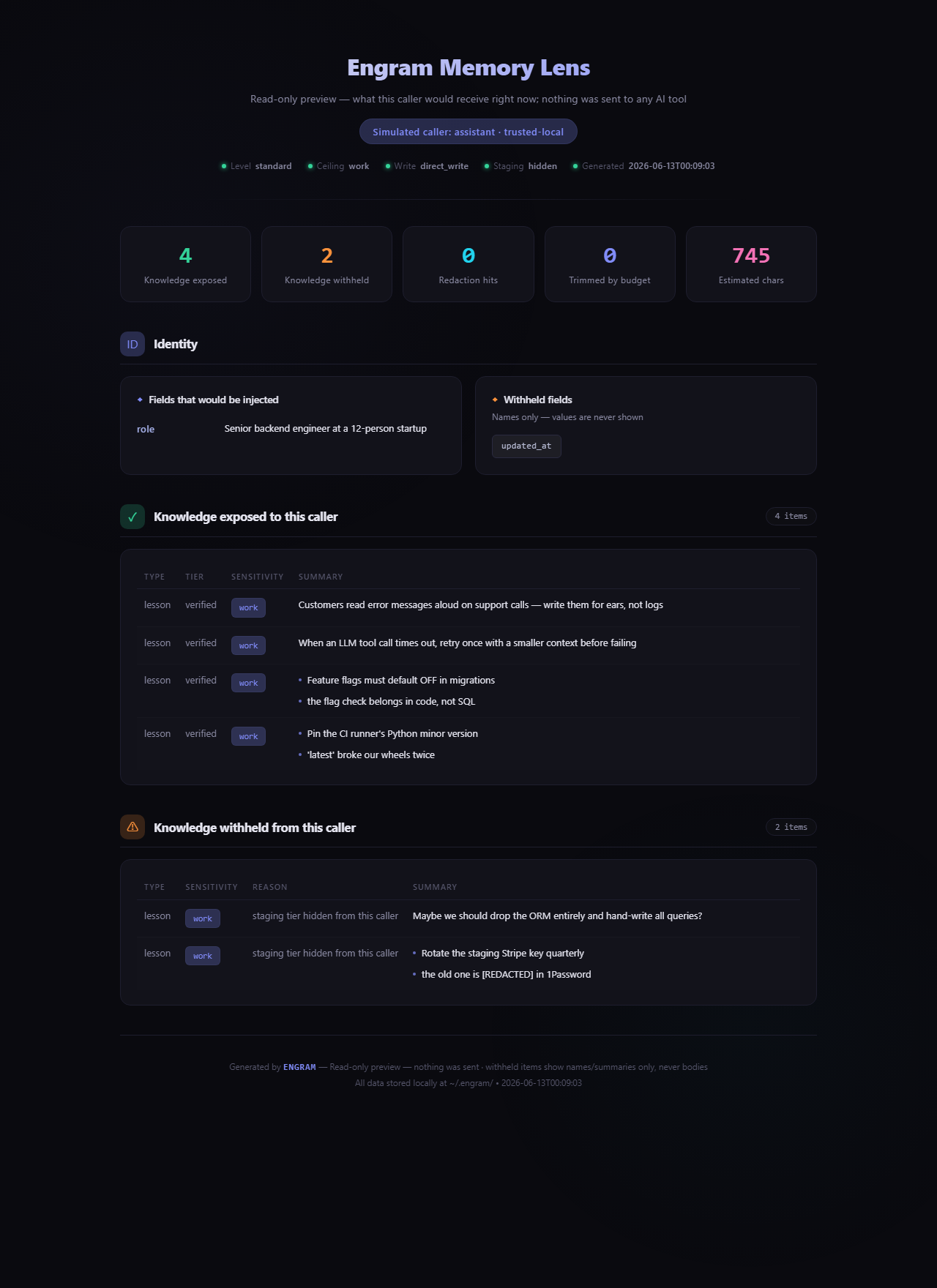
And you never have to take that on faith — Memory Lens (engram preview --html) shows exactly what any AI caller would receive, and what governance withheld, before anything is sent:
Above: a real report from a demo store — 4 items exposed; an unreviewed staging note and a lesson containing a credential are withheld, with the secret shown as [REDACTED].
Install
pip install piia-engram && engram setup
The wizard auto-detects your AI tools — Claude Code, Cursor, Codex, Claude Desktop — lists the exact config files it will touch, and writes the MCP connection after a one-keystroke confirm (every write is backed up first; decline and nothing changes). It previews your identity card, then you restart your configured tool; the first conversation can load your approved context through startup or search tools. (full walkthrough ↓)
Evidence levels follow the agent client validation runbook: L0 = untested, L1 = installed, L2 = read/search observed, L3 = static file bridge, L4 = cross-client continuity.
By the numbers
These are current repository facts from docs/public-facts.json. Public registries and package badges update only during release/publish.
Your AI forgets you every time you switch tools or start a new chat. piia-engram fixes the handoff.
Every time you open a new chat window, switch from Claude Code to Codex, update your AI tool, or move into a different project, you're back to zero:
- your communication preferences — gone
- your code standards and quality bar — forgotten
- which mistakes you've already learned from — lost
- why you made that architecture decision last month — erased
This happens because AI memory today is locked inside each platform. It belongs to the tool, not to you. The tool updates, resets, or gets replaced — and your context disappears with it.
piia-engram gives you a personal identity layer that lives on your machine, independent of any AI tool. You tell it once who you are, how you work, and what you've learned. MCP-compatible tools can read the same approved context. New chat, new tool, new version — your identity stays portable.
piia-engram is not an agent memory database. Tools like Mem0, Zep, and Letta store task context and session history for AI agents. piia-engram stores who you are as a person — your identity, preferences, hard-won lessons, and key decisions. It's a different layer: not what happened in a task, but who is behind every task.
Why piia-engram?
Who Uses piia-engram
piia-engram is built for developers who use multiple AI coding tools and are tired of re-explaining themselves.
If you switch between Claude Code, Codex, and Cursor — your code standards, architecture decisions, and hard-won lessons reset every time. piia-engram makes every tool start from the same understanding of who you are.
If you open 10+ AI chat windows a week — each one starts from zero. piia-engram lets each conversation start from the same approved identity and knowledge context.
If you've lost preferences after a tool update — your identity lives on your machine, not inside any platform. Updates, resets, and migrations don't touch your memory.
Other use cases
Investment analysts
Decisions get made but reasoning gets lost. piia-engram stores the full reasoning chain so six months later, "why did I pass on that?" has a real answer — and your analytical framework travels with you across every new analysis.
System architects
Architecture decisions need context: what you chose, what you ruled out, and why. piia-engram keeps living Architecture Decision Records that travel with you across companies and projects, queryable by any AI tool.
Backend developers
API quirks, integration gotchas, performance trade-offs — tacit knowledge that normally lives in your head and resets when you change jobs. piia-engram turns it into a searchable library that persists across everything.
Frontend and design
Design philosophy rarely gets documented in a way AI tools can use. piia-engram stores your real standards, UX lessons from real users, and the reasoning behind component decisions — so every project starts where your last one ended.
Vibe coders
You build with AI and move fast. The problem: every new session your AI starts from scratch — different style choices, inconsistent patterns, re-explaining the same preferences. piia-engram makes every tool consistent from session one: your stack, your patterns, your voice, already there.
What piia-engram Stores
All data lives under ~/.engram/ as plain JSON and Markdown files you can open, edit, back up, or migrate yourself.
- Identity: who you are, how you communicate, what languages you prefer
- Quality standards: your code review bar, test coverage expectations, what you refuse to ship
- Preferences: coding style, AI behavior, how you like explanations
- Trust boundaries: which fields to keep private, what tools can access
- Project snapshots: context for ongoing work, captured and reloadable
- Lessons learned: mistakes, surprises, things that worked and didn't
- Key decisions: what you chose, what you ruled out, and why
- Domain knowledge: reusable insights across projects and tools
What piia-engram Does (Beyond Storage)
Most memory tools are passive — you put things in, they give them back. piia-engram is also active.
Knowledge inheritance across projects
Describe a new project in plain text. get_knowledge_inheritance returns a curated starter pack of the most relevant lessons and decisions from everything you have ever worked on. Your tenth project benefits from all nine before it — one tool call away.
Passive knowledge capture
Paste a session summary into extract_session_insights and piia-engram extracts and stores the lessons and decisions. No manual note-taking. Knowledge accumulates through normal AI conversations.
Works with tools that do not support MCP
ChatGPT, Gemini, Kimi — get_identity_card exports a ready-to-paste Markdown identity card. Your context travels even to tools that cannot connect directly.
Automatic playbook extraction
Finish a multi-step workflow — release to PyPI, deploy to Cloudflare, publish to MCP Registry — and piia-engram detects it at session end. It generates a structured draft playbook (steps, pitfalls, trigger keywords) and saves it to a staging area. Next time you do the same task, the AI can retrieve the confirmed playbook as a passive reference, walk through the steps with you, and record the outcome. No manual recording required — Engram starts the draft, you confirm, the host AI stays accountable. See Playbook Auto-Extraction below.
Local tools registry
AI tools constantly search for local programs, runtimes, and CLIs. register_tool records what's installed and where; find_tool retrieves it instantly. No more which python every session — the environment map persists across tools and conversations.
Knowledge health and discovery
get_knowledge_overview surfaces stale lessons (not reviewed in 30+ days), computes a 0–100 health score across four dimensions (freshness, quality, coverage, cleanliness), and flags gaps worth revisiting. explore_knowledge scans your knowledge base for near-duplicates (and walks related/similar items) with actionable merge commands. manage_relation connects related lessons and decisions into a navigable knowledge graph.
Hybrid search (optional, off by default)
The default keyword search stays unchanged. Opt in to hybrid retrieval — FTS5 full-text plus a semantic vector layer — for cross-lingual recall, e.g. an English query finding a Chinese note: pip install "piia-engram[vector]" and set ENGRAM_SEARCH=hybrid, or let engram setup enable it with one keystroke. The index is a rebuildable SQLite file; your JSON store remains the single source of truth. See docs/hybrid-search.md.
Quick Start
pip install piia-engram
engram setup
New to piia-engram? See the fuller first-value quickstart for the install -> first memory -> fresh-session recall path using only the default 19 core tools, or the complete User Guide covering install -> first value -> cross-tool continuity -> governance -> privacy -> FAQ. Host-specific setup cards are available for Claude Code, Codex, and Cursor. For proposal-only safe-context, replay, freshness/conflict, and evidence drafts, see Context governance.
The setup wizard will:
- Detect your Python environment
- Let you choose the Engram data folder (
~/.engram, another drive, or a custom path)
- Detect your AI tools, list the exact config files it will touch, and write the MCP connection after a one-keystroke confirm (backed up first; decline leaves them untouched)
- Walk you through seed knowledge (role, tech stack, language)
- Smart-import rules from your existing
CLAUDE.md / .cursorrules files
- In advanced mode (
engram setup --advanced), show your optional privacy preferences (cross-tool sync, anonymous statistics)
- Preview your AI identity card — immediate proof of value
After setup writes the MCP connection (you confirm at the prompt first), restart your AI tool. Many clients can call get_user_context at startup; when a host does not do that proactively, an explicit search_knowledge or get_resume_brief call is still the expected L2 path.
For non-interactive or CI runs, skip the confirmation prompt and write directly:
engram setup --apply-external-config
Either way, every external config write is backed up under the selected Engram data folder, and declining the prompt leaves every external config untouched.
Check health anytime:
engram status        # redacted install + memory health summary
engram status --html # write a local redacted status page
engram preview --as automation  # see exactly what a given AI caller would receive (read-only)
engram continuity    # metadata-only proof that cross-tool handoff is ready
engram management    # metadata-only review/playbook management view
engram doctor        # diagnose all tools
engram doctor --fix  # auto-repair issues + inject missing instructions
engram repair-encoding        # dry-run scan for garbled / mojibake text
engram repair-encoding --apply  # repair reversible cases with a backup
engram continuity is metadata-only: it reports saved-session counts, contributing tools, resume-brief readiness, and aggregate context-load / wrap-up signals without printing memory bodies, raw telemetry events, session IDs, or local paths.
For a machine-readable synthetic loop proof, run:
python demos/cross_tool_continuity_demo.py --json
engram continuity reports readiness metadata. The demo JSON proves an isolated write -> resume -> search -> provenance loop using synthetic data only.
For broader release evidence, run the synthetic MCIC benchmark:
python demos/mcic_benchmark.py --json
MCIC v1 contains 10 purpose-labeled continuity scenarios covering explicit
recall, implicit personalization signals, false-premise guard signals, public
action boundaries, version-chain HEAD selection, negative control, and
provenance. Its claim is narrow: Engram makes the right signal available to the
next client; live model compliance still needs separate A/B testing.
Trust & Evidence
piia-engram treats trust claims as release artifacts, not marketing copy:
Verify it yourself (5 minutes)
Don't take the table above on faith — run the checks on your own machine:
- Check your setup —
engram doctor reports detected tools, store
health, and the active capability mode.
- See what AI sees —
engram preview --as automation renders the exact
context a caller would receive (read-only, nothing sent).
- Control the surface — set
ENGRAM_TOOLS=core (or compose groups) and
re-run engram doctor to confirm it reports the expected core surface.
See capability modes.
- Audit your data — follow the
data sovereignty audit runbook
to confirm identity and knowledge data stays under your Engram root, with
external writes explicit and audited.
- Check the claims — each trust claim in
trust evidence maps to a deterministic check or
inspection path you can run locally.
Claude Code
# Guided setup; confirms before writing external client configs (backed up first)
engram setup
# Skip the confirmation prompt for non-interactive/CI runs
engram setup --apply-external-config
# Or manual:
claude mcp add piia-engram -- piia-engram-mcp
Cursor
Add to ~/.cursor/mcp.json:
{
  "mcpServers": {
    "piia-engram": {
      "command": "piia-engram-mcp",
      "args": ["--transport", "stdio"]
    }
  }
}
Compatible fallback if console scripts are not on PATH:
{
  "command": "python",
  "args": ["-m", "piia_engram.mcp_server"]
}
Codex (OpenAI)
Add to ~/.codex/mcp.json:
{
  "mcpServers": {
    "piia-engram": {
      "command": "python",
      "args": ["-m", "piia_engram.mcp_server"]
    }
  }
}
Plugin manifest note (Codex CLI 0.130.0+): piia-engram ships a .claude-plugin/plugin.json whose schema is also recognized by Codex CLI. Native one-command plugin install via Codex's marketplace flow isn't supported yet (Codex expects a multi-plugin marketplace manifest at the repo root, which would conflict with the single-plugin manifest used by other tools). For now, configure Codex via the ~/.codex/mcp.json snippet above — it's the supported path and works on every Codex version.
Claude Desktop
Add to claude_desktop_config.json:
{
  "mcpServers": {
    "piia-engram": {
      "command": "python",
      "args": ["-m", "piia_engram.mcp_server"]
    }
  }
}
Windsurf / Copilot / Cline / Other MCP clients
Any tool that supports MCP over stdio works. Use this config:
{
  "mcpServers": {
    "piia-engram": {
      "command": "python",
      "args": ["-m", "piia_engram.mcp_server"]
    }
  }
}
For tools without MCP support (ChatGPT, Gemini, Kimi): run get_identity_card in any MCP tool and paste the exported Markdown card into your chat.
Domestic AI IDEs — Trae / CodeBuddy / Tongyi Lingma / Comate / Qoder
engram setup detects Trae (~/.trae/mcp.json) and Tencent CodeBuddy (~/.codebuddy/mcp.json) without changing those files by default. To let Engram write those standard mcpServers files for you, run engram setup --apply-external-config; the previous file is backed up under your selected Engram data folder first.
Tongyi Lingma (通义灵码), Baidu Comate (文心快码), and Qoder manage MCP servers through their in-app MCP panel (or a project-level config), so the wizard can't write them for you. Open the tool's MCP settings and paste:
{
  "mcpServers": {
    "piia-engram": {
      "command": "python",
      "args": ["-m", "piia_engram.mcp_server"]
    }
  }
}
Zero-install alternative (no prior pip install needed) — set "command": "uvx" and "args": ["--from", "piia-engram", "piia-engram-mcp"]. They all speak the same standard MCP-over-stdio protocol.
Verify your setup
After setup, run engram doctor to verify everything is connected:
$ engram doctor

  Detected 3 AI tool(s):
    [ok] Claude Code — Engram configured
    [ok] Cursor — Engram configured
    [ok] Codex — Engram configured

  [ok] All configured tools look healthy.

  ── Functional Checks ──
    [ok] piia_engram.core importable
    [ok] Engram initialized (~/.engram)
    [ok] Identity loaded (role: Senior Backend Developer)
    [ok] quick_context.md ready (4096 bytes)
    [ok] MCP server: 18 tools registered

  -- Terminal encoding --

    [ok] stdout/stderr: utf-8 / utf-8
    [ok] PYTHONIOENCODING not set (stdout/stderr already UTF-8)
    [ok] Runtime encodings: preferred=UTF-8, filesystem=utf-8

  -- Config Integrity --

    [ok] MCP configs: 3/13 files found, 3 configured
    [ok] Instruction files: 3/4 found, 3 fresh
    [ok] Project rule files: 1 found
    [ok] Shared instructions: 1 found
    [ok] Claude hooks: 4/4 registered
    [ok] Report is metadata-only (hashes + counts; no rule bodies)

  -- Continuity --

    [--] No saved agent sessions yet
         Run an AI session, then wrap up or stop the tool to create one.
    [ok] Resume brief builds (2 section(s))
For machine-readable compatibility checks, run engram capabilities --json.
It reports stable capability codes and contract versions without reading user
memory or project content; MCP doctor(output_format="json") includes the same
fingerprint.
Upgrading
pip install --upgrade piia-engram
After upgrading, piia-engram automatically migrates any stale MCP configs the next time its server starts (stdio mode). If your AI tool still shows an "MCP disconnected" error after restarting, run:
piia-engram doctor        # show what's wrong
piia-engram doctor --fix  # auto-repair and fix in one step
Then restart the affected AI tool. The doctor command checks Claude Code, Cursor, Codex, Windsurf, Claude Desktop, and community-supported MCP config locations, removes outdated server entries, and prints a metadata-only config integrity summary.
Remote Deployment
Run piia-engram on your own server and connect from anywhere.
Server Setup
# Install with remote support
pip install piia-engram[remote]

# Generate an auth token
python -c "import secrets; print(secrets.token_urlsafe(32))"
# Save the output, e.g. "abc123..."

# Start in SSE mode
ENGRAM_AUTH_TOKEN=abc123... python -m piia_engram.mcp_server --transport sse --host 0.0.0.0 --port 8767
Client Config (Claude Code)
{
  "mcpServers": {
    "piia-engram": {
      "url": "http://your-server:8767/sse",
      "headers": {
        "Authorization": "Bearer abc123..."
      }
    }
  }
}
Client Config (Cursor)
{
  "mcpServers": {
    "piia-engram": {
      "url": "http://your-server:8767/sse",
      "headers": {
        "Authorization": "Bearer abc123..."
      }
    }
  }
}
Security notes:
- Always use HTTPS in production, behind nginx or caddy with TLS.
- The auth token protects your identity data. Keep it secret.
- Default bind is
127.0.0.1 for localhost only. Use 0.0.0.0 only behind a reverse proxy.
- Set
ENGRAM_CORS_ORIGINS to restrict cross-origin access (e.g. https://your-domain.com).
- Data stays on your server and never touches third-party clouds.
piia-engram ships 59 MCP tools. By default, only the 19 Tier-1 Core tools are loaded to keep the AI's context clean. Core means "used in most sessions", not "read-only": some core tools write local memory or owner-gated export files, and the governance layer still gates those side effects. For the short operator view, see the MCP cheatsheet. To unlock all 59 tools, add ENGRAM_TOOLS=all to your MCP config:
You can also expose composable capability modes such as knowledge management, governance, admin, or integrations; see the capability modes guide.
{
  "mcpServers": {
    "piia-engram": {
      "command": "python",
      "args": ["-m", "piia_engram.mcp_server"],
      "env": { "ENGRAM_TOOLS": "all" }
    }
  }
}
Startup sync: Engram reconciles memories/config snippets from local AI tools when an MCP server starts. By default this runs in the background so stdio clients can initialize quickly. Set ENGRAM_MCP_STARTUP_SYNC=eager to restore synchronous startup sync, or ENGRAM_MCP_STARTUP_SYNC=off to skip startup sync for latency-sensitive test arms. ENGRAM_EPHEMERAL=1 also skips startup sync and migration work in container/ephemeral clients.
Advanced tools include optional local integrations, owner/admin surfaces, and maintenance helpers. Tools that export files, import whole stores, generate review pages, or mutate caller trust are owner/admin/export surfaces even when they are broadly useful product capabilities. Related operations are consolidated into single tools with a mode/action selector (v4.0).
Click to expand full tool list
Legacy Playbook scope migration (classify / apply / rollback / review queue) moved out of the MCP surface into the owner-only local CLI: engram playbook scope classify|apply|rollback|queue|resolve (previews by default; writes require --apply --yes).
piia-engram can detect multi-step workflows you complete during a session and automatically draft structured playbooks — no manual recording required.
How It Works
- Detection — When you call
wrap_up_session or save_agent_context, piia-engram scans for procedural workflow signals: checkpoint steps, action verbs, and trigger keywords.
- Draft generation — If a workflow is detected, a playbook draft is created with steps, pitfalls, trigger keywords, and preconditions. Sensitive information (API keys, tokens, absolute paths) is automatically redacted before storage.
- Staging — The draft is saved to a staging area, never auto-promoted to verified. You review and confirm before it becomes a trusted playbook.
- Schema contract — Stored playbooks are normalized into a versioned contract: trigger keywords, preconditions, pitfalls, structured steps, and optional
required_tools declarations. Thin drafts remain reviewable, but carry machine-readable quality warnings.
- Tool resolution — Playbooks declare tool needs by name or purpose, while local paths stay in the tools registry.
playbook_execution (action prepare) returns resolved_tools, tools_ready, and missing_tools at runtime so the host AI can see which local tools are available without storing resolved paths in the Playbook.
- Reuse and outcome — Next time an AI tool encounters a similar task,
search_knowledge matches the trigger keywords and returns the playbook as a passive reference. The host AI walks through the steps with you and playbook_execution (action status) reports an outcome rollup (pending, partial, succeeded, or failed) instead of treating skipped steps as silent success.
Design Philosophy: Engram Starts, You Confirm, AI Applies
Playbook auto-extraction is not fully automatic. piia-engram detects the workflow and generates a rough draft — but the draft stays in staging until you explicitly confirm it. Once confirmed, AI tools can use the playbook as a governed, passive reference and record step outcomes; Engram does not silently execute the workflow for them. This keeps humans in the loop for quality control while eliminating the manual work of writing operational procedures.
Confidence Levels
Sensitive Info Redaction
Before any draft is stored, piia-engram automatically redacts:
- API keys and tokens (
Bearer, sk-, ghp_, etc.)
- Absolute file paths (Windows and Unix)
- Email addresses
- Environment variable secrets
Kill Switch
Users can disable or re-enable playbook auto-extraction at any time:
- Disable: Tell your AI "关闭 playbook" / "stop playbook" / "disable playbook auto-extraction"
- Enable: Tell your AI "开启 playbook" / "start playbook" / "enable playbook auto-extraction"
The AI calls update_identity(field="preferences", ...) to toggle playbook_auto_extract. Default is enabled.
Manual Playbook Creation
You can always create playbooks manually with add_playbook, regardless of the auto-extraction setting. The kill switch only affects automatic detection during wrap_up_session.
Data Layout
~/.engram/
|-- schema_version.json
|-- identity/
|   |-- profile.json
|   |-- preferences.json
|   |-- quality_standards.json
|   `-- trust_boundaries.json
|-- knowledge/
|   |-- lessons.json
|   |-- decisions.json
|   `-- domains.json
|-- playbooks/
|   |-- _index.json
|   `-- {playbook_id}.json
|-- tools/
|   `-- registry.json
|-- projects/
|   `-- {project_id}.json
|-- contexts/
|   `-- {tool_name}/
|       `-- {session_id}.md
|-- exports/
`-- compat/
    `-- openclaw/
Own & export your data
Everything lives in local JSON you own — inspect, edit, back up, or delete it
directly. Three explicit export paths, each with a different boundary:
Exports are owner-gated when ENGRAM_GOVERNANCE=1 (see
docs/governance.md). There is no cloud copy and no hidden memory:
what you export is exactly what is on your disk.
Storage limits. Reviewed memories are never moved out because the store is
full; unreviewed ones wait in a review queue for at least 7 days, and anything
moved out goes to an append-only overflow archive you can restore from
(engram retention plan shows the counts, engram retention restore <id>
brings an entry back).
Local data sovereignty. Backup and restore cover only the Engram directory
— engram backup-plan prints a metadata-only list of what to copy before an
upgrade (it reads no stored knowledge bodies and never reaches outside the
Engram root). For JSON backups, import_engram(..., dry_run=True) or
engram import <backup.json> returns a metadata-only merge plan with
add/skip/conflict counts before any write; --apply --yes is required to mutate
the local store. Same-summary lessons and same-question decisions with divergent
semantic fields are previewed as version-chain candidates; they are materialized
only when the owner explicitly runs
engram import <backup.json> --apply --yes --materialize-version-chain. Engram
never backs up, modifies, or deletes files in your project folders.
See docs/runbooks/setup-upgrade-safety.md.
Comparison
📊 For the full side-by-side, including when to choose a competitor over piia-engram, see docs/comparison.md.
Built With
piia-engram is a human-directed, AI-assisted open-source project.
FAQ
What MCP server lets me share memory between Claude Code and Cursor?
piia-engram. Install with pip install piia-engram && engram setup, and both tools read the same identity, preferences, and lessons from ~/.engram/. No cloud, no sync service — they both read local JSON files through MCP.
What is piia-engram?
piia-engram is a local-first AI work identity layer for MCP-compatible coding tools. It stores your identity, preferences, code standards, lessons learned, and key decisions as local JSON files on your machine. Configured tools (Claude Code, Codex, Cursor, Windsurf, Claude Desktop) can read the same user-owned context, so new chats and tool switches can start from the same governed memory and identity base.
How is piia-engram different from the official MCP memory server?
The official @modelcontextprotocol/server-memory stores a generic knowledge graph of entities and relations. piia-engram is specialized for developer identity: it has structured fields for your profile, code standards, quality bar, lessons learned, and key decisions — plus 59 tools for knowledge lifecycle management (search, review, merge, inherit across projects). If you need general-purpose entity memory, use the official server. If you want MCP-compatible coding tools to start from the same approved understanding of your preferences and past mistakes, use piia-engram.
How is piia-engram different from agent memory tools like Mem0, Zep, or Letta?
Those tools store task context and session history for AI agents — what happened during a workflow. piia-engram stores who you are as a person — your identity, preferences, hard-won lessons, and key decisions. It's a different layer: identity persists across tools, sessions, and projects, while task memory is scoped to a single agent run. Your data is local JSON files you own and can edit directly.
Why not just use AGENTS.md / CLAUDE.md / .cursorrules?
Those config files are great for repo-specific rules (build steps, coding conventions). piia-engram is for you — your preferences, lessons, and decisions that can follow you across repos and configured MCP-compatible tools. They complement each other: use AGENTS.md for the project, piia-engram for the person. See the full comparison in docs/comparison.md.
Can I use piia-engram with multiple AI tools at once?
Yes. That's the primary use case. piia-engram uses local file storage (~/.engram/) with atomic writes and file locking. Claude Code, Cursor, Codex, and any other MCP client can connect simultaneously. A lesson recorded in Claude Code is immediately available in Cursor.
Which AI tools does piia-engram support?
Any MCP-compatible tool: Claude Code, OpenAI Codex, Cursor, Claude Desktop, Windsurf, GitHub Copilot, Cline, Roo Code, Amazon Q, Augment, Zed, and more. For tools without MCP support (ChatGPT, Gemini, Kimi), export a Markdown identity card with get_identity_card and paste it in.
Where is my data stored?
All data lives in ~/.engram/ on your local machine as plain JSON and Markdown files. No cloud, no account, no subscription. You can open, edit, back up, or migrate the files yourself. Optional AES-256-GCM encryption is available via pip install piia-engram[secure].
How do I install piia-engram?
pip install piia-engram
engram setup
The setup wizard detects your AI tools without changing their config files by default. To auto-configure MCP entries with backups, run engram setup --apply-external-config, then restart your AI tool. The AI will call get_user_context at the start of each session.
After upgrading, my AI tool shows "MCP server disconnected". How do I fix it?
Run engram doctor --fix in a terminal, then restart your AI tool. This command scans all known MCP config files, removes outdated server entries, and repairs broken paths in one step.
Does piia-engram send data to the cloud?
Not by default. Identity and knowledge tools use local files, and telemetry is off by default. Optional anonymous usage statistics can be enabled as a local log; remote telemetry and weekly feedback reports require separate explicit opt-in and send counts only, never knowledge content. You can inspect the next payload with engram telemetry preview, disable anytime with engram telemetry off, and turn remote sending off with engram telemetry remote off. See PRIVACY.md for the full data flow diagram, what is and isn't collected, and your data rights.
How many MCP tools does piia-engram provide?
Two tiers, designed so most users only see 18 tools:
Most users never need to enable Advanced tools — Core covers everyday use.
Is piia-engram free?
Yes. The open-source core is free software under AGPL-3.0. Personal/local use has no subscription, cloud tier, or vendor lock-in. If you plan closed-source embedding, hosted redistribution, or enterprise packaging, review the AGPL obligations first; piia-engram does not currently ship a separate commercial license.
Limitations
piia-engram is functional and actively used, but some things it intentionally does not do yet:
What this means in practice:
- Don't store passwords, API keys, or client PII in piia-engram
- Any process with read access to
~/.engram/ can read your data
restricted_fields reduces what piia-engram emits in cold-start context, but it is not encryption or a true ACL
This is not a warning to avoid piia-engram — it's an honest description of what it is: a local memory layer for personal AI context. For personal use, it works well today.
Security Configuration
Field-level encryption (optional)
Encrypt sensitive profile fields (email, phone, location, etc.) at rest:
pip install piia-engram[secure]
export ENGRAM_SECRET="your-strong-passphrase"
Encrypted fields are stored as enc:v2:... in JSON files; legacy enc:v1:... values still decrypt. Without ENGRAM_SECRET, piia-engram works normally with plaintext (backward compatible).
Audit logging (on by default)
A local audit log records all read/write operations to ~/.engram/audit.log in JSON-lines format. It is a local file only — never sent anywhere. Query it with the get_audit_log tool or grep.
To opt out:
export ENGRAM_AUDIT=0
Agent governance (advanced, optional)
Enable per-caller trust levels and disclosure receipts:
export ENGRAM_GOVERNANCE=1
export ENGRAM_CLIENT_TYPE=claude_code
Governance is off by default. When enabled, known local coding agents are
filtered to public/work knowledge, unknown callers fail closed to public-only,
and owner-only exports/imports/grant changes require private-self. See
docs/governance.md for the exact trust levels, gates,
honest boundaries, and ledger commands.
Recommended rollout: keep the global default compatible, but enable governance
in each MCP client env when you use Engram across multiple AI tools, automation,
or any remote-facing bridge. engram status and engram doctor report whether
this layer is on. Caller identity is still supplied by MCP environment
variables, not cryptographic authentication, so governance is a practical local
policy boundary rather than a hardened sandbox.
CLI Commands
engram setup            # Interactive install wizard (confirms before writing client configs)
engram setup --apply-external-config  # Skip the confirm prompt (non-interactive/CI); writes with backups
piia-engram doctor           # Check config health + governance state
piia-engram status           # Redacted install + memory/governance summary
piia-engram status --html    # Write a local redacted status page
piia-engram preview          # Show what a simulated AI caller would receive (--as ROLE, --level, --html)
piia-engram continuity       # Prove cross-tool handoff readiness (metadata only)
piia-engram management       # Show a metadata-only review/playbook management view
piia-engram doctor --fix     # Auto-repair any issues found
piia-engram sessions         # List saved cross-tool agent sessions
piia-engram sessions show <id>  # Print one saved session
piia-engram review           # List staging knowledge awaiting review
piia-engram review show <id> # Inspect one review item
piia-engram review approve <id> --yes  # Promote a staging item
piia-engram review archive <id> --yes  # Archive a review item
piia-engram management action review approve <id> --yes --json  # Structured metadata-only action receipt
piia-engram management action playbook delete <id> --yes --json # Soft-delete a Playbook without body echo
piia-engram management action playbook_scope accept_project <id> --project . --yes --json # Resolve ambiguous Playbook scope
piia-engram management action playbook_scope accept_shared <id> --project ./app-a --project ./app-b --yes --json # Share one Playbook with selected projects
piia-engram dock-status      # Zero-write Dock owner-console status (--json)
piia-engram repair-encoding  # Dry-run scan for garbled / mojibake text
piia-engram repair-encoding --apply  # Repair reversible cases with a backup
piia-engram backup-plan      # Metadata-only plan of what to copy before upgrading (local-only)
piia-engram retention plan   # Read-only: memory counts per pool and what the next write would archive
piia-engram export-agents-md # Export verified, non-sensitive knowledge as an AGENTS.md/CLAUDE.md block
piia-engram stats            # Show project growth metrics (GitHub + PyPI)
piia-engram stats --log      # Append stats snapshot to local log
engram telemetry        # Manage anonymous usage statistics
engram privacy          # Show what data piia-engram stores and where
Contributing
Contributions, issues, and feedback are welcome.
See CONTRIBUTING.md.
License
AGPL-3.0. piia-engram is free software. Your AI work identity and memory belong to you.