用于数据探索的 MCP Server

by reading-plus-ai

MCP Server 是一款多功能工具,旨在实现交互式数据探索。它需要通过 'csv_path' 输入参数指定本地 CSV 数据文件。

Education & sciencestdioCommunity

Repository-wide counts · Cached 2026-03-09

Overview

The 用于数据探索的 MCP Server MCP server is a publicly available project. Review the upstream repository for installation instructions, supported tools, compatibility, permissions, and current maintenance status.

Configuration

Configuration, transport, authentication, and runtime requirements vary by project. Open the repository before connecting and use the smallest set of credentials and permissions required.

Open the 用于数据探索的 MCP Server repository to read the latest documentation.

KEEP EXPLORING

Compare source, connection, and authentication details before choosing an implementation.

View the complete category

Deep Research

u14app

Community

Deep Research 使用强大的 AI 模型快速生成深入的研究报告。支持 SSE API 和 MCP 服务器。需要在 .env 文件中配置环境变量以设置服务器端的 API 密钥和相关参数。

TorchLeet

Exorust

Community

TorchLeet provides 68 PyTorch problems from real ML/AI interviews at companies like Google, Meta, and Anthropic. It includes an AI Tutor MCP server that gives AI assistants access to problems, hints, prep plans, and learning paths with a no-spoilers teaching style.

Zotero MCP

54yyyu

Community

用于 Zotero 的模型上下文协议(MCP)服务器,将您的 Zotero 研究库与 Claude 及其他 AI 助手连接。支持本地和 Web API 访问、PDF 注释提取以及高级搜索功能。完整本地 API 功能需要 Python 3.10 及 Zotero 7 以上版本。配置可以通过环境变量或 JSON 配置文件进行设置。

mcp-brasil

mcp-brasil

Community

MCP Server for 70 Brazilian public data sources covering economy, legislation, transparency, judiciary, elections, environment, health, education, public security, and more. Some APIs require optional API keys configured via environment variables (e.g., TRANSPARENCIA_API_KEY, DATAJUD_API_KEY, META_ACCESS_TOKEN).

FROM THE SOURCE

Repository README

Build-time snapshot · Retrieved 2026-10-05

View original

MCP Server for Data Exploration

MCP Server is a versatile tool designed for interactive data exploration.

Your personal Data Scientist assistant, turning complex datasets into clear, actionable insights.

mcp-server-data-exploration MCP server

🚀 Try it Out

  1. Download Claude Desktop

  2. Install and Set Up

    • On macOS, run the following command in your terminal:
    python setup.py
    
  3. Load Templates and Tools

    • Once the server is running, wait for the prompt template and tools to load in Claude Desktop.
  4. Start Exploring

    • Select the explore-data prompt template from MCP
    • Begin your conversation by providing the required inputs:
      • csv_path: Local path to the CSV file
      • topic: The topic of exploration (e.g., "Weather patterns in New York" or "Housing prices in California")

Examples

These are examples of how you can use MCP Server to explore data without any human intervention.

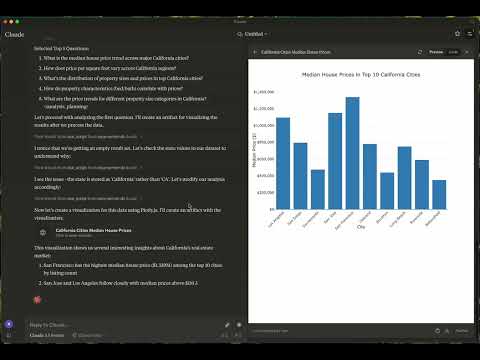
Case 1: California Real Estate Listing Prices

  • Kaggle Dataset: USA Real Estate Dataset
  • Size: 2,226,382 entries (178.9 MB)
  • Topic: Housing price trends in California

Watch the video

Case 2: Weather in London

📦 Components

Prompts

  • explore-data: Tailored for data exploration tasks

Tools

  1. load-csv

    • Function: Loads a CSV file into a DataFrame
    • Arguments:
      • csv_path (string, required): Path to the CSV file
      • df_name (string, optional): Name for the DataFrame. Defaults to df_1, df_2, etc., if not provided
  2. run-script

    • Function: Executes a Python script
    • Arguments:
      • script (string, required): The script to execute

⚙️ Modifying the Server

Claude Desktop Configurations

  • macOS: ~/Library/Application\ Support/Claude/claude_desktop_config.json
  • Windows: %APPDATA%/Claude/claude_desktop_config.json

Development (Unpublished Servers)

"mcpServers": {
  "mcp-server-ds": {
    "command": "uv",
    "args": [
      "--directory",
      "/Users/username/src/mcp-server-ds",
      "run",
      "mcp-server-ds"
    ]
  }
}

Published Servers

"mcpServers": {
  "mcp-server-ds": {
    "command": "uvx",
    "args": [
      "mcp-server-ds"
    ]
  }
}

🛠️ Development

Building and Publishing

  1. Sync Dependencies

    uv sync
    
  2. Build Distributions

    uv build
    

    Generates source and wheel distributions in the dist/ directory.

  3. Publish to PyPI

    uv publish
    

🤝 Contributing

Contributions are welcome! Whether you're fixing bugs, adding features, or improving documentation, your help makes this project better.

Reporting Issues

If you encounter bugs or have suggestions, open an issue in the issues section. Include:

  • Steps to reproduce (if applicable)
  • Expected vs. actual behavior
  • Screenshots or error logs (if relevant)

📜 License

This project is licensed under the MIT License. See the LICENSE file for details.

💬 Get in Touch

Questions? Feedback? Open an issue or reach out to the maintainers. Let's make this project awesome together!

About

This is an open source project run by ReadingPlus.AI LLC. and open to contributions from the entire community.