Ableton Live MCP 服务器

by simon-kansara

Ableton Live MCP 服务器实现了模型上下文协议(MCP),用于通过 OSC(开放声控)实现 LLM(大型语言模型)与 Ableton Live 之间的通信。该服务器需要 Python 3.8 及以上版本,并依赖于 python-osc 和 fastmcp。服务器由两个主要组件组成:mcp_ableton_server.py 和 osc_daemon.py。

Design & creativestdioCommunity

Repository-wide counts · Cached 2026-03-07

Overview

The Ableton Live MCP 服务器 MCP server is a publicly available project. Review the upstream repository for installation instructions, supported tools, compatibility, permissions, and current maintenance status.

Configuration

Configuration, transport, authentication, and runtime requirements vary by project. Open the repository before connecting and use the smallest set of credentials and permissions required.

Open the Ableton Live MCP 服务器 repository to read the latest documentation.

KEEP EXPLORING

Compare source, connection, and authentication details before choosing an implementation.

View the complete category

MCP Server Chart

AntV

Community

A Model Context Protocol server for generating charts using AntV. This is a TypeScript-based MCP server that provides chart generation capabilities. It allows you to create various types of charts through MCP tools.

AbletonMCP

mcpblender

Community

Ableton Live integration through the Model Context Protocol. No external data files required. Telemetry can be disabled via environment variable ABLETON_MCP_DISABLE_TELEMETRY.

AbletonMCP - Ableton Live 模型上下文协议集成

ahujasid

Community

AbletonMCP 通过模型上下文协议(MCP)将 Ableton Live 连接到 Claude AI,允许 Claude 直接与 Ableton Live 交互和控制。这一集成实现了基于提示的音乐制作、轨道创建以及 Live 会话的操作。

Anime Garden

yjl9903

Community

Anime Garden is a third-party mirror and BT resource aggregation site for anime, providing an open API for developers and an MCP server endpoint at https://api.animes.garden/mcp. No external data files are required for the MCP server usage.

FROM THE SOURCE

Repository README

Build-time snapshot · Retrieved 2026-10-05

View original

Ableton Live MCP Server

📌 Overview

The Ableton Live MCP Server is a server implementing the Model Context Protocol (MCP) to facilitate communication between LLMs and Ableton Live. It uses OSC (Open Sound Control) to send and receive messages to/from Ableton Live. It is based on AbletonOSC implementation and exhaustively maps available OSC adresses to tools accessible to MCP clients.

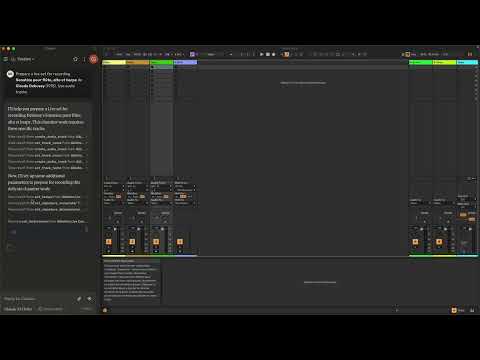
Control Ableton Live with LLMs

This project consists of two main components:

  • mcp_ableton_server.py: The MCP server handling the communication between clients and the OSC daemon.
  • osc_daemon.py: The OSC daemon responsible for relaying commands to Ableton Live and processing responses.

✨ Features

  • Provides an MCP-compatible API for controlling Ableton Live from MCP clients.
  • Uses python-osc for sending and receiving OSC messages.
  • Based on the OSC implementation from AbletonOSC.
  • Implements request-response handling for Ableton Live commands.

⚡ Installation

Requirements

  • Python 3.8+
  • python-osc (for OSC communication)
  • fastmcp (for MCP support)
  • uv (recommended Python package installer)
  • AbletonOSC as a control surface

Installation Steps

  1. Install uv (https://docs.astral.sh/uv/getting-started/installation):

    curl -LsSf https://astral.sh/uv/install.sh | sh
    
  2. Clone the repository:

    git clone https://github.com/your-username/mcp_ableton_server.git
    cd mcp_ableton_server
    
  3. Install the project and its dependencies:

    uv sync
    
  4. Install AbletonOSC Follow the instructions at AbletonOSC

🚀 Usage

Running the OSC Daemon

The OSC daemon will handle OSC communication between the MCP server and Ableton Live:

uv run osc_daemon.py

This will:

  • Listen for MCP client connections on port 65432.
  • Forward messages to Ableton Live via OSC on port 11000.
  • Receive OSC responses from Ableton on port 11001.

Example Usage

In Claude desktop, ask Claude:

  • Prepare a set to record a rock band
  • Set the input routing channel of all tracks that have "voice" in their name to Ext. In 2

⚙️ Configuration

By default, the server and daemon run on localhost (127.0.0.1) with the following ports:

  • MCP Server Socket: 65432
  • Ableton Live OSC Port (Send): 11000
  • Ableton Live OSC Port (Receive): 11001

To modify these, edit the AbletonOSCDaemon class in osc_daemon.py:

self.socket_host = '127.0.0.1'
self.socket_port = 65432
self.ableton_host = '127.0.0.1'
self.ableton_port = 11000
self.receive_port = 11001

Claude Desktop Configuration

To use this server with Claude Desktop, you need to configure it in your Claude Desktop settings. The configuration file location varies by operating system:

  • macOS: ~/Library/Application Support/Claude/claude_desktop_config.json
  • Windows: %APPDATA%/Claude/claude_desktop_config.json

Add the following configuration to your mcpServers section:

{
  "mcpServers": {
    "Ableton Live Controller": {
      "command": "/path/to/your/project/.venv/bin/python",
      "args": ["/path/to/your/project/mcp_ableton_server.py"]
    }
  }

This configuration ensures that:

  • The server runs with all dependencies properly managed
  • The project remains portable and reproducible

Contributing

Feel free to submit issues, feature requests, or pull requests to improve this project.

License

This project is licensed under the MIT License. See the LICENSE file for details.

Acknowledgments

TODO

  • Explore resources and prompts primitives opportunities.
  • Build a standalone Ableton Live MCP client.