AutoHotkey v2 MCP Server
A TypeScript MCP server for AutoHotkey v2 development. It provides script
analysis, file operations, documentation search, and script execution tools for
MCP clients such as Claude Desktop.
Architecture
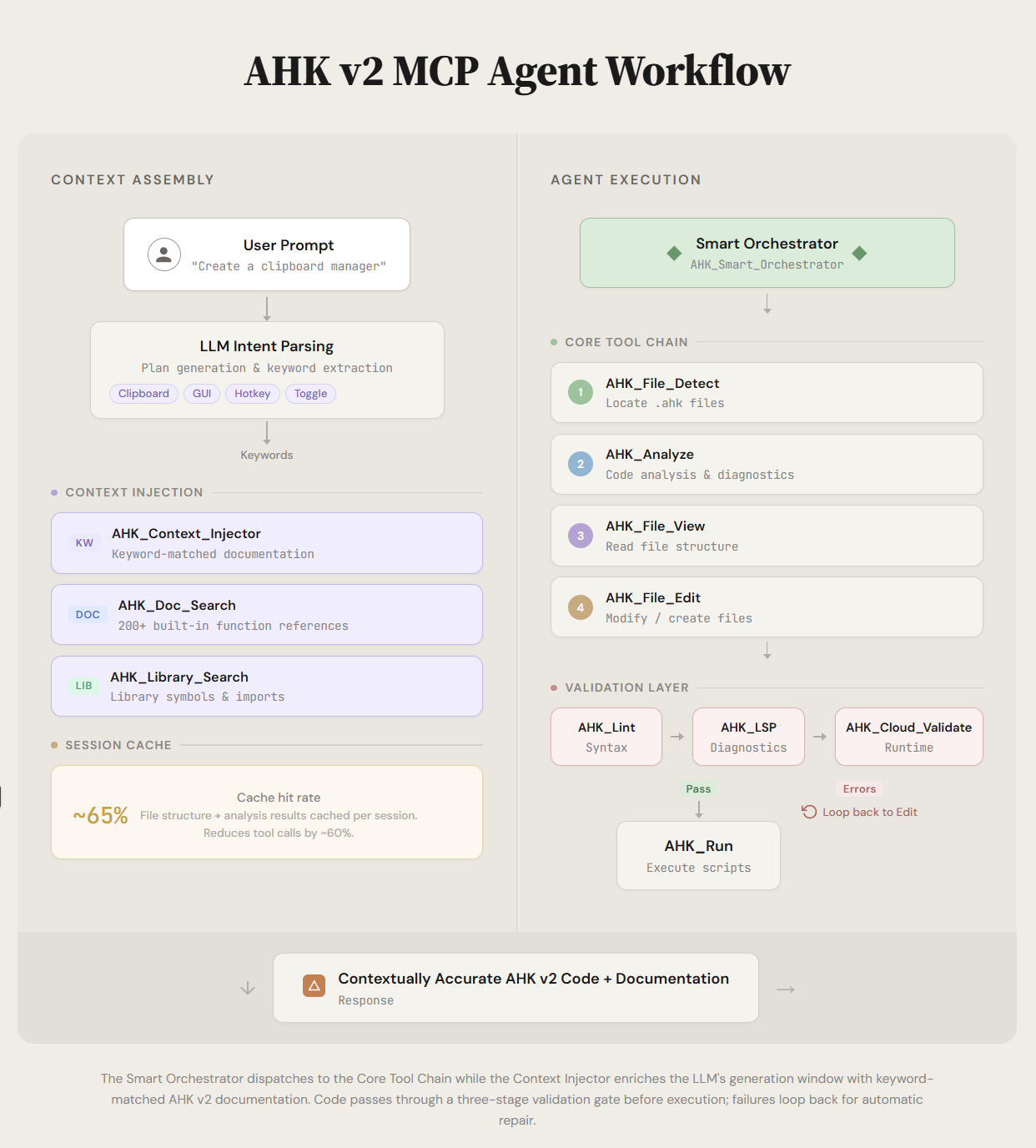
Highlights
- 25+
AHK_* tools for AutoHotkey workflows
- Six read-only
uia_* tools that feed live UI Automation ground truth to the
model, so it writes correct selectors instead of guessing them
- Focused file discovery and active-file aware operations
- Script execution with process tracking and window detection
- Local AutoHotkey validation and diagnostics tools
- Built-in AutoHotkey docs and prompt/context helpers
- Stdio and Streamable HTTP transport support, with opt-in legacy SSE
compatibility
UIA inspection
Writing UIA automation without inspecting the live tree means guessing
selectors. These tools remove the guesswork:
uia_windows  ->  uia_tree  ->  uia_find / uia_element  ->  paste snippet  ->  uia_highlight
   which          what's         the exact control        into your .ahk      confirm it is
   window         in it          + verified selector      script              the right one
Every element result carries a paste-ready AHK v2 snippet that has been executed
against the live tree and confirmed to resolve back to that exact element. Paths
are property chains, not RuntimeIds, so they still work after the target app
restarts.
All six tools are strictly read-only — they read properties and pattern
availability but never invoke a control pattern, so none of them can press,
toggle, select, or delete anything in the target app.
Full reference, including the selector-validation hook and Electron/WebView2
guidance: docs/UIA_INSPECTION.md.
Requirements
- Node.js 18+
- npm
- AutoHotkey v2 (for run/validate tools)
Installation
git clone https://github.com/truecrimedev/ahk-mcp.git
cd ahk-mcp
npm install
npm run build
Run
npm start
Development mode:
npm run dev
Smoke test:
npm run smoke:mcp
npm run smoke:http
Claude Desktop Configuration
Add this to claude_desktop_config.json:
{
  "mcpServers": {
    "ahk": {
      "command": "C:\\Program Files\\nodejs\\node.exe",
      "args": ["C:\\Users\\YourUsername\\path\\to\\ahk-mcp\\dist\\index.js"],
      "env": {
        "NODE_ENV": "production",
        "AHK_MCP_LOG_LEVEL": "warn",
        "AHK_MCP_SCRIPT_DIR": "C:\\Users\\YourUsername\\Documents\\AutoHotkey"
      }
    }
  }
}
Use absolute paths and escape backslashes in JSON. A ready-to-edit template is in
.mcp.example.json.
File Access
File tools only read and write inside allowed directories: the client's MCP roots,
AHK_MCP_SCRIPT_DIR, the scriptDir/searchDirs set with AHK_Config, the server's working
directory, and AHK_MCP_ALLOWED_DIRS. Paths are checked after resolving symlinks, and writes
through a symlink are refused.
Use AHK_Config to set the executable path and non-blocking startup behavior:
{
  "action": "set",
  "ahkPath": "C:\\Program Files\\AutoHotkey\\v2\\AutoHotkey64.exe",
  "waitForStdoutLine": true,
  "stdoutLineTimeoutMs": 300
}
This is used by AHK_Run (and AHK_Cloud_Validate path resolution).
AHK_Smart_Orchestrator: reduce multi-step edit/analysis workflowsAHK_File_List, AHK_File_View, AHK_File_Edit: file operationsAHK_Analyze, AHK_Diagnostics: analysis and diagnosticsAHK_Run: execute scripts (wait, non-wait, window detection)AHK_Cloud_Validate: local execution-based validationAHK_Doc_Search, AHK_Tools_Search: documentation and tool lookupAHK_Config: MCP server configuration
Development Commands
npm run build
npm run clean
npm run lint
npm run test
npm run test:integration
npm run smoke:mcp
npm run smoke:http
Documentation
docs/README.mddocs/QUICK_START.mddocs/QUICKREFERENCE.mddocs/MCP_TRANSPORT_COMPATIBILITY.mddocs/ARCHITECTURE_DIAGRAMS.mddocs/RELEASE_NOTES.md
Contributing
See CONTRIBUTING.md and AGENTS.md.
License
MIT. See LICENSE.