362 Professional Tools for UEFN Python Integration.
Built by Ocean Bennett — 2026




Historic Discovery — March 22, 2026
On this date, Ocean Bennett became the first person to programmatically catalogue
the complete Fortnite Creative device palette using UEFN Python's Asset Registry —
4,698 Creative device Blueprints across 35 categories, extracted from 24,926 total
Blueprint assets in the sandboxed UEFN environment.
Prior to this, no public tool, script, or documentation existed that mapped the full
set of placeable Creative devices accessible from Python. Epic's own documentation
covers individual devices. This is the first machine-readable index of the entire palette.
The scan also uncovered a critical silent failure pattern in UEFN 40.00's Asset Registry
API: deprecated AssetData properties (object_path, asset_class) silently throw
inside a try/except block, causing every asset to be skipped with no error message —
a bug that would defeat any developer who didn't know to split the exception handling.
The full technical breakdown, the category table, and the discovery story are in
docs/AI_AUTONOMY.md.
Automate the tedious, script the impossible, and bridge the gap between Python and Verse.
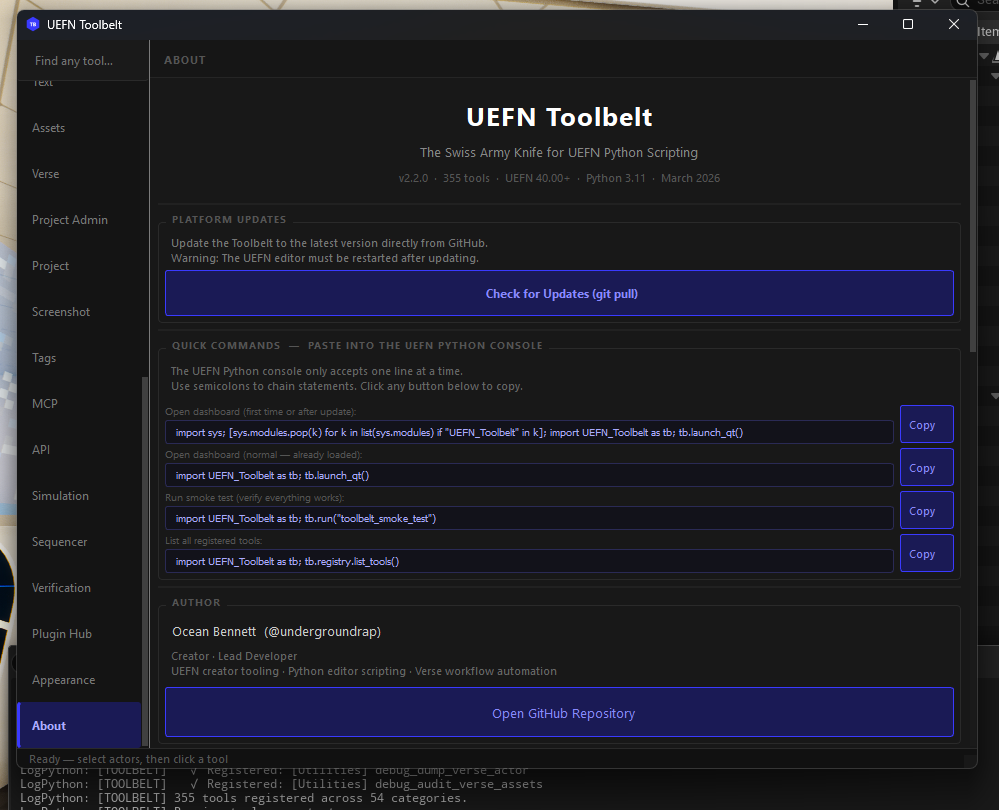
UEFN Toolbelt is a master utility designed to leverage the 2026 UEFN Python 3.11 Update,
allowing creators to manipulate actors, manage assets, and generate boilerplate Verse code
through a high-level, developer-friendly interface — all from the PySide6 dashboard
(tb.launch_qt()). 362 registered tools across 55 categories, complete AI-agent
readiness (100% structured dict returns), and a unified theme system so every window in the
platform looks and feels identical.
The Demo — New Project Setup in Under a Minute
Proven live. Scaffold + Verse game manager + 493-actor arena + reusable room stamps. No manual steps except one Build click.
# Command 1 — professional folder structure + Verse game manager deployed
tb.run("project_setup", project_name="MyGame")
# → 56 folders created in Content Browser
# → MyGameManager.verse generated and deployed to project

# Command 2 — symmetrical Red vs Blue arena spawns in the viewport
tb.run("arena_generate", size="medium")
# → 493 actors placed (6 Red spawns, 6 Blue spawns)

# Command 3 — save a loot room you built as a reusable stamp
tb.run("stamp_save", name="loot_room")
# → saved 12 actors to Saved/UEFN_Toolbelt/stamps/loot_room.json

# Navigate camera to a new location, then stamp it in
tb.run("stamp_place", name="loot_room", yaw_offset=90)
# → 12 FortStaticMeshActors placed at camera, rotated 90°

# One click — Verse menu → Build Verse Code

# Command 4 — error loop closes automatically
tb.run("verse_patch_errors")
# → build_status: SUCCESS
What used to take 30+ minutes of manual setup runs in seconds. Scaffold, code, layout,
stamp your best rooms, build — ready to publish.
🤖 Your Agent Can Build Your Game — Autonomously
This is the headline feature. Not "AI helps you code" — AI reads your live level, writes the Verse, and deploys it. Zero copy-paste. Zero manual wiring.
Here is the complete autonomy loop running live on a real project with 521 actors:
Step 1a — Claude reads the entire level:
tb.run("world_state_export")
# → Captured 521 actors. Saved to docs/world_state.json
Step 1b — Claude reads every device available in Fortnite (not just what's placed):
tb.run("device_catalog_scan")
# → Scanned 24,926 Blueprint assets across all Fortnite packages
# → 4,698 Creative devices identified across 35 categories
# → (Timer ×8, Capture ×7, Score ×28, Spawner ×94, Camera ×446, NPC ×173, ...)
# → docs/device_catalog.json — Claude's complete device palette, git-tracked
Step 2 — Claude identifies all Creative devices and generates a wired game skeleton:
Claude reads world_state.json, finds every device in the level (FortCreativeTimerDevice,
capture_area_device, guard_spawner_device, button_device, 14 teleporters, etc.),
and writes a complete creative_device class — @editable declarations, OnBegin event
wiring, round flow, creature waves, capture logic, and clean shutdown — all referencing the
actual device labels from your level.
Step 3 — Claude deploys it directly to the project:
tb.run("verse_write_file", filename="device_api_game_manager.verse", content=verse_code)
# → Written: Device_API_Mapping\Verse\device_api_game_manager.verse (6187 bytes)
Step 4 — Build Verse. First try.
VerseBuild: SUCCESS -- Build complete.
No type errors. No manual editing. A fully wired, compilable Verse game manager — generated
from live level state in under 60 seconds.
What the generated skeleton contains:
@editable refs for every device discovered: Timer, Timed Objective, Round Settings, Capture Area, 2× Item Spawners, Creature Spawner, Creature Manager, Creature Placer, 2× Buttons, 2× Conditional Buttons, Lock Device, 5 keyed Teleporters, Audio Mixer, Weapon Mod BenchOnBegin that starts the timer, spawns async watchers, and subscribes to all button/timer eventsWatchCaptureArea() — async loop: team captures zone → spawn reward items → trigger creature waveWatchCreatureWaves() — async loop: enable creature manager → 30s cooldown → repeatOnButtonPressed / OnButton2Pressed — unlock doors, activate conditional gatesEndRound() — stops timer, disables creature manager, despawns guards, stops audio
Place the device in your level, drag your real actors into the @editable slots, and play.
See docs/PIPELINE.md for the complete 6-phase industrial pipeline —
every tool, every phase, Claude's full execution script, and the recursive build+fix loop.
See docs/AI_AUTONOMY.md for the live run technical breakdown.
Toolbelt is built to be driven by a coding agent — Claude Code, Codex, or Cursor. To give your agent perfect information about your project's unique Verse devices and custom props:
- Open Dashboard: Run
tb.launch_qt().
- One-Click Sync: Click the "Sync Level Schema to AI" button in Quick Actions.
- Instant Content: The 1.6MB schema is automatically copied to your
docs/ folder. Your AI now knows every hidden property in your specific level.
- Export Tool Manifest: Run
tb.run("plugin_export_manifest") to write Saved/UEFN_Toolbelt/tool_manifest.json — a machine-readable index of all 362 tools with their parameter signatures, types, defaults, and categories. An AI agent can load this file and immediately know what every tool does and how to call it, without reading source code.
Table of Contents
If Toolbelt stops loading on startup, this is almost certainly why.
Enabling Project Settings → Beta Access → UEFN MCP Toolsets prevents your
project's Content/Python/init_unreal.py from running, so Toolbelt never starts.
Nothing errors and nothing is logged. The tool count is 1 instead of 362 and
every tb.run(...) answers Unknown tool, which looks like a Toolbelt bug and
is not one.
Cause. Epic's Toolsets plugins force-enable Python during editor init, about
100 frames before UEFN mounts your project plugin. Your init_unreal.py is not
scanned because the plugin containing it has not loaded yet. Verified by diffing
editor logs across boots with the flag on and off — see docs/UEFN_QUIRKS.md #36.
Workaround. Either turn the flag off, or run this once per editor session:
import UEFN_Toolbelt as tb; tb.register()
That recovers all 362 tools and the dashboard (tb.launch_qt()). It does not
make a top-bar menu appear: menu entries register on 42.00 and still never
render. Epic's MCP continues to work either way; only Toolbelt's auto-start is
affected.
tb.smoke_test() detects this and names it, so you are never left guessing.
Status. Not fixable from Toolbelt: PythonScriptPluginSettings is not exposed
to Python on this build, and UEFN projects have no Config/ directory for an
explicit startup-script entry. It needs an Epic-side fix.
Security
Why this matters: The UEFN Python community has already seen proof-of-concept malicious
scripts that flood the editor with spam windows when run from untrusted sources.
Python editor scripts run with full access to your project — treat them like executable code.
This repo's safety guarantees
How to verify before running any .py file (from this repo or anyone's)
# Before exec()-ing any script, read it first:
with open("path/to/script.py") as f:
    print(f.read())

# Red flags to look for:
# - import requests / import http / import socket
# - exec() / eval() on anything fetched from outside
# - os.system() / subprocess with network targets
# - anything writing outside your project folder
- Always read the script before running it
- Run unknown scripts in a throwaway project first
- Keep UEFN's Python access set to Editor Scripting only (the default)
⚠️ Automated Integration Testing
The smoke test checks registration only: a minimum registry count (179) and six named tools; it executes no tool and validates no schema. The integration test verifies that they work — in a live UEFN editor, against real actors.
What the integration test actually does
toolbelt_integration_test is a fixture-driven test harness that runs inside UEFN:
- Spawns temporary cube/sphere actors programmatically
- Selects them via
EditorActorSubsystem
- Runs each tool against that live selection
- Verifies the result — property changed, actor spawned, file written, count correct
- Cleans up every actor it touched via a single undo transaction
190 checks across 362 tools — 190/190 passing live on UEFN 42.00 — covering materials, bulk ops, patterns, scatter, splines, snapshots, asset management, Verse tools, screenshots, LODs, arena, measurement, localization, zones, stamps, actor org, proximity placement, advanced alignment, signs, post-process, audio, level health, config, lighting, and world state.
Of those 190, 163 verify a real outcome — a property changed, a file written,
an actor count, a tag read back — and 27 are execution-only: they prove the
tool ran without raising, nothing more. Both numbers are reported by the suite
on every run, because a headline "190/190" that silently includes checks which
cannot fail overstates what the suite knows. That is not hypothetical: a fully
green run once hid a wrong-rotation-axis bug (Quirk #41)
for exactly that reason.
This is the closest thing to a full CI suite possible inside the UEFN Python sandbox. If this passes, you have high confidence that the core tool logic is sound — not just that it imported. The current live run takes about 70 seconds.
How to run it
# Use a clean template level — never run in a production project
import UEFN_Toolbelt as tb; tb.register_all_tools(); tb.run("toolbelt_integration_test")
Results are written to:
Saved/UEFN_Toolbelt/integration_test_results.txt
If the editor crashes mid-run (rare), the file will contain partial results up to the last completed test — useful for pinpointing which section caused the crash.
[!WARNING]
DO NOT run the full integration test in a live production project.
It spawns, modifies, and deletes actors. Use a blank Empty Level or throwaway test project.
Every test section cleans up after itself, but the undo history will be long.
Smoke test vs integration test
Run the smoke test after every change. Run the integration test before submitting a PR.
Community context: Built in response to the March 2026 UEFN Python wave. Inspired by
early community tools like standalone material editors, spline prop placers,
and Verse device editors — then taken further into a unified, permanently
docked creator toolkit.
Concept
UEFN Toolbelt isn't just a library — it's a meta-framework. While the standard UEFN
Python API provides the what, Toolbelt provides the how. It follows a
Blueprint-to-Script philosophy: taking complex manual editor tasks (mass material
assignment, procedural arena generation, bulk Verse device editing) and reducing them to
single-line Python commands callable from the dashboard or the Python console.
The toolbelt is designed for three creator personas:
🏗️ Solving Soul-Crushing Repetition (The 8 Pillars)
The UEFN Toolbelt exists because manual work doesn't scale, but scripts do. We solve 90% of the repetitive tasks reported by the UEFN community:
- Manual Placement & Spacing: Procedural spawners, align/distribute scripts, and spline-based distribution.
- Asset Organization: Bulk import pipelines, smart renaming, and auto-folder scaffolding.
- Material Batch Edits: Parameter randomization, team-color splitters, and bulk texture swaps.
- Structural Elements: High-performance cable, wire, fence, and rail generators.
- Layout Math: Instant 3D distance and travel-time (Walk/Run/Sprint) estimation.
- Bulk Optimization: Automated LOD generation, memory audits, and cooking pre-flight checks.
- Verse Boilerplate: Selection-to-code generation and spec-accurate device stubs.
- Component Spam: Scripted "Quick-Add" macros for entity sets and Niagara effects.
- AI-Agent Readiness: Every tool returns a structured
dict — AI agents operate on results, not logs. The MCP bridge, tool_manifest.json, and describe_tool command let any LLM discover and call every tool autonomously. This is the first UEFN toolkit designed to be equally usable by humans and AI agents.
AI Return Contract — 100% Machine-Readable
Every single one of the 362 tools returns a clean, structured dict. No None returns. No bare primitives. No output that requires parsing log lines. This was completed as Phase 21 and applies to every tool added since.
What Claude gets back
# Asset scan
{"status": "ok", "count": 4, "textures": [
  {"name": "T_Rock", "path": "/Device_API_Mapping/Textures/T_Rock",
   "compression": "TC_DEFAULT", "srgb": "true", "size_x": "2048", "size_y": "2048"}
]}

# Audit
{"status": "ok", "total": 12, "clean": 10, "issues": 2, "issue_list": [
  {"name": "SK_Hero", "path": "/Device_API_Mapping/Characters/SK_Hero",
   "issues": ["No physics asset assigned"]}
]}

# Write op (dry_run)
{"status": "ok", "dry_run": true, "changed": 8, "skipped": 3, "changes": [
  {"name": "T_Wall", "from": "TC_DEFAULT", "to": "TC_NORMALMAP"}
]}

# Error — always catchable
{"status": "error", "message": "Could not load asset at '/Game/Missing'."}
The full MCP chain
Claude Code → MCP server → run_tool → registry.execute() → _serialize(result) → JSON response → Claude reads it
Claude never has to parse a log line. Every domain follows the same shape:
tb.run("plugin_export_manifest") writes Saved/UEFN_Toolbelt/tool_manifest.json — a machine-readable index of all 362 tools with full parameter signatures (name, type, required, default) and a concrete example call string for every tool. Claude reads this once and knows exactly what params to pass to any tool without guessing.
The Workflow Loop — Efficiency Mechanic
This is the core philosophy. We solve the "Iteration Tax" — the time lost between an
idea and its implementation in the editor.
The Three Efficiency Scalars
$$T_{\text{save}} = (T_{\text{manual}} \times N) - (T_{\text{script}} + T_{\text{execution}})$$
Tech Stack
Architecture Overview
UEFN Editor
    │
    │  init_unreal.py  ← auto-executed by UEFN on every startup
    │                     (generic submodule loader — NOT part of the Toolbelt package)
    │                     If you already have one, add the package-discovery pattern
    │                     from the provided template instead of overwriting yours.
    ▼
UEFN TOOLBELT ─── UEFN_Toolbelt/__init__.py   (register, launch, run, registry accessor)
    │
    ├── core.py           Shared utilities: undo_transaction, get_selected_actors,
    │                     with_progress, color_from_hex, spawn_static_mesh_actor, …
    │
    ├── registry.py       ToolRegistry singleton — @register_tool decorator,
    │                     execute-by-name, category listing, tag search,
    │                     to_manifest() for full parameter-introspected export
    │
    └── tools/
        ├── material_master.py        17 presets, gradient, harmony, team split, save/load
        ├── arena_generator.py        Symmetrical Red/Blue arenas (S/M/L)
        ├── spline_prop_placer.py     Props along splines — count or distance mode
        ├── bulk_operations.py        Align, distribute, randomize, snap, mirror, stack
        ├── verse_device_editor.py    List, filter, bulk-edit, export Verse devices
        ├── smart_importer.py         FBX batch import + auto-material + Content Browser organizer
        ├── verse_snippet_generator.py  Context-aware Verse boilerplate from level selection
        ├── text_painter.py           Colored 3D text actors with saved style presets
        ├── asset_renamer.py          Epic naming convention enforcer with dry-run + audit
        ├── project_scaffold.py       Professional folder structure generator (4 templates)
        ├── verse_schema.py           Verse Digest IQ & Universal Schema Search (143th Tool)
        ├── system_build.py           Automated UEFN Build Scraper & Error Monitor
        ├── system_perf.py            Background CPU Optimizer & Monitor
        ├── measurement_tools.py      Distance Calculator & Travel Time Estimator (Phase 15)
        └── localization_tools.py     Multi-language Text Export/Import (Phase 15)
All heavy logic lives in Python. The optional UMG dashboard calls into it via
Execute Python Command Blueprint nodes — zero coupling, infinitely extensible.
Directory Structure
[YourUEFNProject]/
├── Content/
│   ├── Python/
│   │   ├── init_unreal.py               ← COPY HERE if you don't have one yet
│   │   │                                   (generic loader — not Toolbelt-specific)
│   │   │                                   ⚠️ If you already have this file, do NOT
│   │   │                                   overwrite it. Add the package-discovery
│   │   │                                   loop from the template into your existing file.
│   │   └── UEFN_Toolbelt/               ← COPY HERE — the full package
│   │       ├── __init__.py
│   │       ├── core.py
│   │       ├── registry.py
│   │       └── tools/
│   │           ├── __init__.py
│   │           ├── material_master.py
│   │           ├── arena_generator.py
│   │           ├── spline_prop_placer.py
│   │           ├── bulk_operations.py
│   │           ├── verse_device_editor.py
│   │           ├── asset_importer.py         # NEW: URL & Clipboard image importing
│   │           ├── verse_snippet_generator.py
│   │           ├── text_painter.py
│   │           ├── asset_renamer.py
│   │           ├── procedural_geometry.py    # NEW: Wire & Volumetric generators
│   │           ├── text_voxelizer.py         # NEW: 3D Text geometry generation
│   │           ├── smart_organizer.py        # Proprietary Heuristics Engine
│   │           ├── system_perf.py            # Background CPU Optimizer
│   │           ├── verse_schema.py           # NEW: Verse Digest IQ (Phase 14)
│   │           ├── system_build.py           # NEW: Automated Build Monitor (Phase 14)
│   │           ├── measurement_tools.py      # NEW: Distance & Travel Time (Phase 15)
│   │           └── localization_tools.py     # NEW: Text Export & Translation (Phase 15)
│   └── UEFN_Toolbelt/
│       ├── Blueprints/
│       │   └── WBP_ToolbeltDashboard    ← optional EUW — create in UEFN
│       └── Materials/
│           └── M_ToolbeltBase           ← required for Material Master
├── deploy.bat                           ← double-click to deploy to any UEFN project
└── README.md
Critical path: Files must live under Content/Python/ exactly.
Any other location (e.g. Content/Scripts/) is not scanned by UEFN's Python interpreter.
Key Systems — How They Work
Every tool self-registers with a one-line decorator. The registry is a singleton shared
across the entire session.
from UEFN_Toolbelt.registry import register_tool

@register_tool(
    name="my_tool",
    category="Procedural",
    description="Does something amazing",
    tags=["procedural", "spawn"],
)
def run(**kwargs) -> dict:
    ...
    return {"status": "ok", "count": placed}
Calling tb.run("my_tool") from anywhere — REPL, Blueprint node, another tool — routes
through the registry with full error containment. A crashing tool never kills your session.
Every tool returns a structured dict with at minimum a "status" key. This is the
MCP Return Contract: AI agents calling tools via the bridge read the return dict directly
from the JSON response. Zero log parsing required.
2. Material Master
17 built-in presets stored as pure data dictionaries. All material work happens through
MaterialEditingLibrary — no Blueprint graph required.
tb.run("material_apply_preset", preset="chrome")        # apply to selection
tb.run("material_gradient_painter",                     # world-space gradient
       color_a="#0044FF", color_b="#FF2200", axis="X")
tb.run("material_team_color_split")                     # auto Red / Blue by X position
tb.run("material_save_preset", preset_name="MyLook")    # save to JSON
Custom presets persist across sessions in Saved/UEFN_Toolbelt/custom_presets.json.
3. Arena Generator
Instant symmetrical competitive arenas. What used to take 45 minutes of manual prop
placement now runs in under 5 seconds.
tb.run("arena_generate", size="large", apply_team_colors=True)
Internally places floor tiles, perimeter walls, a center platform, and team spawn pads —
all in a single ScopedEditorTransaction. One Ctrl+Z removes the entire arena.
4. The Verse Bridge
The biggest pain point in UEFN is syncing editor state with Verse code. The snippet
generator reads your actual level selection and produces strongly-typed output:
# Select 6 devices in the viewport, then:
tb.run("verse_gen_device_declarations")
Output (written to Saved/UEFN_Toolbelt/snippets/ and copied to clipboard):
# Actor: 'TriggerDevice_01'  @ (1200, 400, 0)
@editable  triggerdevice_01        : trigger_device = trigger_device{}

# Actor: 'SpawnPad_Red_01'  @ (3200, 0, 0)
@editable  spawnpad_red_01         : player_spawner_device = player_spawner_device{}
5. Undo Safety
Every destructive operation is wrapped in core.undo_transaction():
# From core.py — used by every tool:
with undo_transaction("Material Master: Apply chrome"):
    for actor in actors:
        _apply_preset_to_actor(actor, preset_data, "chrome")
If something goes wrong mid-operation the transaction closes cleanly. No corrupted
undo stack, no phantom changes.
6. Project Scaffold
The first tool you run on any new UEFN project. Four opinionated templates — pick
the one that matches your workflow:
# See what it would create before touching anything
tb.run("scaffold_preview", template="uefn_standard", project_name="MyIsland")

# One command builds 50+ folders in the right hierarchy
tb.run("scaffold_generate", template="uefn_standard", project_name="MyIsland")
Templates are stored as plain JSON in Saved/UEFN_Toolbelt/scaffold_templates.json
— email or Git the file to every teammate so everyone gets the same structure instantly.
Custom templates are one call:
tb.run("scaffold_save_template",
       template_name="StudioDefault",
       folders=["Maps/Main", "Materials/Master", "Materials/Instances",
                "Meshes/Props", "Verse/Modules", "Audio/SFX"])
7. Smart Importer
Drop a folder of FBXs and get back a fully organized Content Browser:
tb.run("import_fbx_folder",
       folder_path="C:/MyAssets/Props/",
       apply_material=True,
       place_in_level=False)
Assets land in /Game/Imported/[date]/Meshes/ with auto-generated material instances.
An import log is appended to Saved/UEFN_Toolbelt/import_log.json after every run.
8. Advanced Project Intelligence (Phase 14)
The Toolbelt now features a native "Off-Engine IQ" that understands your Verse code without needing a live actor in the level.
- Verse Schema IQ: Parses your
.digest.verse files to build a mapping of all Verse classes, properties, and events.
- Build Monitor: Triggers a background UEFN build and scrapes the log for Verse compilation errors with file/line precision.
- Global Safety Gate: A centralized protection layer (
core.safety_gate) that all "Write" operations must pass through. It prevents accidental modification of Epic/Fortnite core assets.
System & Safety (category="System")
Advanced project diagnostics and protection layers.
To prevent the editor from hanging during mass operations, Toolbelt uses
unreal.ScopedSlowTask — a native UE progress dialog with cancel support.
For an operation across $A$ actors with $M$ material slots each:
$$\text{Complexity} = O(A + (A \times M))$$
Chunked Execution Pattern
# From core.py — wrap any iterable:
with with_progress(actors, "Applying materials") as bar_iter:
    for actor in bar_iter:
        _apply_preset_to_actor(actor, preset, "Chrome")
        # ScopedSlowTask advances one step per actor
        # User can cancel mid-way — no partial corrupt state
The progress bar displays a cancel button. Cancellation is handled gracefully; already-
processed actors retain their changes (inside the transaction, so all-or-nothing undo
still works at the outer level).
362 tools · 55 categories — all return {"status": "ok"/"error", ...} structured dicts.
Run any tool with tb.run("tool_name", param=value).
AI agents: use tb.run("plugin_export_manifest") to get the full machine-readable manifest.
Quick navigation:
Actor Organization ·
Alignment ·
API Explorer ·
Asset Management ·
Asset Tagger ·
Assets ·
Audio ·
Bulk Ops ·
Entities ·
Environmental ·
Generative ·
Level Snapshot ·
Lighting ·
Localization ·
Materials ·
MCP Bridge ·
Measurement ·
Optimization ·
Pipeline ·
Post-Process ·
Procedural ·
Project ·
Project Admin ·
Prop Patterns ·
Proximity Tools ·
Reference Auditor ·
Screenshot ·
Selection ·
Sequencer ·
Simulation ·
Stamps ·
System ·
Tests ·
Text & Signs ·
Utilities ·
Verse Helpers ·
Zone Tools
Actor Organization (10)
Alignment (6)
API Explorer (10)
Asset Management (5)
Asset Tagger (6)
All tags use the TB: namespace prefix to avoid collisions.
Assets (11)
Audio (4)
Bulk Ops (9)
Entities (2)
Environmental (2)
Generative (2)
Level Snapshot (8)
tb.run("snapshot_save", name="before_scatter")
# ... make changes ...
tb.run("snapshot_compare_live", name="before_scatter")
tb.run("snapshot_restore",      name="before_scatter")
Lighting (6)
Localization (2)
Materials (10)
17 built-in presets: chrome · gold · neon · hologram · lava · ice · concrete · wood_oak · metal_rust · glass · team_red · team_blue · team_green · team_yellow · glow_pulse · scanlines · iridescent
MCP Bridge (4)
Start the listener in UEFN, then an authenticated same-user MCP client can run
the registered catalogue by name and operate the editor through queued
main-thread dispatch. Listener start/stop/restart remain local-only controls.
Arbitrary remote Python is unavailable and cannot be enabled with the former
UEFN_TOOLBELT_MCP_ALLOW_EXECUTE_PYTHON variable. Deliberate scripting remains
available through the local UEFN Python console.
tb.run("mcp_start")
# Output Log: [MCP] ✓ Listener running on http://127.0.0.1:8765
Measurement (3)
Optimization (8)
Pipeline (2)
Post-Process (4)
Procedural (12)
Project (7)
Built-in templates: uefn_standard · competitive_map · solo_dev · verse_heavy
Project Admin (3)
Prop Patterns (9)
All pattern tools take asset_path + layout params and spawn at camera position.
Reference Auditor (7)
Always dry_run=True before any destructive operation.
Screenshot (4)
Output: Saved/UEFN_Toolbelt/screenshots/{name}_{YYYYMMDD_HHMMSS}_{W}x{H}.png
Selection (3)
Sequencer (2)
Simulation (2)
Stamps (5)
Save a group of placed actors as a reusable named stamp and re-place it anywhere. Not the same as prefab_migrate_open — stamps are for level layout reuse, not asset migration.
tb.run("stamp_save",  name="guard_post")
tb.run("stamp_place", name="guard_post", yaw_offset=90.0)

# Instant symmetric layout — 4 compass points
for angle, x, y in [(0,5000,0),(90,0,5000),(180,-5000,0),(287,0,-5000)]:
    tb.run("stamp_place", name="guard_post", location=[x,y,0], yaw_offset=angle)
System (4)
Tests (1)
Text & Signs (14)
Publish blocker: these six spawning tools create TextRenderActor, which
UEFN 42.00 rejects during remote validation: text_place,
text_label_selection, text_paint_grid, text_color_cycle,
sign_spawn_bulk, and label_attach. They are editor-visualization helpers.
Before Launch Session or publishing, run
tb.run("sign_clear", all_text_actors=True, dry_run=False) and confirm
tb.run("publish_audit") reports zero text_render_actors.
Utilities (12)
Verse Helpers (26)
Zone actors can be any box-shaped actor. Convention: select the zone actor first, then other actors.
tb.run("zone_spawn", width=4000, depth=4000, height=800, label="ArenaCenter")
tb.run("zone_resize_to_selection", padding=200)
tb.run("zone_select_contents")
tb.run("zone_move_contents", offset_x=5000)
tb.run("zone_fill_scatter", asset_path="/Engine/BasicShapes/Cube", count=50, min_spacing=300)
Health Check
# Run all 6 layers: Python env → UEFN API → Toolbelt core → MCP → Dashboard → Verse Book
tb.run("toolbelt_smoke_test")
# Results saved to Saved/UEFN_Toolbelt/smoke_test_results.txt
Getting Started
Tested on UEFN 42.00 (UE 6.0), Windows 11, Python 3.11.8 — August 2026.
Step 1 — Enable Python in UEFN
Open your UEFN project. Go to Edit → Project Settings, search python, and tick:
- Python Editor Script Plugin ✓
Note: UEFN only shows one Python checkbox — unlike full Unreal Engine which shows three. That's normal. Once you see "Enter a Python statement" appear in the Output Log, Python is active.
Restart UEFN when prompted.
Step 2 — Install PySide6 (one-time, required for the dashboard UI)
Open a regular Windows terminal — not inside UEFN — and run:
"C:\Program Files\Epic Games\Fortnite\Engine\Binaries\ThirdParty\Python3\Win64\python.exe" -m pip install PySide6
Why outside UEFN? UEFN's embedded Python can't run pip itself. You must use the same python.exe that UEFN uses, just run it directly from a terminal.
If the path above doesn't exist, find it at:
C:\Program Files\Epic Games\Fortnite\Engine\Binaries\ThirdParty\Python3\Win64\python.exe
You only need to do this once. PySide6 stays installed across projects.
First time — run the installer:
python install.py
It will find your Fortnite Projects folder automatically, let you pick a project, copy the Toolbelt in, and handle init_unreal.py safely — whether you already have one or not.
Or point it directly at a project:
python install.py --project "C:\Users\YOURNAME\Documents\Fortnite Projects\YOURPROJECT"
Updating after a git pull: Re-run python install.py — it overwrites only the Toolbelt package, never your project's own files.
If you're actively developing the Toolbelt itself — use deploy.bat instead:
deploy.bat is the dev workflow tool. Double-click it or run it from a terminal. In addition to copying files it will:
- Check and install PySide6 automatically if it's missing
- Copy the
verse-book/ reference without its Python lexer helpers
- Print the hot-reload command to paste into UEFN so you don't need a full restart
deploy.bat
Before Launch Session, Push Changes, or publishing: UEFN 42.00 rejects
every .py under the project for the standard VKCreateUGC role.
.urcignore does not affect this upload check. Run prepare_launch.bat, wait
for the upload to finish, then run restore_after_launch.bat. The prepare
helper stashes every project .py outside the project and verifies zero remain;
restore refuses to overwrite any file created while the stash was active.
Hot-reload after any code change (no UEFN restart needed):
import sys; [sys.modules.pop(k) for k in list(sys.modules) if "UEFN_Toolbelt" in k]; import UEFN_Toolbelt as tb; tb.register_all_tools(); tb.launch_qt()
Manual install (if neither script works):
Your UEFN project lives at C:\Users\YOURNAME\Documents\Fortnite Projects\YOURPROJECT\.
xcopy /E /I /Y "PATH_TO_REPO\Content\Python\UEFN_Toolbelt" "C:\Users\YOURNAME\Documents\Fortnite Projects\YOURPROJECT\Content\Python\UEFN_Toolbelt"
Then copy init_unreal.py into Content\Python\ — or if you already have one, paste only the package-discovery for loop from it into your existing file (under # ── 2. Discover and load all packages). It won't conflict with anything already there.
Step 4 — Restart UEFN
Close and reopen your project. Watch the Output Log. You should see:
[TOOLBELT] ✓ All tools registered.
[TOOLBELT] Menu entries submitted, but MainFrame.MainTabMenu is not registered on this build
          - UEFN sandboxes ToolMenus for third-party Python (40.20 onward, still true on
          42.00), so no Toolbelt menu will appear in the top bar. Use the dashboard instead:
          tb.launch_qt()
On UEFN 42.00 no Toolbelt menu appears in the top bar. menu.py registers its entries
and every call succeeds, but Epic sandboxes ToolMenus for third-party Python so nothing
renders. Toolbelt checks is_menu_registered and says which happened instead of claiming
success. Open the dashboard with tb.launch_qt().
Step 5 — Verify with the smoke test
In the Output Log, switch the input dropdown from Cmd to Python and run:
import UEFN_Toolbelt as tb; tb.run("toolbelt_smoke_test")
UEFN Python console tip: The console only accepts one line at a time — no multi-line pastes. Chain multiple statements on the same line using semicolons (;). A space before and after the semicolon works fine: import UEFN_Toolbelt as tb; tb.run("toolbelt_smoke_test")
Expected output in the log:
✓ All systems healthy — Toolbelt is ready.
If you haven't installed PySide6 or cloned the verse-book yet, you may see a few non-critical failures.
Complete Steps 2 and 7 in the Getting Started guide above to resolve them.
Step 6 — Open the dashboard
After completing Step 2 (PySide6 installed), run:
import UEFN_Toolbelt as tb; tb.launch_qt()
A dark-themed floating window opens with a left sidebar nav and 362 tools across 55 categories (including an About page).
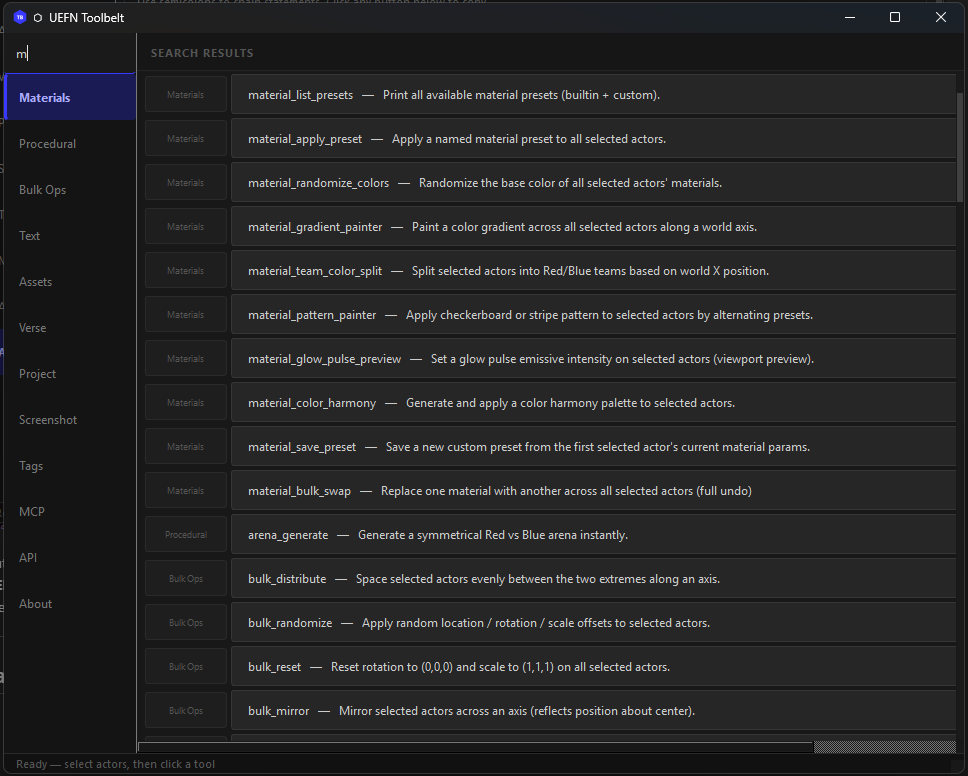
Two search modes:
If the dashboard doesn't open after installing PySide6: The module may be cached from before PySide6 was installed. Paste this single line to clear and reload:
import sys; [sys.modules.pop(k) for k in list(sys.modules) if "UEFN_Toolbelt" in k]; import UEFN_Toolbelt as tb; tb.launch_qt()
Step 7 — (Optional) Clone the Verse spec for AI codegen
In your repo folder, run:
git clone https://github.com/verselang/book.git verse-book
This gives Claude access to the full live Verse language spec for spec-accurate code generation. After cloning, the smoke test reports 89/89 with PySide6 installed.
Step 8 — (Optional) Connect Claude Code via MCP
This lets Claude Code directly control UEFN — spawn actors, run any tool, generate Verse code — without you typing anything in the console.
1. Install the MCP Python package (regular terminal, not UEFN):
pip install mcp
2. Create your own .mcp.json: a fresh clone has none. The file is
gitignored, so your local paths and configuration are never committed.
copy .mcp.json.template .mcp.json
Open .mcp.json and set the absolute path to mcp_server.py in your clone:
{
  "mcpServers": {
    "uefn-toolbelt": {
      "command": "python",
      "args": ["C:/Users/YOURNAME/Projects/UEFN-TOOLBELT/mcp_server.py"]
    }
  }
}
mcp_server.py takes the listener's port from the session handoff, so the
template sets no port. Add UEFN_MCP_PORT to an env block only to override
that, and only with the port the listener actually bound: the session secret is
sent to whatever is listening on the port you name.
3. Restart Claude Code so it picks up the new server config.
4. Start the listener inside UEFN — paste this in the Python console:
import UEFN_Toolbelt as tb; tb.run("mcp_start")
You should see in the Output Log:
[MCP] ✓ Listener running on http://127.0.0.1:8765
5. Try it from Claude Code:
run the toolbelt smoke test
If the client connects, it calls run_toolbelt_tool("toolbelt_smoke_test") through the bridge.
Untested path: No accepted record has run mcp_server.py through any MCP host, stdio, or FastMCP since the WO-001 authentication and WO-004 transport changes. client.py
direct calls are the path with recorded live evidence, on one UEFN 42.20 boot.
See the evidence gaps.
Note: The listener must be started in UEFN each session. You can also click Dashboard → MCP → Start Listener instead of pasting the command.
What Claude can do once connected:
- Run any of the 362 tools by name
- Spawn, move, delete actors directly
- Generate spec-accurate Verse code (pulls from the live verse-book spec)
- Use registered commands remotely; arbitrary Python remains local to UEFN
- Batch multiple operations in one editor tick
Step 9 — (Optional) Verse Snippet Library
The Verse tab in the dashboard has a built-in Snippet Library browser. Every time you generate a Verse snippet, it's saved to:
Saved/UEFN_Toolbelt/snippets/
├── game_systems/       ← game manager, elimination handler, scoring tracker
├── device_wiring/      ← @editable declarations, prop spawner
├── spline_tools/       ← patrol AI, zone boundary, vector3 arrays
└── custom/             ← your custom / Claude-generated snippets
In the dashboard:
- Go to Verse → Code Generation and generate any snippet
- Click Refresh Library in the Snippet Library section below
- Your snippets appear organized by category — click any to copy to clipboard
- Click Open Folder to browse them in Windows Explorer
- Paste directly into your
.verse file in UEFN
Snippets also auto-copy to the Windows clipboard when generated, so you can paste immediately without even opening the library.
The "Nuclear Reload" Command
If you have modified the Toolbelt source code, run this in the UEFN console to refresh everything without a restart:
import sys; [sys.modules.pop(k) for k in list(sys.modules) if "UEFN_Toolbelt" in k]; import UEFN_Toolbelt as tb; tb.register_all_tools(); tb.launch_qt()
[!IMPORTANT]
Always include tb.register_all_tools() after a pop, otherwise the tool registry will be empty!
REPL Usage
UEFN console tip: Chain multiple statements on one line with semicolons (;). The console does not accept multi-line pastes, but a single line can contain as many ;-separated statements as you need.
Dashboard & Health Check:
import UEFN_Toolbelt as tb; tb.launch_qt()
import UEFN_Toolbelt as tb; tb.run("toolbelt_smoke_test")
Force reload (after git pull or update):
import sys; [sys.modules.pop(k) for k in list(sys.modules) if "UEFN_Toolbelt" in k]; import UEFN_Toolbelt as tb; tb.launch_qt()
Materials & Bulk Ops:
import UEFN_Toolbelt as tb; tb.run("material_apply_preset", preset="gold")
import UEFN_Toolbelt as tb; tb.run("bulk_align", axis="Z")
import UEFN_Toolbelt as tb; tb.run("arena_generate", size="large", apply_team_colors=True)
Plugin Management:
import UEFN_Toolbelt as tb; tb.run("plugin_validate_all")
import UEFN_Toolbelt as tb; tb.run("plugin_list_custom")
API Explorer & Capability Crawling:
import UEFN_Toolbelt as tb; tb.run("api_crawl_level_classes")
import UEFN_Toolbelt as tb; tb.run("api_crawl_selection")
import UEFN_Toolbelt as tb; tb.run("api_export_full")
Search & Discovery:
import UEFN_Toolbelt as tb; tb.registry.search("material")
import UEFN_Toolbelt as tb; print(len(tb.registry.list_tools()))
Handy Combos:
import UEFN_Toolbelt as tb; tb.run("toolbelt_smoke_test"); tb.run("plugin_validate_all")
import UEFN_Toolbelt as tb; tb.run("snapshot_save", name="before"); tb.run("bulk_randomize", rot_range=360)
Required Asset Setup (Material Master)
Create Content/UEFN_Toolbelt/Materials/M_ToolbeltBase in the material editor with
these five exposed parameters:
Everything else works out of the box.
3 steps. No boilerplate. No registration config.
Step 1 — Create Content/Python/UEFN_Toolbelt/tools/my_tool.py:
"""UEFN TOOLBELT — My Tool"""
import unreal
from ..core import undo_transaction, require_selection, log_info
from ..registry import register_tool

@register_tool(
    name="my_tool",
    category="Utilities",
    description="Does something amazing",
    tags=["utility", "amazing"],
)
def run(**kwargs) -> dict:
    actors = require_selection()
    if actors is None:
        return {"status": "error", "count": 0}
    with undo_transaction("My Tool"):
        for actor in actors:
            log_info(f"Processing {actor.get_actor_label()}")
            # your logic here
    return {"status": "ok", "count": len(actors)}
Return contract: Every tool must return a dict with a "status" key. This is what
makes tools readable by AI agents via the MCP bridge — they read result["status"] and
domain keys like "count" or "path" directly from the JSON response. Never return None.
Step 2 — Add one line to tools/__init__.py:
from . import my_tool
Step 3 — Add a menu entry in init_unreal.py's _build_toolbelt_menu() (optional):
_add_entry(tb_sub, "Utilities", "MyTool",
           "My Tool", "Does something amazing",
           "import UEFN_Toolbelt as tb; tb.run('my_tool')")
Your tool is now registered, searchable, undo-safe, and reachable from the dashboard
and tb.run("my_tool").
UEFN Toolbelt ships a live Plugin Hub tab in the dashboard. Click Refresh Hub to pull the latest community registry directly from GitHub — no restart required.
What you see in the Hub
The registry is hosted at:
https://raw.githubusercontent.com/undergroundrap/UEFN-TOOLBELT/main/registry.json
Getting your plugin listed
Add an entry to registry.json at the repo root and open a PR:
{
  "id": "my_cool_tool",
  "name": "My Cool Tool",
  "version": "1.0.0",
  "author": "Your Name",
  "author_url": "https://github.com/yourhandle",
  "type": "community",
  "description": "One sentence on what it does.",
  "category": "Gameplay",
  "tags": ["verse", "gameplay"],
  "url": "https://github.com/yourhandle/yourrepo/blob/main/my_cool_tool.py",
  "download_url": "https://raw.githubusercontent.com/yourhandle/yourrepo/main/my_cool_tool.py",
  "min_toolbelt_version": "1.5.3",
  "size_kb": 10
}
download_url must be a raw GitHub URL. The dashboard downloads it directly into
Saved/UEFN_Toolbelt/Custom_Plugins/ — no zip, no installer, single .py file.
Custom Plugins & Security
UEFN Toolbelt is a security-first extensible platform. Third-party developers can create custom tools that automatically load into the Dashboard and AI bridge — but the Toolbelt enforces strict sandboxing to protect your editor and project files.
How Custom Plugins Work
Drop a .py file into [Your Project]/Saved/UEFN_Toolbelt/Custom_Plugins/. The Toolbelt will:
- Discover the file on startup.
- Security-screen it through four gates (see below).
- Register it in the tool registry with a UI button and AI accessibility.
- Log a tamper-evident audit record.
# Example: one-file custom plugin
from UEFN_Toolbelt.registry import register_tool
from UEFN_Toolbelt import core

@register_tool(name="my_tool", category="Community", description="Does something cool")
def run(**kwargs) -> dict:
    core.log_info("My custom tool ran!")
    return {"status": "ok"}   # always return a dict
🔒 Four-Gate Security Model
Every plugin passes through four security gates before it can execute inside your editor:
📋 Plugin Audit Log
Every time the Toolbelt boots, it writes a tamper-evident audit trail to:
Saved/UEFN_Toolbelt/plugin_audit.json
Each entry records the plugin name, its SHA-256 hash, file size, load status, and timestamp. If a plugin file changes between sessions, the hash changes — making unauthorized modifications instantly detectable.
Read the full developer guide here: docs/plugin_dev_guide.md
API Capability Crawler
Epic's documentation for the UEFN Python API is incomplete. Many Fortnite device properties are exposed to Python but never documented. The Capability Crawler solves this by brute-forcing introspection on live actors inside the editor — mapping out exactly what variables exist, which are readable, and what values they hold.
Why This Matters
- For Verse developers: Discover hidden properties on Fortnite devices that aren't in the docs
- For tool builders: Know exactly what you can automate before writing a single line of code
- For AI-assisted workflows: Generate a machine-readable API map that Claude can analyze and act on
Verified Results (Live)
Tested on a real UEFN project (March 2026):
Found 41 total actors, distilling to 12 unique classes...
✓ Level class schema saved: api_level_classes_schema.json
The crawler scanned 41 actors, identified 12 unique class types, and deep-introspected every property, method, and component hierarchy — all in under a second, with zero editor impact.
Workflow
Step 1 — Scan your level (headless, no selection required):
import UEFN_Toolbelt as tb; tb.run("api_crawl_level_classes")
Step 2 — Scan a specific selection (select actors in viewport first):
import UEFN_Toolbelt as tb; tb.run("api_crawl_selection")
Step 3 — Review the output:
Saved/UEFN_Toolbelt/api_level_classes_schema.json   ← full level scan
Saved/UEFN_Toolbelt/api_selection_crawl.json        ← selection scan
The JSON contains a per-class schema with every exposed property, its type, readability, and an example value:
{
  "classes": {
    "StaticMeshActor": {
      "properties": {
        "root_component": { "type": "SceneComponent", "readable": true },
        "mobility": { "type": "str", "readable": true, "example_value": "EComponentMobility.STATIC" }
      },
      "methods": ["get_actor_label", "set_actor_location", "get_components_by_class"],
      "components": {
        "StaticMeshComponent0": {
          "properties": { "static_mesh": { "type": "StaticMesh", "readable": true } }
        }
      }
    }
  }
}
Properties marked "readable": false with an "error" field indicate locked-down C++ internals that Epic has not yet exposed.
AI-Powered Analysis (Claude Integration)
Because the crawler output is structured JSON, it becomes a direct input for AI analysis. After running a crawl, you can ask Claude Code:
"Read Saved/UEFN_Toolbelt/api_level_classes_schema.json and tell me which properties on each device class are writable from Python."
"Which classes in my level have components with exposed transform properties I could animate?"
"Generate a Verse class that references every device in my level using the correct variable types from the crawl data."
The crawler is the data collection engine. Claude is the analysis layer. Together they let you reverse-engineer Epic's undocumented API surface without ever reading a single page of docs.
Fortnite Device API Mapping
The Toolbelt includes a fully schema-derived API map built from real UEFN level introspection —
not guesswork. The reference schema (uefn_reference_schema.json) was generated by running
api_crawl_level_classes against a live level with 76 actors, producing a 1.6MB JSON
with every readable and restricted property across 14 C++ classes.
Discovery Workflow
import UEFN_Toolbelt as tb

# Crawl your level — produces docs/api_level_classes_schema.json
tb.run("api_crawl_level_classes")

# Or use the Dashboard "Sync Level Schema" button for one-click sync
The Three Schema Layers
Verified Actor Classes (from real schema)
Full reference — property tables, enums, collision groups, automation patterns, and
access cheatsheet: docs/DEVICE_API_MAP.md
Creative device reference — Trigger, Score Manager, Teleporter, Guard Spawner, channel
wiring, Verse code gen: docs/FORTNITE_DEVICES.md
PySide6 Dashboard
The real dashboard. One pip install PySide6 (or just run deploy.bat) and you get a full floating window with a scrollable left sidebar nav, two search modes, dark theme, inline parameter inputs, and live status feedback.
No Blueprint. No UMG. No Restart.
What you get
⬡ UEFN Toolbelt
┌─────────────────────────────────────────────────────┐
│ Materials │ Procedural │ Bulk Ops │ Text │ Assets │ Verse │ Project │ API │
├─────────────────────────────────────────────────────┤
│ ┌─ PRESETS ──────────────────────────────────────┐  │
│ │ [Chrome] [Gold]  [Neon]  [Hologram]            │  │
│ │ [Lava]   [Plasma][Ice]   [Mirror]              │  │
│ │ [Wood]   [Conc.] [Rubber][Carbon]              │  │
│ │ [Jade]   [Obsid.][Rusty] [Team Red][Team Blue] │  │
│ └────────────────────────────────────────────────┘  │
│ ┌─ OPERATIONS ───────────────────────────────────┐  │
│ │ [Randomize Colors                            ] │  │
│ │ [Team Color Split  (Red / Blue by X pos)     ] │  │
│ │ [Color Harmony]  [triadic          ▾]          │  │
│ │ [Gradient Painter  (Blue → Red along X)      ] │  │
│ └────────────────────────────────────────────────┘  │
│ ────────────────────────────────────────────────── │
│  ✓  material_apply_preset — done               4s  │
└─────────────────────────────────────────────────────┘
Launch
import UEFN_Toolbelt as tb; tb.launch_qt()
Color reference (QSS applied automatically)
Event loop integration
The dashboard registers a slate_post_tick_callback that calls
QApplication.processEvents() once per editor tick — the same pattern used in
Kirch's uefn_listener.py.
This keeps the Qt window responsive while UEFN runs heavy operations without
needing a separate thread.
Blueprint Dashboard (Legacy / Optional)
The Blueprint approach still works and is documented for completeness.
Prefer the PySide6 dashboard — it launches faster and requires no Blueprint setup.
tb.launch_qt() works without this. Build the widget if you want
a visual panel with buttons, sliders, and live text input instead of the REPL.
- In Content Browser →
Content/UEFN_Toolbelt/Blueprints/
- Right-click → Editor Utilities → Editor Widget
- Name it exactly:
WBP_ToolbeltDashboard
- Double-click to open the UMG Designer.
Dark Mode Styling
The dashboard targets a #181818 / #212121 dark theme to match the UEFN editor chrome.
Apply these values in the Details panel for each widget:
Setting background color on a Border widget (UMG has no plain colored panel):
- Drag a Border widget into the hierarchy where you need a colored region.
- In Details → Brush → Image: leave blank (or use a 1×1 white texture).
- Set Brush → Tint to your hex color.
- Set Content → Horizontal/Vertical Alignment to
Fill.
- Drop your content widgets inside the Border as children.
Font recommendation: Import Rajdhani-SemiBold.ttf (free, SIL OFL) as a Font Face asset
at /Game/UEFN_Toolbelt/Fonts/Rajdhani. Set it on all Text Blocks for a modern HUD look.
Fallback: the built-in Roboto works fine.
Recommended UMG Layout
[Canvas Panel]  — #181818 background (via full-screen Border)
  └── [Vertical Box]  (fill screen, padding 0)
        ├── [Border]  header bar  — #212121, height 48px
        │     └── [Horizontal Box]
        │           ├── [Text Block]  "⬡ UEFN TOOLBELT"  white, 18pt, Rajdhani
        │           └── [Spacer]
        ├── [Border]  tab bar  — #181818, height 36px
        │     └── [Horizontal Box]
        │           Buttons: Materials | Procedural | BulkOps | Text | Optimize | Verse
        │           (blue tint on active, dark on rest)
        └── [Widget Switcher]  (content area — fills remaining space)
              └── [Scroll Box]  (per tab)
                    └── [Vertical Box]  (tool buttons, padding 8px, gap 4px)
                          └── [Border]  per button row  — #2D2D2D hover #3D3D3D
                                └── [Button]  → Execute Python Command
Tip: Wire each tab button's On Clicked → set the Active Widget Index on the
Widget Switcher. Each index corresponds to one category's button panel.
Tip: Add a [Text Block] at the bottom of each panel wired to a Blueprint variable
StatusText. On tool button click, set StatusText to "Running..." before the
Execute Python Command node and "Done ✓" after. This gives live feedback without
needing to read the Output Log.
- Add a Button widget with a Text Block child (e.g. "Apply Chrome").
- In the Graph tab, find the button's On Clicked event.
- Search for and add: Execute Python Command.
- Wire On Clicked → Execute Python Command.
- Type the tool call into the Python Command string pin:
import UEFN_Toolbelt as tb; tb.run("material_apply_preset", preset="chrome")
# Materials
import UEFN_Toolbelt as tb; tb.run("material_apply_preset", preset="chrome")
import UEFN_Toolbelt as tb; tb.run("material_apply_preset", preset="gold")
import UEFN_Toolbelt as tb; tb.run("material_apply_preset", preset="neon")
import UEFN_Toolbelt as tb; tb.run("material_apply_preset", preset="hologram")
import UEFN_Toolbelt as tb; tb.run("material_randomize_colors")
import UEFN_Toolbelt as tb; tb.run("material_gradient_painter", color_a="#0044FF", color_b="#FF2200")
import UEFN_Toolbelt as tb; tb.run("material_team_color_split")
import UEFN_Toolbelt as tb; tb.run("material_color_harmony", harmony="triadic")

# Procedural
import UEFN_Toolbelt as tb; tb.run("arena_generate", size="small")
import UEFN_Toolbelt as tb; tb.run("arena_generate", size="medium")
import UEFN_Toolbelt as tb; tb.run("arena_generate", size="large")
import UEFN_Toolbelt as tb; tb.run("spline_place_props", count=20, align_to_tangent=True)
import UEFN_Toolbelt as tb; tb.run("scatter_props", mesh_path="/Engine/BasicShapes/Sphere", count=100, radius=3000.0)

# Bulk Ops
import UEFN_Toolbelt as tb; tb.run("bulk_align", axis="Z")
import UEFN_Toolbelt as tb; tb.run("bulk_distribute", axis="X")
import UEFN_Toolbelt as tb; tb.run("bulk_randomize", rot_range=360.0, randomize_rot=True)
import UEFN_Toolbelt as tb; tb.run("bulk_snap_to_grid", grid=100.0)
import UEFN_Toolbelt as tb; tb.run("bulk_reset")
import UEFN_Toolbelt as tb; tb.run("bulk_mirror", axis="X")

# Text & Signs
import UEFN_Toolbelt as tb; tb.run("text_place", text="ZONE", color="#FFDD00", location=(0,0,200))
import UEFN_Toolbelt as tb; tb.run("text_label_selection", color="#00FFCC")
import UEFN_Toolbelt as tb; tb.run("text_paint_grid", cols=4, rows=4, cell_size=2000.0)
import UEFN_Toolbelt as tb; tb.run("text_clear_folder")

# Assets
import UEFN_Toolbelt as tb; tb.run("rename_dry_run", scan_path="")
# lod_auto_generate_folder is disabled in UEFN (see UEFN_QUIRKS.md #18) — use lod_audit_folder to find meshes, then add LODs manually in the Static Mesh Editor
import UEFN_Toolbelt as tb; tb.run("lod_audit_folder", folder_path="")
import UEFN_Toolbelt as tb; tb.run("organize_assets", source_path="/Game/Imports")

# Verse
import UEFN_Toolbelt as tb; tb.run("verse_gen_device_declarations")
import UEFN_Toolbelt as tb; tb.run("spline_to_verse_points")
import UEFN_Toolbelt as tb; tb.run("spline_to_verse_patrol")
import UEFN_Toolbelt as tb; tb.run("verse_list_devices")
import UEFN_Toolbelt as tb; tb.run("verse_bulk_set_property", property_name="bIsEnabled", value=True)

# Optimization
import UEFN_Toolbelt as tb; tb.run("memory_scan", scan_path="")
import UEFN_Toolbelt as tb; tb.run("memory_scan_textures", scan_path="")
import UEFN_Toolbelt as tb; tb.run("memory_scan_meshes", scan_path="")
import UEFN_Toolbelt as tb; tb.run("memory_top_offenders", limit=20)
import UEFN_Toolbelt as tb; tb.run("memory_autofix_lods", scan_path="")

# API Explorer
import UEFN_Toolbelt as tb; tb.run("api_export_full")
import UEFN_Toolbelt as tb; tb.run("api_list_subsystems")
import UEFN_Toolbelt as tb; tb.run("api_search", query="material")
import UEFN_Toolbelt as tb; tb.run("api_inspect", name="EditorActorSubsystem")
Adding a Text Input to a Button
When a tool needs a dynamic argument (file path, preset name, text string):
- Add an Editable Text Box above the button.
- In the button's On Clicked event, drag off the text box → Get Text.
- Convert Text to String → feed into a Format Text node to build the command:
import UEFN_Toolbelt as tb; tb.run("text_place", text="{0}", location=(0,0,200))
- Pass the formatted string into Execute Python Command.
Opening the Dashboard Manually
import UEFN_Toolbelt as tb; tb._try_open_widget()
Or pin it permanently: Window → UEFN Toolbelt (registers as a dockable tab).
This project builds on the first 48 hours of real-world community testing after the
UEFN Python v40.00 experimental drop (March 2026).
API discovery vs. Execution: The "Superset" Architecture
KirChuvakov/uefn-mcp-server · @KirchCreator
Kirch pioneered the MCP bridge pattern for UEFN Python — the queue + Slate tick
architecture that makes it possible to call unreal.* from an external process
without deadlocking the editor. He built the foundational "API Ground Truth" tools
(dump_uefn_api.py, generate_uefn_stub.py, uefn_listener.py). Full credit.
How UEFN Toolbelt differs: Kirch's project focused on Discovery — mapping the API
and teaching AI what exists. UEFN Toolbelt is an Execution Engine — 362 tools for
actually building levels, built on top of that same bridge architecture. You don't need
to run a standalone MCP server alongside Toolbelt — Toolbelt is the all-in-one superset.
PySide6 UI approach inspired by:
- Early PySide6 experiments — proving out polished Qt UIs in the UEFN Python space
- Community validations — confirming PySide6 install paths and event loop patterns
Community requests that shaped this toolbelt:
- Map Makers — Spline → Verse data converters (shipped as
spline_to_verse.py)
- Device Programmers — Verse device property editing workarounds (shipped as
verse_device_editor.py)
- Performance Testers — memory profilers, API explorers, level snapshots, prop patterns
⚠️ Critical: The "Main Thread Lock" Quirk
Because UEFN runs Python on the main render thread, there is a unique deadlock behavior you must avoid:
- Async APIs: Commands like
take_high_res_screenshot or background asset saves are queued for the next frame.
- The Deadlock: If your Python script uses
time.sleep() or a long loop to "wait" for a file to appear, you are blocking the main thread. Unreal cannot finish the current frame, so it will never write the file while your script is waiting.
- The Solution: Trigger the action and exit. Do not attempt to verify file existence in the same execution block if the engine needs to tick to produce that file.
🚀 Automated "Hands-Free" Verification
The UEFN Toolbelt includes a sophisticated integration test suite that validates tools programmatically.
- How it works: The
integration_test.py script uses the Unreal Python API to remote-control the editor. It spawns actors, modifies transforms, applies tags, and captures screenshots—verified against the engine's internal state.
- What it tests: It validates the "Logic & Engine" layer (Layer 3). While it doesn't click the physical buttons on the Pyside6 UI, it proves that the toolbelt's brain is working perfectly.
- Benefits: Run 12 tests in under 5 seconds (excluding screenshots) to ensure no regressions were introduced.
🏎️ Optimized Development Workflow (Hot Reload)
Hot reload covers most tool edits, so most iterations need no restart. A full UEFN
restart is required for dashboard_pyside6.py and other Qt-window changes, for
init_unreal.py changes, and for any new module added to tools/__init__.py.
See docs/UEFN_QUIRKS.md Quirks #26 and #27 and the test matrix in CLAUDE.md.
- Edit your Python code in your IDE.
- Run
deploy.bat to sync files to your UEFN project.
- Paste the right command from the table below into the UEFN Python console.
[!WARNING]
Always include tb.register_all_tools() after the module pop. If you skip it the registry will be empty and every tool call will fail with "Unknown Tool".
Quick-Reference Command Table
Copy the command that matches what you're doing right now:
All of these also appear in deploy.bat output — after deploying, just copy from the terminal.
🛠 Troubleshooting
- Slow on large selections?
with_progress(actors, "label") gives a cancellable progress bar — already used in all bulk tools.
- Accumulating material instances? They stack in
/Game/UEFN_Toolbelt/Materials/Instances/. Periodically delete unused ones via the Content Browser.
- Arena generation slow? Increase
tile_size in ARENA_PRESETS so fewer tiles are needed for the same area.
- Dense scatter hanging the editor? Use
scatter_hism instead of scatter_props for counts above ~500 — it's one actor instead of N.
- Spline sampling too slow? Reduce
sample_count in spline_to_verse_points — control points (default) are instant.
MCP — Connect an AI Client to UEFN
UEFN Toolbelt ships a two-process MCP (Model Context Protocol) architecture:
mcp_server.py is an MCP stdio server intended for clients such as Claude Code,
Codex, or Cursor, and it forwards registered commands to the editor through
Toolbelt's authenticated custom bridge.
MCP-host integration is untested since the security hardening.
No accepted record has run mcp_server.py through any MCP host, stdio, or FastMCP since the WO-001 authentication and WO-004 transport changes; earlier compatibility statements predate them. See the
evidence gaps. Claude Code
loads CLAUDE.md, and Codex and Cursor load AGENTS.md, so an agent that does
connect starts with this codebase's context.
How it works:
Your AI  ←── MCP stdio ──→  mcp_server.py  ←── authenticated loopback ──→  UEFN
  (IDE)                       (same user)                         (mcp_bridge.py)
One-time setup:
pip install mcp
Start the listener in UEFN:
import UEFN_Toolbelt as tb; tb.run("mcp_start")
# Output Log: [MCP] ✓ Listener running on http://127.0.0.1:8765
If UEFN MCP Toolsets is enabled and mcp_start reports that Toolbelt is not
registered, recover once after each full editor start before starting the
listener (known Quirk #36):
import UEFN_Toolbelt as tb; tb.register(); tb.run("mcp_start")
.mcp.json is not tracked: copy .mcp.json.template to the gitignored
.mcp.json and set the absolute path to mcp_server.py (Getting Started, Step 8).
The listener creates a rotating same-user session handoff under
Saved/UEFN_Toolbelt/; mcp_server.py reads it automatically. Restart rotates
the secret and stop removes it. The secret is never printed or returned.
What a connected client can do:
- Run registered Toolbelt tools by name (
run_toolbelt_tool), except local-only
listener lifecycle controls
- Spawn, move, delete actors; read selected actors live
- List, rename, duplicate, import, delete Content Browser assets
- Create material instances with parameters
- Batch multiple operations in a single editor tick
- Undo / redo editor actions
- Read command history with per-command timing
- Control the viewport camera
- Generate spec-accurate Verse code (see below)
Arbitrary remote Python is unavailable through the Toolbelt bridge. Use a
registered command for remote automation or the local UEFN Python console for
deliberate in-editor scripting.
External client — works with any AI, any language:
client.py in the project root is a stdlib-only client for trusted same-user
automation. It loads the current session handoff and authenticates every request:
from client import ToolbeltClient

ue = ToolbeltClient()
ue.ping()
ue.run_tool("scatter_hism", count=200, radius=4000.0)
actors = ue.get_all_actors()
ue.batch([
    {"command": "run_tool", "params": {"tool_name": "snapshot_save"}},
    {"command": "save_current_level", "params": {}},
])
Raw unauthenticated HTTP, browser requests, CORS preflight, remote hosts, and
cross-machine CI are rejected. A non-Python local client must deliberately
implement the same protected handoff and bearer-header contract. Treat the
handoff as privileged editor-control material; loopback is not a sandbox and a
compromised process running as the same Windows user may be able to read it.
Host compatibility is unconfirmed for this release. No MCP host — Claude
Code, Codex, Cursor, or another — has been exercised against the hardened
mcp_server.py; client.py direct calls are the path with recorded live
evidence, on one UEFN 42.20 boot. Claude Code additionally auto-loads CLAUDE.md on open, which is why the autonomous-build walkthrough above uses it — Codex and Cursor get the same context from AGENTS.md.
MCP bridge architecture inspired by Kirch's uefn-mcp-server (@KirchCreator) — full credit for the queue + Slate tick pattern.
Spec-Accurate Verse Code Generation
Every other Verse code generator on the market generates from static templates written once and never updated. When Epic changes the Verse spec, those tools silently produce wrong code.
UEFN Toolbelt is the only Verse code generator backed by the live Verse language spec — verselang/book, a 27,000-line authoritative reference maintained by the Verse language team. Before generating any code, Claude queries the spec for exact syntax, effect specifiers, and API signatures. The generated code is spec-accurate, not template-accurate.
How it works in practice:
When you ask Claude to generate Verse code via the MCP bridge, it:
- Calls
verse_book_search("suspends") or verse_book_chapter("concurrency") to pull the relevant spec section
- Reads the authoritative syntax and examples directly
- Generates code that matches the current spec — not a six-month-old template
Verse book MCP tools:
Keeping the spec current — one command, always:
When Epic ships a Verse update, run either of these to pull the latest spec instantly:
# Option 1: from inside Claude Code (MCP tool — no terminal needed)
verse_book_update()

# Option 2: from a terminal
git -C verse-book pull
That's it. Next time Claude generates Verse code it's working from the updated spec. No reinstall, no version bump, no waiting for a tool maintainer to push an update — you pull directly from the Verse language team's own repo.
verse_gen_custom — Claude writes your device:
# Claude consults the spec, then writes your code to disk
tb.run("verse_gen_custom",
       filename="my_patrol_ai.verse",
       code="...",  # Claude fills this from spec-verified generation
       description="Patrol AI using spline waypoints and concurrency race block")
Spec coverage: expressions, primitives, containers, operators, mutability, functions, control flow, failure, structs, enums, classes, interfaces, types, access modifiers, effects, concurrency, live variables, modules, persistable state, language evolution — all 18 chapters.
Agent Context Files — CLAUDE.md and AGENTS.md
Most GitHub repos require hours of reading before an AI can contribute meaningfully.
UEFN Toolbelt is the first UEFN project — and one of the first on GitHub at any scale —
to ship full AI-native onboarding as a core feature.
How it works: the repo ships two context files, and your agent loads one of them automatically when you open the project directory — CLAUDE.md for Claude Code, AGENTS.md for Codex and Cursor. Between them they carry everything an agent needs to contribute correctly on the first try:
- Every tool name, category, parameter, and usage example across all 362 tools
- The exact nuclear reload command and when it's safe vs. unsafe (Quirk #26)
- V2 device property wall — what Python can and cannot configure (Quirk #19)
- UEFN path mounting quirks — why
/Game/ breaks and what to use instead (Quirk #23)
- Commit format, testing requirements, and the two-phase validation workflow
- MCP bridge command reference for AI → UEFN live control
- The complete 6-phase industrial pipeline for autonomous game building
What this means in practice:
git clone https://github.com/undergroundrap/UEFN-TOOLBELT
cd UEFN-TOOLBELT
claude
# → Claude knows all 362 tools, all UEFN quirks, and the full test workflow.
# → "Add a tool that does X" works on the first try. No session history needed.
Any contributor — including external contributors who've never seen this codebase — opens it with Claude Code and immediately has the same working knowledge as someone who's built it from scratch. The onboarding system is the repo.
No other UEFN tool on GitHub has this. Most repos have a README. This repo has a machine-readable contributor brain that upgrades every AI session that opens it.
See CONTRIBUTING.md for the full 5-step contributor loop with Claude.
UEFN Toolbelt is not just a collection of scripts; it is a secure platform for the UEFN community. It is the definitive way to add, test, update, verify, and document UEFN Python tools:
- Adding & Updating: Drop any Python script into the
Custom_Plugins folder and it instantly acquires a beautiful UI card in the PySide6 Dashboard with its author, version, and external documentation links.
- Security Verification: Every plugin passes through a 4-Gate strict security audit (Size constraints, AST malicious import scanning, Namespace protection, and SHA-256 hashing) before it can ever execute. You can see the health of every script live in the UI.
- Testing: A programmatic
integration_test.py validates that your tools work perfectly against the live UEFN C++ API, giving developers total confidence after engine updates.
Testing & Validation
The UEFN Toolbelt includes a professional-grade testing suite to ensure stability across UEFN updates.
1. Smoke Test (Registration Check)
Checks that the package and every expected tool module load, that the registry
holds at least a minimum count (179) and six named tools, and that key UEFN APIs
are present. It executes no tool and validates no tool schema.
import UEFN_Toolbelt as tb
tb.run("toolbelt_smoke_test")
2. Integration Test (Context-Aware Verification)
A sophisticated fixture-based test that spawns actors, programmatically selects them in the viewport, runs tools, and verifies the results (e.g., material changes, transforms, JSON exports).
import UEFN_Toolbelt as tb
tb.run("toolbelt_integration_test")
Validated areas: Materials, Bulk Ops, Prop Patterns, Level Snapshots, API Crawler, Asset Tagger, Verse Helpers, and Screenshots.
Development Workflow
Hot-Reloading (No UEFN Restart Required)
Use the Nuclear Reload command — it completely wipes the Toolbelt from Python's module cache and re-imports everything fresh. See the Quick-Reference Command Table above for the full set of variants (dashboard, graph window, tests, etc.).
# Standard — reload everything and open the dashboard
import sys; [sys.modules.pop(k) for k in list(sys.modules) if "UEFN_Toolbelt" in k]; import UEFN_Toolbelt as tb; tb.register_all_tools(); tb.launch_qt()
[!TIP]
deploy.bat prints the right command for your current task after each deploy — no memorisation needed.
| Open source | AGPL-3.0, full source | Closed or single files |
Built for the 2026 UEFN Python wave. First. Most complete. Spec-accurate.
Documentation
Patch Notes
Full history for every release lives in docs/CHANGELOG.md.
The entries below stopped being maintained after v1.5.3 and are kept as-is;
for anything between v1.6.0 and v2.3.9, read the changelog rather than this
section.
v2.5.0 — October 2026 (Hardened bridge, honest coverage, official-MCP truth)
Why this matters: Toolbelt's custom bridge used to accept unauthenticated
loopback requests and run arbitrary Python sent to it. This release closes
that, makes the clients say when they do not know whether a command ran, and
replaces coverage and compatibility claims with what the records support.
⚠️ Not backward-compatible — read before upgrading if you script the
bridge:
execute_python is gone. The bridge command and the MCP tool are
removed; ToolbeltClient.execute_python() raises. Use a registered command,
or UEFN's local Python console.- Every request needs the session secret.
client.py and mcp_server.py
read the rotating same-user handoff automatically; raw HTTP, browser
origins, and remote hosts are rejected. mcp_start, mcp_stop,
mcp_restart, and the integration suite are local-only.
- Client exceptions changed. A bridge
504 or a wrapped timeout is
CommandTimeout / TimeoutError; a reply that does not prove whether the
command ran is OutcomeUnknown. Both new classes subclass ToolbeltError,
so except ToolbeltError around bridge calls still catches them, but
except RuntimeError no longer catches an mcp_server.py timeout.
- No proxies, no redirects, no retries for bridge requests.
ToolbeltClient accepts only 127.0.0.1. Any other host raises
ValueError when the client is constructed, which is not a ToolbeltError.
Its default port, like connect()'s, now comes from the session handoff
(it was 8765), and .mcp.json.template no longer pins UEFN_MCP_PORT.list_untested.py exits with status 3. Run
py -3 scripts/coverage_report.py from a repository checkout instead.- Shared Claude Code settings are narrower: no
enableAllProjectMcpServers, and no pre-approved python -c or find.
Security:
- Fixed, released: through 2.4.1 the bridge authenticated no client and
ran arbitrary
execute_python. Every earlier tag, 2.3.7 through 2.4.1, and
the 2.4.1 GitHub Release are affected. Upgrade.
- Fixed, never released: between 2026-08-25 and 2026-09-28,
main sent
the bridge secret through configured HTTP proxies and redirects. No tag or
Release contains it. Details in SECURITY.md.
Added and changed:
- Registry-derived coverage:
scripts/coverage_report.py classifies all
362 registered tools from their test code — 80 defined-outcome, 73
defined-execution, 209 registration-only. These describe test code, not
live verification.
- Epic's official MCP and Toolbelt:
what each control plane does, the bridge's security boundary, recovery, and
the evidence gaps. Toolbelt is not reachable through Epic's official MCP
server; WO-002's external probes failed on UEFN 42.00.
- Documentation claims match the evidence: MCP-host integration is
untested since the hardening, the smoke test is a registration check that
executes no tool, and fresh clones create their own gitignored
.mcp.json.
Evidence and limits: client behaviour was accepted live on one UEFN 42.20
boot, for the outcome rows its record lists. WO-002 and WO-003 ran on UEFN
42.00; WO-001's live check did not record its editor build. The complete 2.5.0
package, MCP-host integration, live proxy and
redirect behaviour, and exactly-once execution were not tested, and the
version change itself was not run in UEFN. Known issues: an unhandled
ConnectionAbortedError in the bridge; a client timeout equal to the bridge's
30-second deadline; and the dashboard's MCP text and the Toolbelt ▾ menu entry still say that any MCP-compatible AI or agent can control UEFN; that runtime wording was not changed in this release, and MCP-host integration remains untested. Full list in
docs/CHANGELOG.md.
Benchmark disclosure: A controlled comparison was planned. The only live attempt was rejected:
logged cadence did not establish the required foreground condition, and the
project was saved during the session. No accepted comparison, performance
ranking, compatibility finding or bridge-replacement conclusion exists.
v2.4.1 — August 2026 (Launch Session validation fixes)
Why this matters: UEFN 42.00 remote validation can open Fortnite and still
reject the upload afterward. Two independent blockers were confirmed in a live
VKCreateUGC project: every .py staged anywhere under the project root, and
every placed /Script/Engine.TextRenderActor.
Fixed:
- One-command Python staging:
prepare_launch.bat moves every project .py
into a recoverable LocalAppData manifest stash and verifies zero remain.
restore_after_launch.bat collision-checks and restores the exact tree after
Launch Session, Push Changes, or publishing. Hidden files and interrupted
prepare/restore operations are covered by recovery tests.
- Cleaner deployments:
deploy.bat lists only real .uefnproject folders,
no longer copies the pytest suite, and excludes Python helpers from the
optional Verse reference. Repository attributes now force CRLF for Windows
batch files so native cmd.exe parses the deploy and launch wrappers reliably.
- Visible TextRenderActor blockers: all six text/sign spawners warn in the
Output Log and return structured cleanup guidance.
publish_audit now
hard-fails when any remain, and sign_clear(all_text_actors=True) removes
them through checked editor-subsystem deletion.
- Publish-safe integration cleanup: the live suite now removes and re-scans
all text fixtures instead of leaving a green test run that blocks the island.
Verified: UEFN 42.00 / TOOL_TEST registered all 362 tools across 55
categories, opened the dashboard and MCP listener, and passed 190/190 live
checks — 163 verified and 27 execution-only. The real launch helper round trip
was 96 Python files before, zero while prepared, and all 96 restored.
v2.4.0 — August 2026 (Stopped reporting success for things that did not happen)
Why this matters: the platform had one bug class running through it —
success was the default, and failure had to opt in. Several engine calls
report failure by return value and never raise:
save_asset / save_loaded_asset      -> False
rename_asset                        -> False
duplicate_asset                     -> None
consolidate_assets                  -> False
destroy_actor                       -> False
Used as a bare statement, each one did the work in memory, failed to persist
it, and reported a checkmark. An audit found 50 discarded returns of this
family. The change was gone after a restart and nothing warned you.
⚠️ Four behaviour changes — read before upgrading if you script these:
dry_run now defaults to True on rename_enforce_conventions,
organize_assets and actor_rename_folder. These rewrite names and paths in
bulk, so the safe mode is now the default. Pass dry_run=False to apply.
Existing scripts relying on the old default will preview instead of acting.
Four dashboard buttons had to be updated to pass dry_run=False for the same
reason - if you are on a pre-release build of 2.4.0, "Enforce - Apply All
Renames", "Fix Asset Naming Conventions", "Rename Folder" and "Organize" were
previewing instead of applying.material_bulk_swap returns status="error" (reason="no_slots_matched")
when a swap matched nothing. It used to log a ✓ and return "ok" for a swap
that changed zero slots.tag_show returns data, not just {"status": "ok"} — {"assets": {path: {key: value}}}, plus an optional asset_paths. MCP callers no longer have to
scrape the Output Log.- Cooker tools gained
save (default True, so existing callers are
unaffected). cooker_mark_selection used to force a full synchronous level
save on every click. Pass save=False when scripting several calls and save
once at the end.
Fixed:
- Asset tags were written to memory and never saved —
tag_add logged a ✓
two lines under the editor's own "failed to save" message, and tag_search
then found nothing. The tag read path was also calling a one-argument
function with two arguments, so reading a tag back always returned nothing.
- Actors reported deleted when they were not.
actor_replace_class was the
worst case: it ignored a failed destroy and spawned the replacement anyway,
leaving both actors in your level.
- Four tools returned a path for an asset they never saved —
curve_create,
anim_create_montage, input_create_action, skel_set_physics_asset.
prefab_export_to_disk could report every asset migrated with none of them
on disk — it discarded both duplicate_asset and save_asset.- 37 returns across 16 tools carried no
status key despite the docs
promising every tool returns one. The whole Bulk Ops category returned a bare
{"count": N}, so result["status"] raised KeyError.
- Quirk #41 —
unreal.Rotator positional args are (roll, pitch, yaw), so
unreal.Rotator(0, yaw, 0) silently set pitch. 31 sites fixed. unreal.Color
has the same trap (FColor is B, G, R, A).
- Undo now works for
niagara_spawn_system and niagara_clear_systems,
which the docs had promised and the code never delivered.
Testing — read the split, not the total:
- The headline number was overstating what the suite knew. 39 checks passed as
long as the tool did not raise. Counted inside one "180/180", that is what
let Quirk #41 sit inside a fully green run. The suite now prints both
figures every run, and 12 of those checks became real assertions.
- Suite is 189/189 live on UEFN 42.00 — 162 verified, 27 execution-only,
116 sections, 48.6s.
- Six static guards added, each with a non-vacuous self-check proving the
detector rejects the shape that was actually wrong.
Docs: 80 /Game-prefixed paths corrected across 19 files — in UEFN the mount
point is your project name, not /Game (Quirk #23). The README no longer claims
the Toolbelt ▾ top-bar menu works; Epic sandboxes ToolMenus for third-party
Python, so registration succeeds and the menu silently never renders. Use
tb.launch_qt().
v1.5.3 — March 2026 (Audit Fixes + MCP Auto-Start)
- Version string corrected:
__version__ bumped from stale 1.2.0 to 1.5.3. Dashboard About tab now shows v1.5.3 · 247 tools.
- MCP listener auto-starts when the dashboard opens — no more manual
tb.run("mcp_start"). If Claude Code is already configured, it connects automatically on first dashboard open. Silent if already running; never blocks the UI if MCP fails.
- Smoke test threshold corrected:
MIN_TOOL_COUNT updated from stale 155 to 171. Smoke test now catches regressions at the real tool count.
- Safe tool execution expanded: 23 no-argument tools now verified at smoke-test time (was 9). Coverage:
theme_list, theme_get, config_list, config_get, verse_graph_scan, api_search, spline_measure, and more.
- Coverage report tool upgraded (
list_untested.py): Fixed repo root path resolution, improved string literal detection, categorized output, CI-friendly exit codes (0 = all covered, 1 = gaps). Run python Content/Python/UEFN_Toolbelt/list_untested.py any time to see 78% coverage with a grouped gap report.
v1.5.2 — March 2026 (Live Theme Switcher + Appearance Tab)
- 6 built-in themes (
toolbelt_dark, midnight, ocean, nord, forest, daylight): Switch via the new Appearance tab in the dashboard, tb.run("theme_set", name="ocean"), or MCP. Changes apply live to every open window instantly — no restart needed.
- Appearance tab added to the dashboard sidebar with visual swatch buttons. Each swatch is styled with its own theme colors so you see exactly what you're choosing. Active theme shown with ✓ marker and white border.
- Theme tools (
theme_list, theme_set, theme_get): 3 new registered tools. theme_set persists the choice to config.json and notifies all subscribers. theme_get returns the full palette dict so AI agents can introspect current colors.
- Subscriber system in
core/theme.py: subscribe(fn) / unsubscribe(fn) — any window can register for live theme changes. _ToolbeltDashboard and all ToolbeltWindow subclasses subscribe automatically on open and unsubscribe on close. Dead Qt object callbacks cleaned up automatically via RuntimeError detection.
- Tool count: 171 (up from 168).
Why this matters: As the platform grows — more tool windows, community plugins, AI-generated features — the only way to keep everything looking professional is to make consistency structural, not just documented. This release does that.
core/theme.py (new): PALETTE dict is the single source of truth for every color in the platform. QSS is built dynamically from PALETTE — edit one hex value and the dashboard, every tool window, and every plugin updates automatically on next reload. No more hunting across files.core/base_window.py (new): ToolbeltWindow(QMainWindow) base class. Subclass instead of QMainWindow directly to get: theme applied automatically, Slate tick driver via show_in_uefn() (required in UEFN or windows are invisible), self.P palette dict, self.hex(token), and factory helpers for every standard widget type (make_topbar, make_btn, make_label, make_divider, make_text_area, make_hbar, set_hbar_value, make_scroll_panel). What used to be ~45 lines of boilerplate per window is now 3 lines.dashboard_pyside6.py: _QSS now sourced from core/theme.py instead of defined inline. Backward-compatible.verse_device_graph.py: Refactored to use ToolbeltWindow. ~40 lines of manual boilerplate removed.docs/ui_style_guide.md: Fully rewritten — documents the new architecture, full ToolbeltWindow API, canvas/QGraphicsScene theming, semantic color table, and a dedicated AI agent rules section.docs/CHANGELOG.md (new): Full version history.- Hot-reload command table added to README and
deploy.bat — one command per dev task, always at hand.
v1.5 — March 2026 (Verse Device Graph + Config Persistence)
- Verse Device Graph (
verse_graph_open, verse_graph_scan, verse_graph_export): The most powerful tool in the Toolbelt for understanding a UEFN level's logic architecture. Interactive node graph of every Creative/Verse device — nodes grouped in Blueprint-style category columns, edges colored by type (@editable red, .Subscribe green, .call blue). Architecture Health Score (0–100) with Union-Find cluster detection. Minimap overlay (colored dots + blue viewport rect, click/drag to navigate). Category filter dropdown to isolate a device family. Focus button to jump to any selected node. Comment/note boxes survive every re-scan. Hover highlight dims unrelated nodes. ● Live mode polls every 4 s without disturbing node positions. Write-back renames actors and moves folders from the side panel. Gen Wiring generates a ready-to-compile creative_device stub. ? Help dialog covers full purpose, workflow, badge guide, and tips. Fully MCP-callable via verse_graph_scan. (Inspired by ImmatureGamer's uefn-device-graph — independent PySide6 rewrite integrated into the Toolbelt stack.)
- Persistent Config System (
config_list, config_get, config_set, config_reset): 12 configurable values persisted at Saved/UEFN_Toolbelt/config.json — survives install.py updates. Tools read from config instead of hardcoded defaults. verse.project_path lets you set your Verse root once and never type it again.
- Tool count: 171 (up from 165). 103/103 integration tests passing.
v1.4 — March 2026 (Deep Schema Documentation)
docs/DEVICE_API_MAP.md rewrite: Complete property reference for all 14 C++ actor classes in the reference schema. Every readable property with type, default value, and automation notes. Enum value tables (FortBuildingType, FortResourceType, NetDormancy, etc.). The 19 restricted properties explained. Property access cheatsheet (get_editor_property vs getattr vs component access).docs/FORTNITE_DEVICES.md: New document covering every common Fortnite Creative device (Trigger, Team Settings, Score Manager, Guard Spawner, Teleporter, Item Spawner, Capture Area, Countdown Timer). The Python↔Verse bridge problem documented with two working access paths. Channel system (1–255) explained with standard channel conventions. Full export → inspect → automate workflow. Verse code generation quick reference.docs/SCHEMA_EXPLORER.md updated: Three-schema-layer model (tool manifest + C++ schema + Verse schema). Schema files reference table. Phase 21 complete AI return loop section.docs/uefn_python_capabilities.md updated: Tool count corrected to 161.
v1.3 — March 2026 (Phase 21: Complete AI Return Loop)
- 100% Structured Dict Returns: Every single
@register_tool function across all 23 tool modules now returns {"status": "ok"/"error", ...data...}. This is the full completion of the MCP return contract — AI agents calling any tool via the bridge receive a machine-readable result. Zero None returns, zero bare primitives, zero unreal objects remain.
describe_tool MCP Command: New MCP bridge command that returns a single tool's full manifest entry (name, description, parameters, tags, category) without loading the entire tool_manifest.json. AI agents can query parameter contracts per-tool on demand.- Files updated:
spline_prop_placer, text_painter, smart_organizer, localization_tools, foliage_converter, sequencer_tools, lighting_mastery, verse_schema, system_build — all 15+ remaining -> None and primitive-return tools converted.
- Internal callers updated:
run_measure_travel_time, run_enforce_conventions (dry_run path) — callers that expected float/None return values updated to handle the new dict returns.
v1.2 — March 2026 (Phase 20: AI-Agent Readiness)
- 362 tools across 55 categories
- Tool Manifest Export (
plugin_export_manifest): Writes Saved/UEFN_Toolbelt/tool_manifest.json — a machine-readable index of every registered tool with its full parameter signature (name, type, required/optional, default). Any AI agent or automation script can load this file and know how to call every tool without reading source code. This is the key artifact for full AI-driven UEFN workflows.
- Structured Returns Everywhere (Phase 21 complete): All 362 tools return
{"status": "ok"/"error", ...} dicts. Zero None returns remain. MCP callers (Claude Code, client.py, scripts) can read every result programmatically — no log parsing required.
- Schema-Driven Property Discovery (
schema_utils.discover_properties): verse_device_editor's property reader now queries the reference schema for each actor's class before falling back to a hardcoded list. It reads whatever properties the schema actually defines for that class, making it correct-by-construction rather than hardcoded.
- Registry
to_manifest(): New method on ToolRegistry that introspects every function's signature via inspect.signature() — captures param names, type annotations, required/optional status, and defaults. Powers plugin_export_manifest and exposes the full tool catalog programmatically.
schema_utils expansion: Added list_classes() (all schema class names) and discover_properties(class_name) (schema property dict for a class) — two new helper functions that replace hardcoded property lists with live schema lookups.- Full MCP Return Loop: The complete chain is verified: tool returns dict →
registry.execute() → _serialize(result) → JSON in MCP response → readable by Claude Code. Every structured return flows end-to-end.
v1.1 — March 2026 (Phase 19: Simulation & Sequences)
- 160 tools across 50 categories: Simulation, Sequencer, Verse Helpers, and more
- Verse Simulation Proxies: Generate Python counterparts for @editable Verse properties to test logic without full UEFN sessions.
- Named Auto-Link Breakthrough: Robust fuzzy resolution for
VerseDevice_C actors—auto-links viewport labels to Verse schema.
- Sequencer Automation: One-click "Actor to Spline" paths and batch keyframe management.
- Dashboard v2 Refactor: Migrated ALL 24 tabs to the modern
builder(R) pattern; fixed critical NameError: _title bug.
- Deep Diagnostics: New
debug_dump_verse_actor and debug_audit_verse_assets tools for troubleshooting hidden API links.
v1.0 — March 2026 (Initial Release)
- 250 tools across 13 categories: Materials, Procedural, Bulk Ops, Text, Assets, Verse, Project, Screenshot, Tags, MCP, API Explorer, Utilities, and more
- PySide6 dashboard — dark-themed floating window with sidebar nav, search across all tools, and per-category pages
- Tool Registry —
@register_tool decorator system, execute-by-name, tag/category search
- MCP bridge — full two-process architecture letting Claude Code control UEFN over HTTP
- Verse spec integration — live
verselang/book backed Verse code generation
- Smoke test — 6-layer health check (Python env, UEFN API, tool registry, MCP bridge, PySide6, Verse spec)
- UEFN 40.00 compatibility — tested against real UEFN API, fixed
TextRenderHorizontalAlignment, find_or_add_section, register_menu keyword arg incompatibilities
- About page — in-dashboard credits, license info, and repo links
Why the Theme System Matters
Most tools hard-code their colors. When a new window is built, the developer copy-pastes hex values and the UI slowly drifts — different shades of dark, slightly different borders, inconsistent accent colors. Community plugins make it worse because plugin authors have no reference to match.
The Toolbelt theme system solves this structurally, not just with documentation:
core/theme.py is the single source of truth. PALETTE is a live dict. Every color in the platform — dashboard, tool windows, device graph, community plugins — reads from it. Change one value and every window updates on the next reload.set_theme() updates everything live. It mutates PALETTE in-place, rebuilds the QSS stylesheet, and notifies every subscribed window via a callback list. No restart needed. This is exactly how Discord, VS Code, and Obsidian implement live theme switching.ToolbeltWindow enforces the standard automatically. Subclassing ToolbeltWindow instead of QMainWindow means your window gets the theme applied, subscribes to future changes, and unsubscribes cleanly on close — for free. Plugin authors get platform-consistent UI without knowing how the theme system works.- Community plugins inherit theming. A plugin that subclasses
ToolbeltWindow will switch themes with the rest of the platform automatically. The platform grows without visual fragmentation.
- 6 built-in themes (
toolbelt_dark, midnight, ocean, nord, forest, daylight) — switchable from the Appearance tab, tb.run("theme_set", name="ocean"), or MCP. Persists across restarts via config.json.
This is what separates a collection of scripts from a platform.
Attributions
The UEFN Toolbelt is built on the shoulders of community pioneers who proved these patterns work:
Both tools are independently developed and go significantly beyond their inspirations, but these creators deserve credit for proving the concepts first. Go follow them.
Contributing
Contributions are welcome and encouraged. This project follows a simple rule: keep it useful for real UEFN creators.
Testing your tools: Before contributing, please read TOOL_STATUS.md to understand which tools are covered by automated tests and which require manual verification.
How to contribute
- Fork the repo and create a branch:
git checkout -b feature/my-tool
- Follow the tool structure — see Adding a New Tool for the exact pattern
- Test in a live UEFN editor — this is mandatory. Syntax checks don't catch UEFN runtime failures. Run the hard-refresh bundle in the UEFN Python console and confirm your tool works:
import sys; [sys.modules.pop(k) for k in list(sys.modules) if "UEFN_Toolbelt" in k]; import UEFN_Toolbelt as tb; tb.register_all_tools(); tb.run("your_tool_name")
Then run the smoke test to confirm no regressions: tb.run("toolbelt_smoke_test")
- Open a Pull Request with a clear description of what the tool does and why it belongs here
Guidelines
- Every tool must be wrapped in
ScopedEditorTransaction if it modifies the level — one Ctrl+Z must undo it
- No network calls. Tools that need external data should require the user to provide it as a parameter
- No new dependencies beyond
unreal (built-in) and PySide6 (already required for the dashboard)
- Tool names use
snake_case. Category names use Title Case. Both must be unique
- Add your tool to the smoke test if it has a meaningful self-test
- If you fix a UEFN API incompatibility, document what the correct API is in a comment — the API is underdocumented and your discovery helps everyone
Code style
- Follow the existing patterns in
tools/ — no need for docstrings on every line, but the @register_tool description must be clear enough for the search box
- Python 3.11 compatible — no f-string backslashes, no 3.12+ syntax
- All paths use
unreal.Paths or os.path — no hardcoded Windows separators
Attribution
By contributing, you agree that your code may be distributed under the AGPL-3.0 license. Your name will be credited in the patch notes for the release that ships your contribution.
Have an idea for a tool that should be in the Toolbelt? Open a GitHub Issue with the label tool-request.
Good tool request format:
Title: [Tool Request] Bulk set collision preset on selected actors

What it does:
  Sets the collision preset (e.g. BlockAll, OverlapAll, NoCollision) on all
  selected static mesh actors in one click.

Why it's useful:
  Setting collision on 50 props one at a time in Details is extremely slow.
  This is one of the most common repeated tasks in UEFN prop placement.

Category: Bulk Ops
Tags: collision, bulk, static mesh
The more specific you are about the exact UEFN operation and why it saves time, the more likely it is to ship.
Note: Tool requests from contributors who have already opened a PR get prioritized.
You can also request tools directly from inside the dashboard — click About → Open an Issue on GitHub.
License
GNU Affero General Public License v3.0 (AGPL-3.0) with Visible Attribution Requirement
Copyright © 2026 Ocean Bennett
This software is free and open source. You may use, fork, and modify it under AGPL-3.0. Derivative works — forks, plugins, tools built on top of this codebase — must also be open source and must include visible credit:
"Built on UEFN Toolbelt by Ocean Bennett (https://github.com/undergroundrap/UEFN-TOOLBELT)"
Commercial use: Integrating this toolbelt into a closed-source or monetized product requires a separate commercial license. Contact Ocean Bennett to arrange terms.
Full license: see LICENSE — or read it in the dashboard under About → License.
Built by Ocean Bennett — @undergroundrap — for the 2026 UEFN Python wave.




