
Baseline MCP Server
日本語版 | English Version
Web Platform APIのサポート状況を提供するModel Context Protocolサーバーです。

概要
このサーバーは、Web Platform DashboardのAPIを使用して、WebのAPI機能のBaselineステータス(サポート状況)を取得できるMCPサーバーを実装しています。クエリに基づいてWeb機能の情報を取得し、その結果をMCPクライアントに返します。
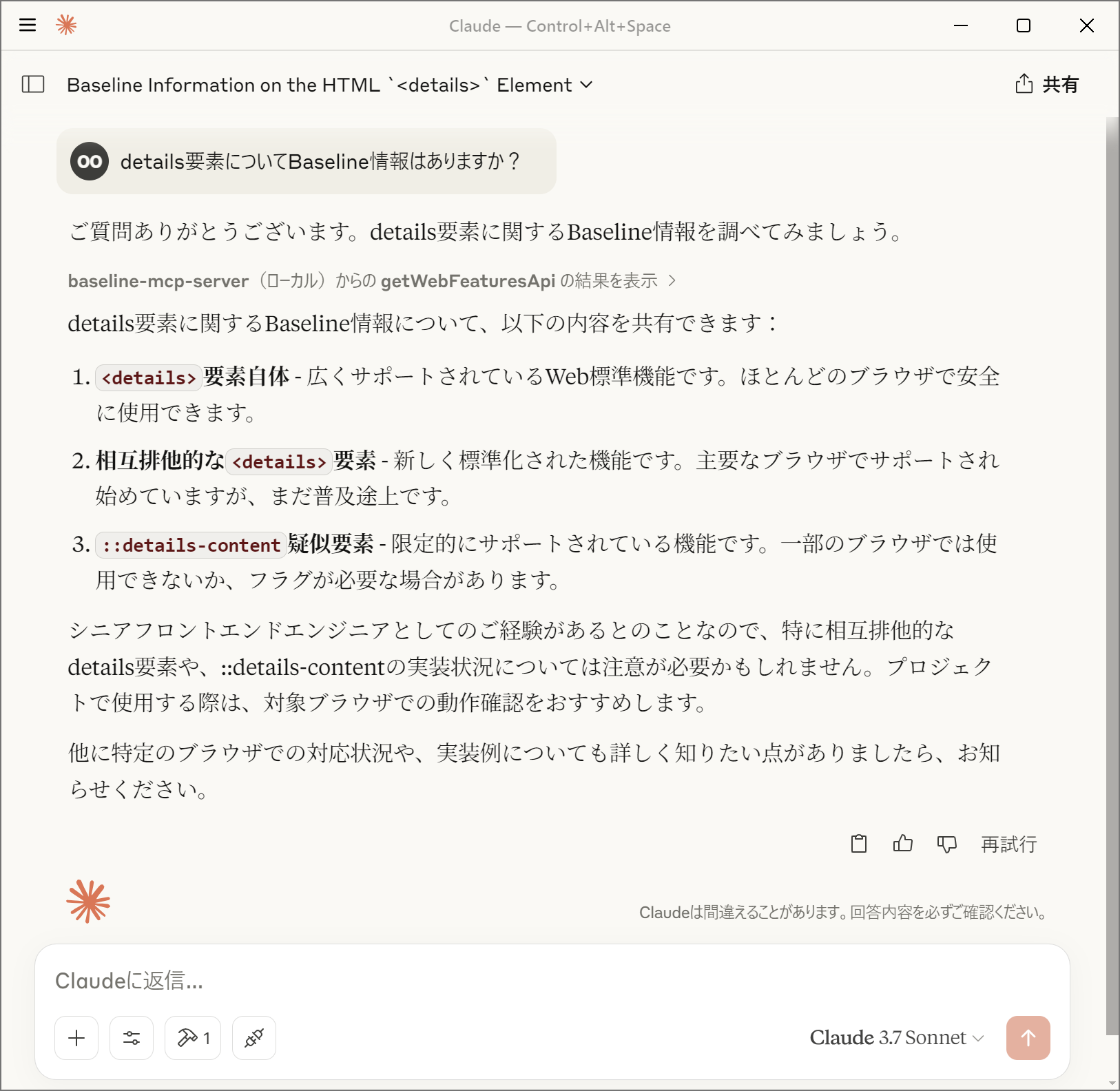
機能
- Web Platform DashboardのAPIを使用した機能検索
- 機能のBaselineステータス(
widely、newly、limited、no_data)の提供
- ブラウザ実装状況(バージョンと実装日)の提供
- 機能の使用状況データの提供
- 特定のブラウザを除外した機能検索(
chrome, edge, firefox, safari)
- MCPを介した各種AIモデルとの連携
Baselineステータスについて
Baselineステータスは、Web機能のブラウザサポート状況を示します:
- widely:
広くサポートされているWeb標準機能。ほとんどのブラウザで安全に使用できます。
- newly:
新しく標準化されたWeb機能。主要なブラウザでサポートされ始めていますが、まだ普及途上です。
- limited:
限定的にサポートされているWeb機能。一部のブラウザでは使用できないか、フラグが必要な場合があります。
- no_data:
現時点ではBaselineに含まれていないWeb機能。ブラウザのサポート状況を個別に確認する必要があります。
Baselineについての詳細については「Baseline (互換性) - MDN Web Docs 用語集」を参照してください。
MCPクライアントでの設定
- サーバーを起動するにあたり、Denoの使用を推奨します
- パーミッションとして
api.webstatus.devのみのアクセスを許可してください
@yamanoku/baseline-mcp-serverを指定するか、お手元のローカル環境にbaseline-mcp-server.tsを設置して読み取るように設定してください- Denoをインストールせずに使う場合は、スタンドアロンバイナリを利用できます
Claude Desktop
Claude
DesktopのMCPクライアントで使用するには、以下のようにcline_mcp_settings.jsonに設定を追加します。
{
  "mcpServers": {
    "baseline-mcp-server": {
      "command": "deno",
      "args": [
        "run",
        "--allow-net=api.webstatus.dev",
        "jsr:@yamanoku/baseline-mcp-server"
      ]
    }
  }
}
Visual Studio Code
Visual Studio
CodeのMCPクライアントで使用するには、以下のようにsettings.jsonに設定を追加します。
{
  "mcp": {
    "servers": {
      "baseline-mcp-server": {
        "command": "deno",
        "args": [
          "run",
          "--allow-net=api.webstatus.dev",
          "jsr:@yamanoku/baseline-mcp-server"
        ]
      }
    }
  }
}
Dockerによる起動
最初にDockerイメージをビルドします。
docker build -t baseline-mcp-server .
MCPクライアントの設定でDockerコンテナを実行するようにします。
{
  "mcpServers": {
    "baseline-mcp-server": {
      "command": "docker",
      "args": [
        "run",
        "-i",
        "baseline-mcp-server:latest"
      ]
    }
  }
}
スタンドアロンバイナリ
deno compile
で、Denoランタイムを含んだ単一の実行ファイルを作れます。ネットワーク許可(api.webstatus.dev)はコンパイル時に埋め込まれるため、実行時にDenoや追加のパーミッション指定は不要です。
GitHub Releasesから入手する
バージョンタグ(v*)をpushすると、OSごとのzip(linux.zip / macos.zip /
windows.zip)がGitHub Releasesに公開されます。展開後の配置は次のとおりです。
最新リリース
から環境に合ったzipをダウンロードして展開し、実行権限を付与してください。同梱のSHA256SUMSで改ざんがないことも確認できます。
unzip linux.zip
chmod +x linux/baseline-mcp-server-x86_64
sha256sum --ignore-missing -c SHA256SUMS
MCPクライアントでは、ダウンロードしたバイナリのパスをcommandに指定します。
{
  "mcpServers": {
    "baseline-mcp-server": {
      "command": "/path/to/linux/baseline-mcp-server-x86_64"
    }
  }
}
ローカルでコンパイルする
# 実行中のOS向け
deno task compile

# ドキュメント記載の全ターゲット向け(GitHub Releasesと同じ成果物)
deno task compile:all
成果物はdist/に出力されます。ホスト向けバイナリはdist/baseline-mcp-server、全ターゲット向けはdist/linux/・dist/macos/・dist/windows/です。
謝辞
このOSSはGPT-4o Image Generationによってロゴを製作、Claude 3.7
Sonnetによって実装、ドキュメントのサンプルを提案いただきました。感謝申し上げます。
ライセンス
MIT License