Binance MCP Server
Overview
Binance MCP Server is a backend service designed to interact with the Binance API. It facilitates seamless interaction with the Binance exchange, enabling users to view their portfolio, convert tokens, and execute trades with minimal market impact. The server utilizes the Model Context Protocol (MCP) framework to ensure secure, structured, and efficient transactions.
Key Functionalities:
- Interact with Binance exchange API for account information and trading
- Display portfolio composition and valuation
- Execute smart token conversions with market impact mitigation
- Process market orders and algorithmic trading strategies
- Retrieve real-time trading data and account information
- Implement structured transactions using the Model Context Protocol framework
- Provide secure authentication and API key management for Binance integration
Features
- Binance API Integration: Connect to Binance exchange for account information and trading operations
- Portfolio Management: View detailed portfolio composition, market value, and percentage allocation
- Portfolio Analytics: Optional historical value tracking to monitor performance over time
- Smart Token Conversion: Convert between tokens with intelligent order execution strategies
- Market Impact Mitigation: Automatically use algorithmic trading for larger orders to prevent price slippage
- Account Management: Retrieve detailed account information, balances, and trading history
- Market Data Access: Access real-time order books and market data for informed trading decisions
- Order Execution: Place spot market orders with flexible quantity specifications
- Algorithmic Trading Support: Implement Time-Weighted Average Price (TWAP) orders to minimize market impact
- Automated Trading: Execute trades programmatically based on predefined strategies
- Secure Authentication: Manage API keys and secure connections to Binance services
- Comprehensive Error Handling: Detailed error reporting for transaction failures and API issues
Requirements
Before setting up the Binance MCP Server, ensure you have the following installed:
- Node.js (v16 or later)
- npm or yarn
- Binance API key and secret (for Binance exchange integration)
- A valid Binance Smart Chain (BSC) wallet private key (for blockchain transactions)
Installation
Clone the repository and install dependencies:
git clone https://github.com/your-repo/binance-mcp-server.git
cd binance-mcp-server
npm install  # or yarn install
Configuration
To configure the server, create a .env file in the root directory and specify the following variables:
# Binance API Configuration
BINANCE_API_KEY=your_binance_api_key_here
BINANCE_API_SECRET=your_binance_api_secret_here
Creating a Binance API Key
Before using the Binance API integration, you need to create an API key. This allows you to connect to Binance's servers via several programming languages, pull data from Binance, and interact with external applications. You can view your wallet and transaction data, make trades, and deposit and withdraw funds in third-party programs.
Prerequisites:
- You need to make a deposit of any amount to your Spot Wallet to activate your account
- Complete identity verification
- Enable two-factor authentication (2FA) on your account
Steps to create a Binance API Key:
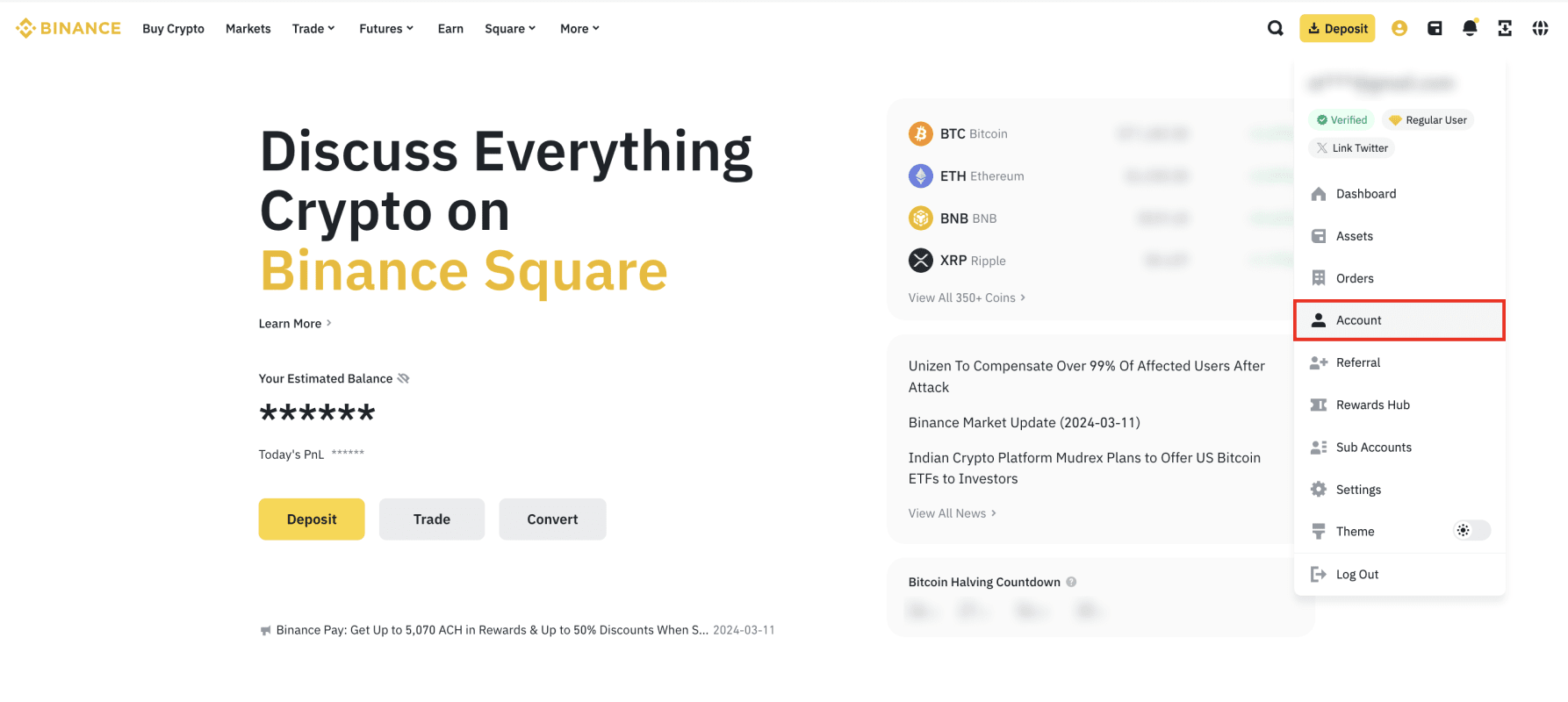
Log in to your Binance account and click the profile icon, then [Account].
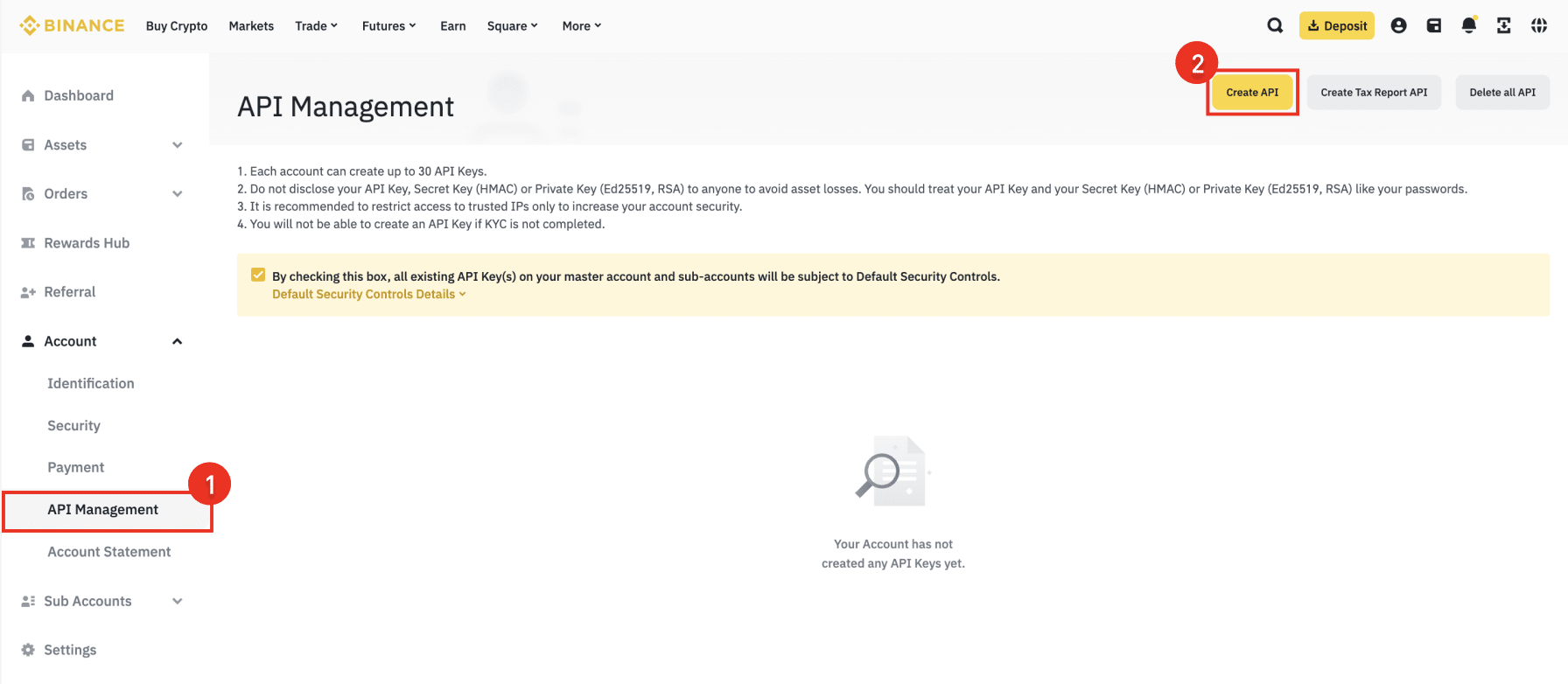
Go to [API Management] then click [Create API].
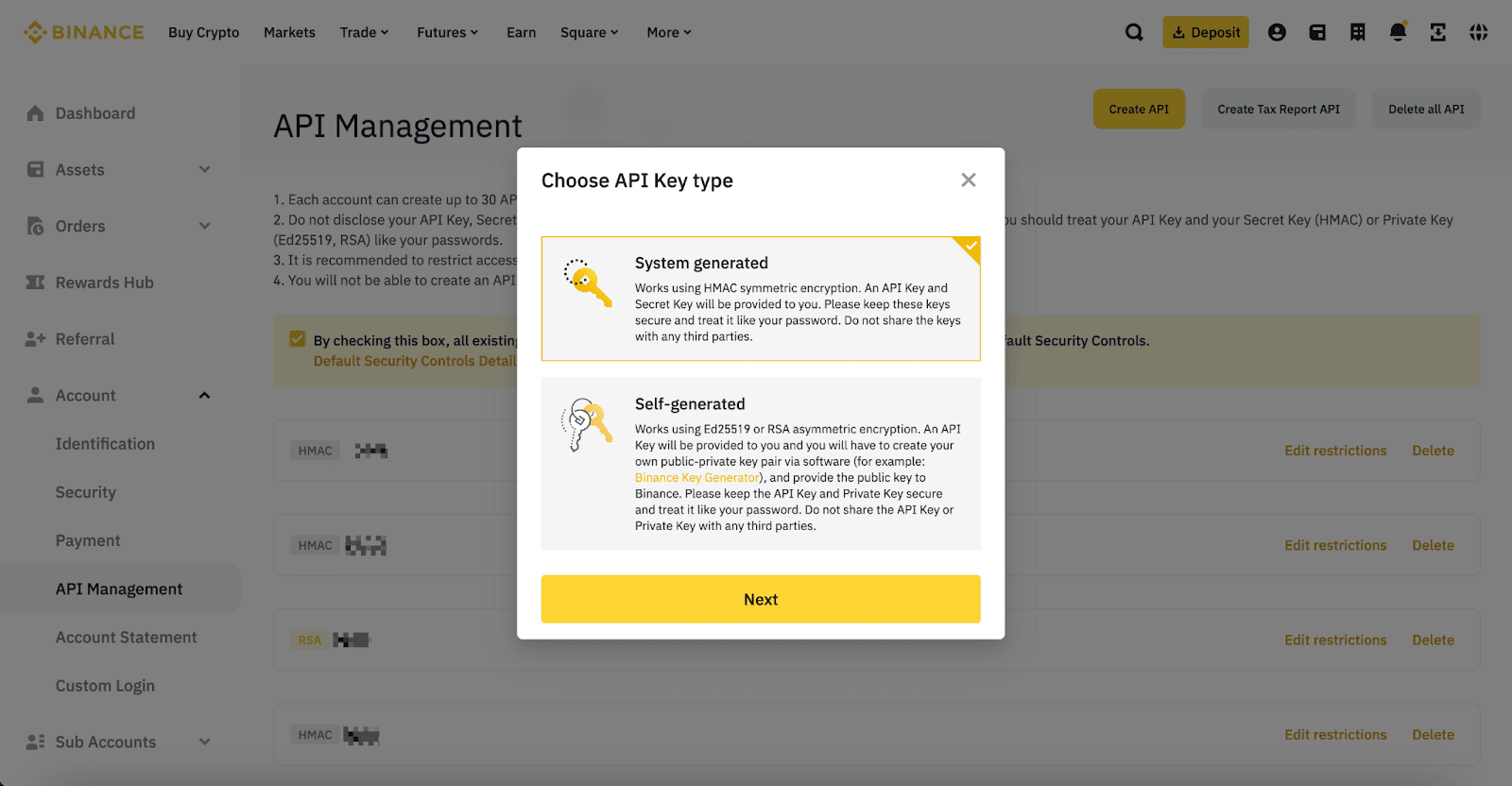
Select your preferred API Key type:
- System-generated API keys (HMAC symmetric encryption) - You'll get the API key and the Secret Key.
- Self-generated API keys (Ed25519 or RSA asymmetric encryption) - You'll receive an API key, but you have to create your own public-private key pair.
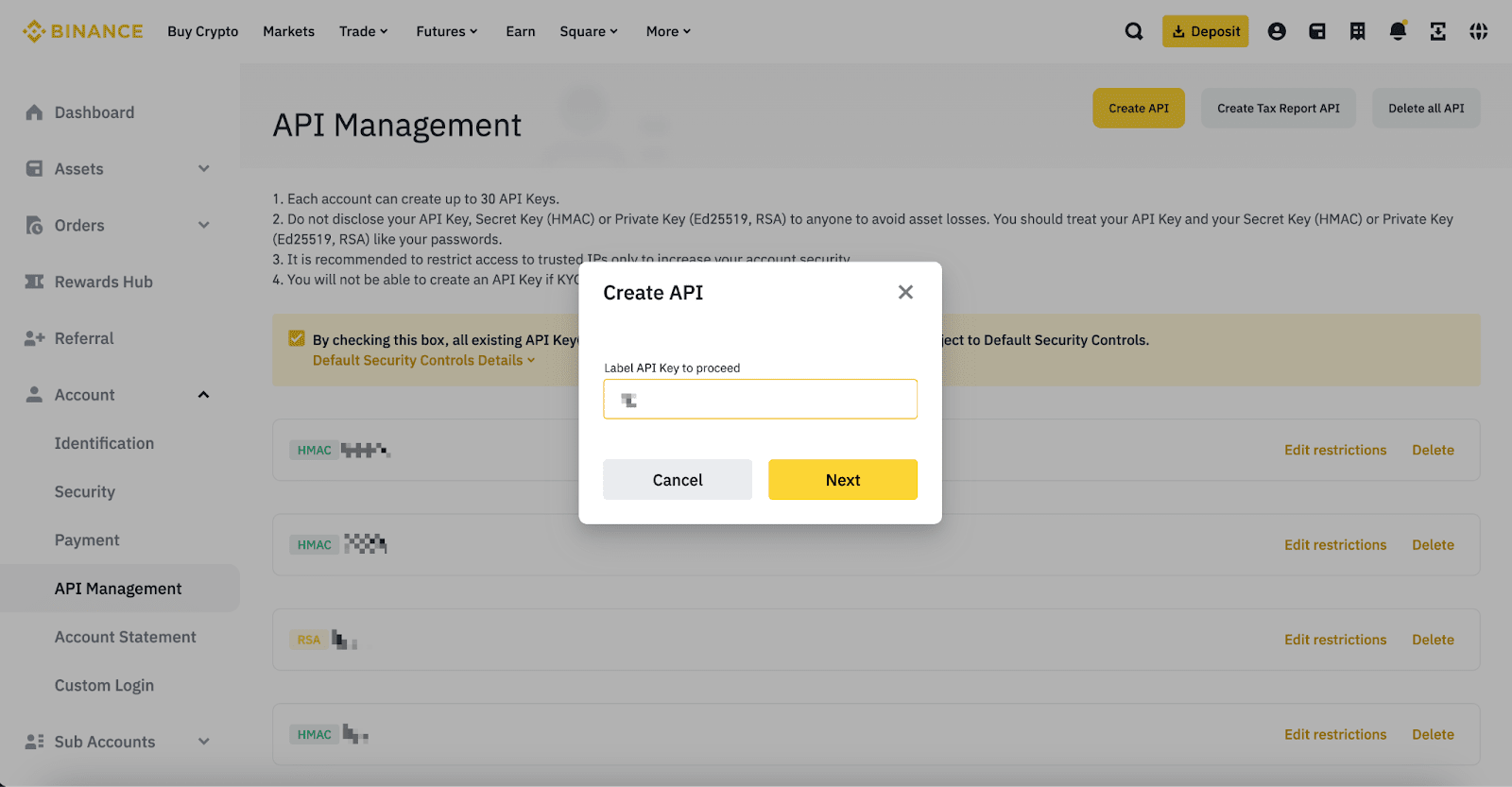
Enter a label/name for your API Key.
Verify with your 2FA devices and passkeys.
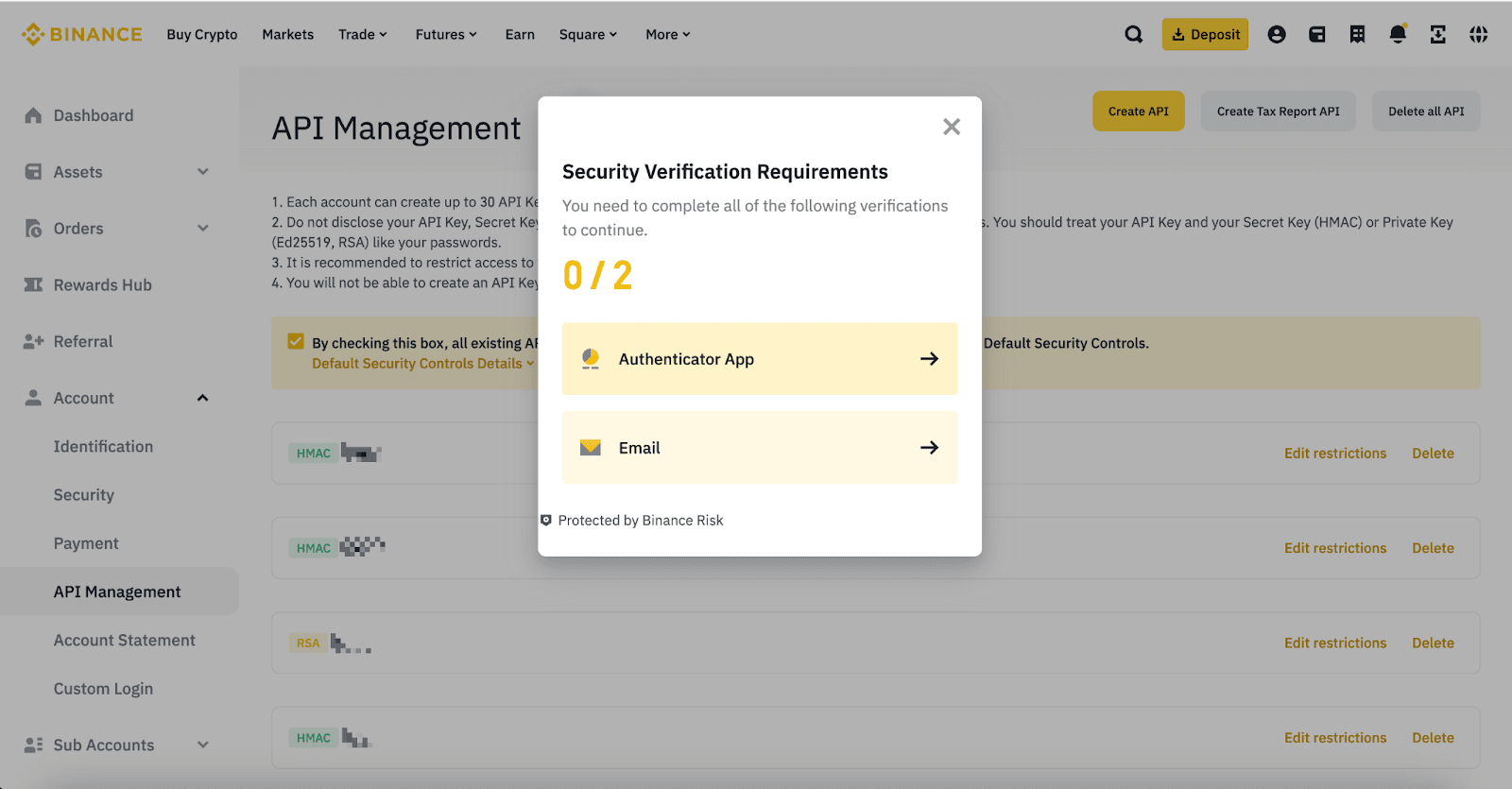
Your API key is now created.
For more details on Binance API, please refer to the Binance API Documentation.
Integration with Claude Desktop
Before integrating this MCP server with Claude Desktop, ensure you have the following installed:
Then build the server using the following command:
npm run build
To add this MCP server to Claude Desktop:
Create or edit the Claude Desktop configuration file at:
- macOS:
~/Library/Application Support/Claude/claude_desktop_config.json
- Windows:
%APPDATA%\Claude\claude_desktop_config.json
- Linux:
~/.config/Claude/claude_desktop_config.json
Add the following configuration:
{
    "mcpServers": {
        "binance-mcp": {
            "command": "node",
            "args": [
                "/Users/Username/Desktop/binance-mcp/build/index.js"
            ],
            "env": {
                "BINANCE_API_KEY": "BINANCE_API_KEY",
                "BINANCE_API_SECRET": "BINANCE_API_SECRET"
            },
            "disabled": false,
            "autoApprove": []
        }
    }
}
Make sure to pass the correct location of the index.js file in the args field.
Restart Claude Desktop for the changes to take effect.
Usage (For Connecting MCP HOST other than Claude)
Start the Server
To start the MCP server, run:
npm start # or node index.js
Functions
Binance API Functions
Get Binance Account Information - binanceAccountInfo
Retrieves comprehensive information about your Binance account, including balances, trading permissions, and account status.
Get Binance Account Snapshot - binanceAccountSnapshot
Gets a snapshot of your Binance account status, including current BTC price information. Includes history for the last 30 days.
Check Binance Order Book - binanceOrderBook
{
    "symbol": "BTCUSDT"
}
Retrieves the current order book for a specified trading pair, showing available buy and sell orders up to 50 levels deep.
Place Spot Market Order - binanceSpotPlaceOrder
{
    "symbol": "BTCUSDT",
    "side": "BUY",
    "quantity": 0.001,
    // OR
    "quoteOrderQty": 100
}
Places a market order for immediate execution at the best available price. Use quantity to specify the amount of base asset or quoteOrderQty to specify the amount in quote currency. Suitable for small orders.
Place TWAP Order - binanceTimeWeightedAveragePriceFutureAlgo
{
    "symbol": "BTCUSDT",
    "side": "BUY",
    "quantity": 1.0,
    "duration": 3600
}
Places a Time-Weighted Average Price (TWAP) order that executes gradually over a specified duration to minimize market impact. Suitable for large orders that might otherwise cause significant price movements.
Model Context Protocol (MCP)
The Model Context Protocol (MCP) is an open standard designed to enhance the way applications interact with AI models and blockchain-based computational systems. MCP establishes structured context that improves the efficiency of automated transactions and decentralized applications.
Benefits of MCP:
- Standardization: Defines a unified approach for application interactions.
- Efficiency: Reduces computational overhead and improves transaction speed.
- Interoperability: Supports integration across multiple platforms and blockchain ecosystems.
Error Handling
When a transaction fails, the server returns an error message with details. Check the console logs for more debugging information. Common error scenarios include:
- Insufficient funds in the wallet
- Invalid recipient address
- Network congestion or RPC issues
- Binance API authentication errors
- Trading limit restrictions
License
This project is open-source under the MIT License.
For contributions, bug reports, or feature requests, submit an issue on GitHub.


