AutoCAD MCP Server

by yourusername

An MCP server integrating AutoCAD with large language models like Claude for natural language interaction. Requires Python 3.10+, AutoCAD 2018+ with COM interface on Windows. Dependencies installed via requirements.txt. Optionally, external SQLite database used internally for CAD element storage.

Developer toolsstdioCommunity

Repository-wide counts · Cached 2026-03-16

Overview

The AutoCAD MCP Server MCP server is a publicly available project. Review the upstream repository for installation instructions, supported tools, compatibility, permissions, and current maintenance status.

Configuration

Configuration, transport, authentication, and runtime requirements vary by project. Open the repository before connecting and use the smallest set of credentials and permissions required.

Open the AutoCAD MCP Server repository to read the latest documentation.

KEEP EXPLORING

Compare source, connection, and authentication details before choosing an implementation.

View the complete category

模型上下文协议服务器

modelcontextprotocol

Community

一组用于模型上下文协议(MCP)的参考实现,展示了对大型语言模型(LLM)工具和数据源的安全且受控的访问方式。

Context7 Platform - Up-to-date Code Docs For Any Prompt

upstash

Community

Context7 MCP server providing up-to-date, version-specific documentation and code examples for libraries, enabling coding agents to fetch accurate docs and code snippets. Requires an API key for higher rate limits, passed via CONTEXT7_API_KEY header.

Playwright MCP

Microsoft Corporation

Community

A Model Context Protocol (MCP) server that provides browser automation capabilities using Playwright. Enables LLMs to interact with web pages through structured accessibility snapshots, bypassing the need for screenshots or visually-tuned models.

AIHawk

feder-cr

Community

AIHawk is an anti detect browser and web browsing agent, open source, with an MCP server for coding agents: undetected, no captchas, no blocks. It requires an OpenRouter API key for the standalone web UI mode, which can be provided via the --openrouter-key flag or the OPENROUTER_API_KEY environment variable or a .env file in the running directory.

FROM THE SOURCE

Repository README

Build-time snapshot · Retrieved 2026-10-05

View original

MseeP.ai Security Assessment Badge

AutoCAD MCP 服务器 / AutoCAD MCP Server

⚠️ 本项目目前维护精力有限,欢迎有兴趣的开发者参与协作!
⚠️ Currently this project is not actively maintained due to time constraints. I would be very happy to collaborate with anyone interested in co-maintaining or extending it.

基于 Model Context Protocol (MCP) 的 AutoCAD 集成服务器,允许通过 Claude 等大型语言模型 (LLM) 与 AutoCAD 进行自然语言交互。
An AutoCAD integration server based on Model Context Protocol (MCP), enabling natural language interaction with AutoCAD via large language models like Claude.

🔗 项目在 MseeP.ai 展示 / Referenced on MseeP.ai:
https://mseep.ai/app/zh19980811-easy-mcp-autocad

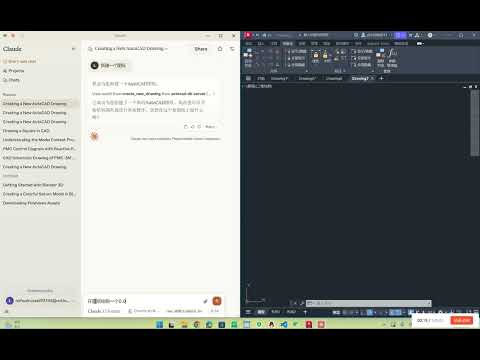
🎬 演示视频 / Demo Video:
AutoCAD MCP 演示视频


✨ 功能特点 / Features

  • 🗣️ 自然语言控制 AutoCAD 图纸 / Natural language control of AutoCAD drawings
  • ✏️ 基础绘图功能(线条、圆)/ Basic drawing tools (line, circle)
  • 📚 图层管理 / Layer management
  • 🧠 自动生成 PMC 控制图 / Auto-generate PMC control diagrams
  • 🔍 图纸元素分析 / Drawing element analysis
  • 🔦 文本高亮匹配 / Highlight specific text patterns
  • 💾 内嵌 SQLite 数据库存储 CAD 元素 / Integrated SQLite storage for CAD elements

🖥️ 系统要求 / System Requirements

  • Python 3.10+
  • AutoCAD 2018+ (需支持 COM 接口 / with COM interface support)
  • Windows 操作系统 / Windows OS

⚙️ 安装步骤 / Installation

1. 克隆仓库 / Clone the repository

git clone https://github.com/yourusername/autocad-mcp-server.git
cd autocad-mcp-server

2. 创建虚拟环境 / Create virtual environment

Windows:

python -m venv .venv
.venv\Scripts\activate

macOS / Linux:

python -m venv .venv
source .venv/bin/activate

3. 安装依赖 / Install dependencies

pip install -r requirements.txt

4. (可选)构建可执行文件 / (Optional) Build as executable

pyinstaller --onefile server.py

🚀 使用方法 / How to Use

独立运行服务器 / Run server independently

python server.py

集成 Claude Desktop / Integrate with Claude Desktop

编辑配置文件 / Edit config file:

Windows 路径 / Config path on Windows: %APPDATA%\Claude\claude_desktop_config.json

推荐配置 (源码运行) / Recommended Config (Run from source):

💡 请将 path/to/project 替换为您实际的项目绝对路径。 💡 Please replace path/to/project with your actual absolute project path.

{
  "mcpServers": {
    "easy-autocad": {
      "command": "C:/path/to/project/.venv/Scripts/python.exe",
      "args": [
        "C:/path/to/project/server.py"
      ]
    }
  }
}

注意 / Note:

  1. 请使用正斜杠 / 或双反斜杠 \\ 作为路径分隔符。
  2. python.exe 必须指向 .venv 虚拟环境中的解释器。

🧰 工具 API / Available API Tools

功能 / Function 描述 / Description
create_new_drawing 创建新的图纸 / Create a new drawing
draw_line 画直线 / Draw a line
draw_polyline 画多段线 / Draw a polyline
draw_rectangle 画矩形 / Draw a rectangle
draw_circle 画圆 / Draw a circle
draw_text 添加文字 / Add text annotation
create_layer 创建或修改图层 / Create or modify layer
move_entity 移动实体 / Move entity
rotate_entity 旋转实体 / Rotate entity
copy_entity 复制实体 / Copy entity
highlight_entity 高亮显示实体 / Highlight entity
highlight_text_matches 高亮显示匹配文本 / Highlight matching text
scan_all_entities 扫描并入库 / Scan and save entities
count_text_patterns 统计文本模式 / Count text patterns
execute_query 执行SQL查询 / Execute SQL query

🙋‍♂️ 维护状态 / Maintenance Notice

⚠️ 当前我正忙于其他项目,维护精力有限。欢迎 Fork 项目或提交 PR,一起完善 AutoCAD 智能交互生态!
⚠️ I'm currently busy and not able to actively maintain this repo. PRs and collaborators are welcome!


📬 联系我 / Contact: [email protected]


Made with ❤️ for open-source learning.